Archive
How to manually add a user to your course.
Less than intuitive, but you have to go via “Assign roles”. Here are the steps:
- Go to “Assign Roles” in your bottom left hand course menu
- Choose a role you want to assign
- Search, add and assign the role to a user. This will also add the user to the course.
- Check results by going to “Participants” in your bottom left hand course menu
Here is the screencast of adding users to your Moodle course.
Potential Moodle-compatible replacements for Wimba Voice
With the demise of Wimba Voice on campus, Languages and Culture Studies lost some of their online learning acitivities and are still looking for a replacement, perferably within Moodle.
I have looked through some options and would recommend the following applications for a test install:
1. NanoGong, free (as in kittens). More info here:
2. WebSwami, a language learning platform, not free, and can also record video, and do much more. More info here:
Introduction of NanoGong, free open source voice recorder for Moodle
- This is a brief summary outline of NanoGong (which has just been upgraded to version 4.1, which includes an installation file for our current Moodle version 1.9.8), would be a good audio recording add-on for language learning to install in our Moodle learning system. What follows is compiled from various online sources:
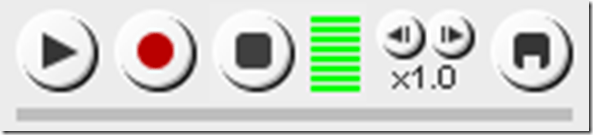
- “NanoGong is an applet that can be used by someone to record, playback and save their voice, in a web page. When the recording is played back the user can speed up or slow down the sound without changing it. The speeded up or slowed down version of the recorded sound can be saved to the user’s hard disk, if he/she wishes
- There are special features for programmers, such as the ability to show or hide parts of the NanoGong interface or to completely control what the applet does.
- The NanoGong applet has been released as an open source project since version 3. The picture below shows the NanoGong applet with all components shown. “
- “NanoGong provides a very simple and transparent voice support for Moodle. Using a NanoGong activity and a NanoGong filter NanoGong provides two different types of voice support for Moodle”:
- “An extended HTML editor which supports voice-enriched content”, “ enabling a voice recording option for virtually any Moodle activity entry that uses the wysiwyg toolbar”, as you can see here:

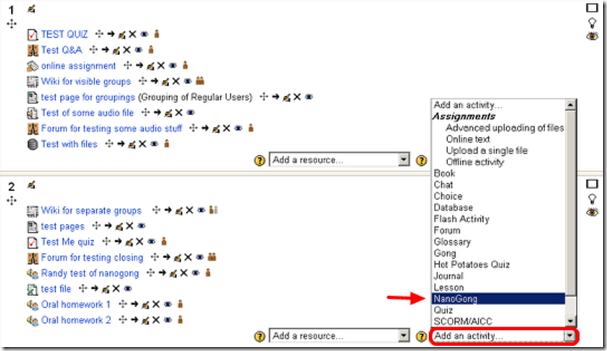
- ”A NanoGong activity which allows students to submit voice messages to their teachers”:
- Questions remain:
- You can customize the recorder applet: Need to check whether this includes the timestretching capability, given that language teachers can be averse to student-controlled,
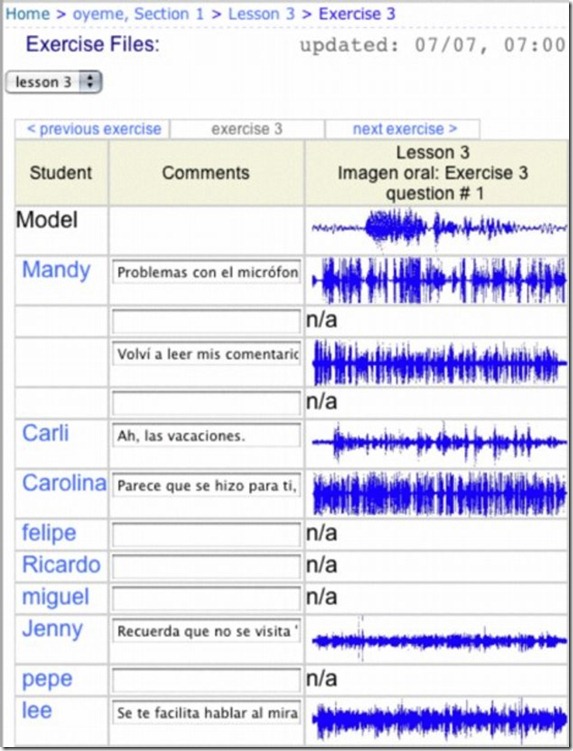
- Need to check for capability of downloading batches of submissions from the student class and grade it with time-saving techniques, like described here using Audacity. A more sophisticated example that testifies to the same features required to get graders adopt increasing audio student submissions was Web Audio Lab, an authoring system for developing interactive audio-based language courses (Language Resource Center, Cornell University. 2003-2007):

- How could one implement a dual-track recorder using NanoGong, with the program track providing aural cues for a more natural oral interaction?
- Requires JAVA (test compatibility).
- There is no Moodle 2.0 version yet.
- NanoGong seems “a derivative of the Gong standalone voice board” – without similar requirements and issues? Gong can also be integrated into Moodle, seems more advanced, but also much more difficult to implement (requires a tomkat server; problems have been reported with losing course deletion functionality in Moodle, the authentication pass-through not working from Moodle and the audio graph not working in Moodle).
- As with any open source project, there are some move Ifs.
- However, Nanogong seems the free audio recording plug-in for Moodle which is currently most favored.


Moodle: Video Assignment
Kaltura has been integrated into our Moodle system to enable video upload as an assignment type. Teachers can upload videos already now. It seems that students will be able to upload videos starting with the fall term.
Video source can be a webcam which could be interesting for language proficiency assessment, including – if the pieces can be gotten out of Moodle and into an ePortfolio system – to demonstrate longitudinal progression in proficiency.
The videos get stored on the Kaltura servers and redelivered in form of a Flash plug-in – in between happens a transcoding so that results are not available immediately. You can see us waiting for it at the end of this Kaltura video assignment upload screencast demo:
UNCC showed off our use of Kaltura at Educause 2011. You can see example applications quoted in the attached Kaltura use slide deck.
Finally, here is a test and walk-through of an elementary language course homework assignment using Kaltura.
Webswami, a Moodle-compatible language learning platform for self access (homework, asynchronous distance learning)
What about improving language learning through technology during homework activities?
“The greatest strength of WebSwami lies in the seamless support it provides for doing audio/visual-based tutorial activities within an existing course management system, thus allowing anywhere/anytime access for lesson designers, instructors, and students alike. Its student record keeping system, in particular the integration [duplication] of a grade book with direct access to student responses and the support it provides for multimedia response feedback, far surpasses what is available in any other virtual learning environment. Most important, it manages all of this through well established, reliable, web browser and Flash software coupled with ubiquitous, inexpensive web camera hardware.” (review by Jack Burston for CALICO (pay-link, ask me for access); see also also the freely accessible review by İlhan İnçay).
Authoring and managing authored materials is not an easy task, but gives more flexibility than using textbook provided materials. WebSwami promises the possibility of exchanging learning materials through a materials bank.
View a recording of a recent WebSwami Online Demo.
How to make a student signup sheet, using Google Docs
If the student group you want to sign up with you, is not in a (Moodle) course (otherwise, go here), follow these steps:
- Make a source signup sheet in MS-Word, like so:

- Go to http://googleapps.uncc.edu and sign in with your UNCC account.
- In the apps type list, select Google docs.
- In the left menu, choose button: upload.
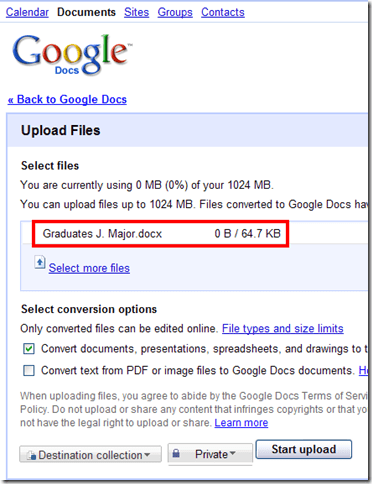
- Click “start Upload”, the “Back to Google Docs”
- In the upper right corner, click “Share”.
- In the new window, type your student names (if your students are in a Moodle Course, you can save these time consuming steps by creating a signup sheet in Moodle, as explained here).
- . Include an explanatory message and share.
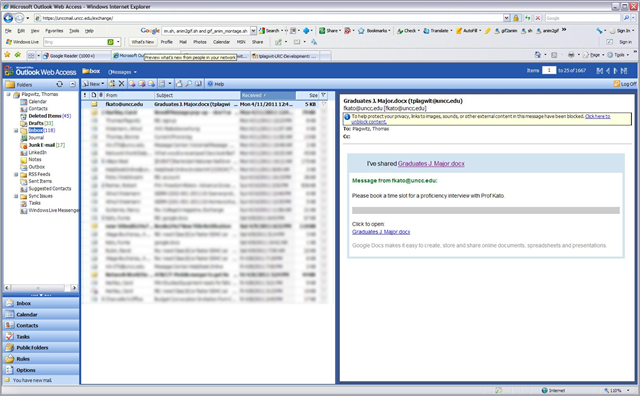
- . Each Student will receive an email like this, where they can follow the link to the document to edit/sign up.
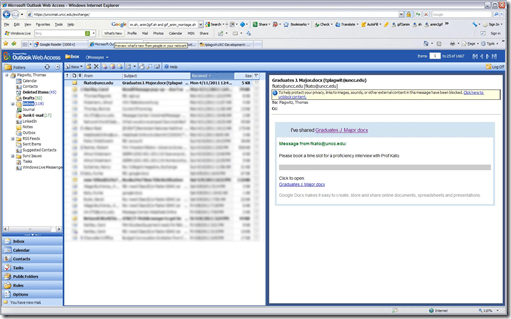
- there may be sign-in problems: Do not sign in with your non-UNCC Google account, like so:

- Try “Sign in as a different user”
- If this fails, try a different browser, or, even better, do not click on the link in the email, but go to http://googleapps.uncc.edu and log in with you UNCC account.


- The document share with you will appear in your documents list.

- Or use http://docs.moodle.org/en/Scheduler_module, as explained here: Using the Scheduler Activity.




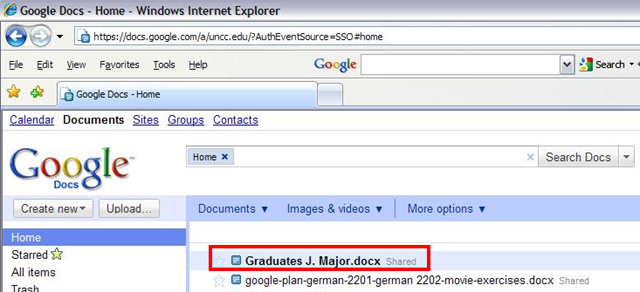
How to do language proficiency assessment with AV recordings, using Moodle’s Single file upload assignment
You can do video assessments of your students in the LRC. Given that we currently have only one webcam for this pilot project, reserve early. We have no teacher controlled class examination video (or audio) recording facilities currently.
However, students can upload their results to Moodle, provided their teacher has created a single file upload assignment. We have tested this to work in our Moodle installation with video files to 64MB, which is more than 20 minutes of simple “talking head” footage recorded in the LRC (@320*240, 15fps resolution WMV, captured with Windows Moviemaker on Windows XP).
Please consult the screencast demo of the Moodle single file upload assignment creation and actual video upload here.
How to use a Moodle choice activity as student signup sheet
To arrange for students *from your course* (for students not part of a (Moodle) course, see here) signing up for a meeting with you (e.g. oral exam or paper preparation and discussion), follow these steps:
- Log into your Moodle course
- Enable editing
- Add an Activity: Choice from the dropdown
- Give the signup event a meaningful title and instructions
- Add time slots, limiting each signup to 1 (unless you do not want students to sign up for 1-on-1’s with you, but for group meetings)
- Select whether students are allowed to see their own and each other’s choices
- Display horizontally, like a calendar column.
- Decide whether students can change their choice
- Decide whether you want to set a deadline.
Before following these steps, you may want to watch this demo screencast.
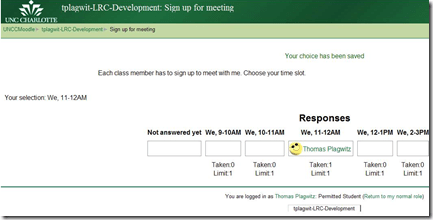
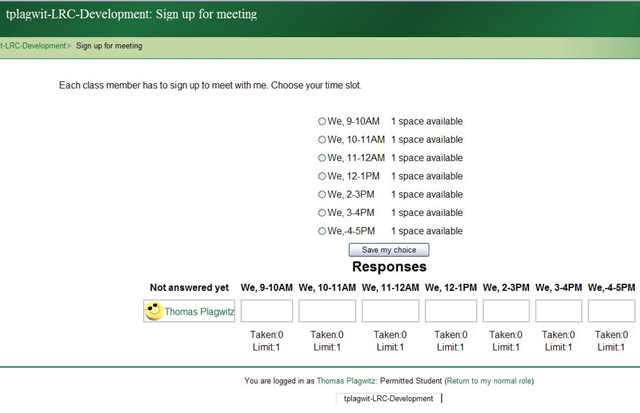
- Here is the choices that your students will see:

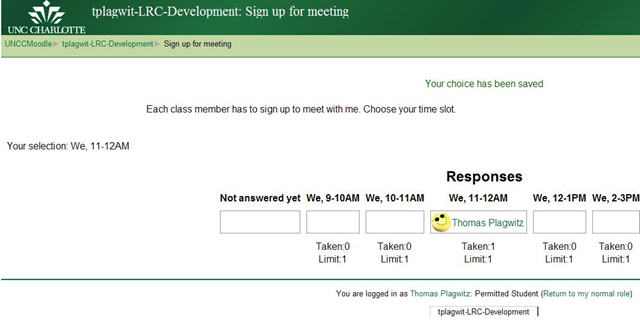
- And if you allow them to view this, here is the result they see:


Questions? Read the About. Or just ask me a quick Our Databases: Resources with calendars -- Language learning material Moodle Sites, multimedia files -- films


FAQs for LRC student staff or for students or for teachers. To search our FAQs, in the browser addressbar, add after "https://plagwitz.wordpress.com/feed/?tag=faqs+/" "+TAG1" (from tag cloud below) OR "https://plagwitz.wordpress.com/feed/tag=faqs
&category_name=" "CAT1" (from category hierarchy below). OR search both categories and tags, and multiple TAGs/CATs (connect with "," for OR-search, with "+" for AND-search), like so: https://plagwitz.wordpress.com/feed/?tag=TAG1+TAG2+...TAGn&category_name=CAT1
+CAT2+...CATn"
Other ways to find help
If you cannot find it here, look there: 5,500 Language-Learning Links and Programs for learning or teaching 150 languages
Shortcuts:Our Lists, Our Maps, LRC Staff Moodle Site,LRC Project Moodle Site, 49erexpress, UNCC Moodle, Student Recordings: s:claslcslrcsanakostudent
Learning usage samples: Sanako oral exam, Kaltura webcam presentation, Dictation with speech recognition, Sanako written exam, Chinese and Japanese interactive stroke-order practice
Test the Sanako Installer, Webbrowser Popup Konfigurator for XP, or Windows7, faster LRC TeacherPC Log-in Let MS facilitate diacritics writing by installing for you US-International keyboard layout
This is my personal blog (Google+). The views expressed on these pages are mine alone and not those of my employer. The information in this weblog is provided “AS IS” with no warranties, and confers no rights.
 Thomas' Work Space