Archive
Posts Tagged ‘live@edu’
Fall2013 LRC room booking and equipment circulation improvements
2013/08/22
Leave a comment
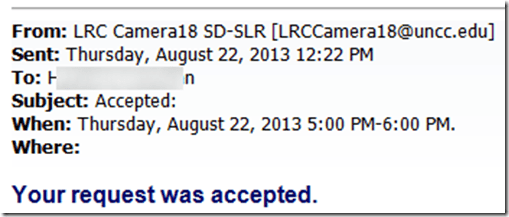
- We had a lot of problems over the last 2 years with students, unlike faculty and staff, not getting automated accepted/declined responses to their resource booking requests. This seems now finally a thing of the past:
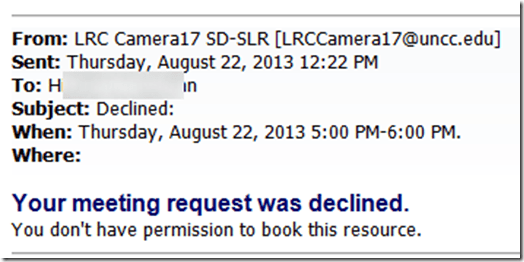
- In addition to automated responses in cases of policy violations or booking conflicts, we meant to automatically enforce policies that restrict booking of certain resources to certain groups. While groups still need to be maintained manually, this is now possible (and being implemented first for film studies and film club students that have exclusive rights to our film equipment). And here is what it will look like: “You don’t have permission to book this resource”. Don’t hand out equipment to clients who got this response.
- Now onto the next problem: about seeing those responses from within in meeting request in OWA? (works in Outlook Desktop, but that does not help us at the reception desk).


How to extend your LRC class booking to the entire term by adding weekly recurrence
2013/01/09
1 comment
- The single screenshot booking FAQ mentions recurrence briefly. If you failed to add recurrence when you booked the LRC for your class, you can likely still add it:
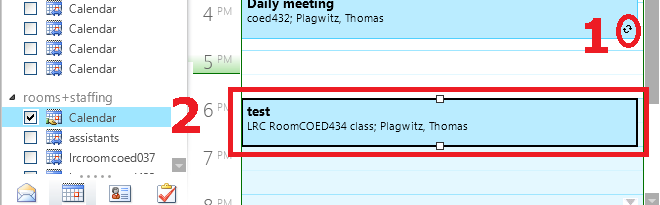
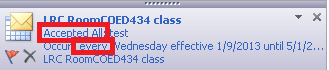
- Go to your NINERMAIL calendar, open your “meeting”, like so:

- if the (1) recurrence indicator is missing or if, when browsing your NINERMAIL calendar for the term, your class booking shows up not every week, only during the first?
- Then (2) open your class booking by double-clicking on it.
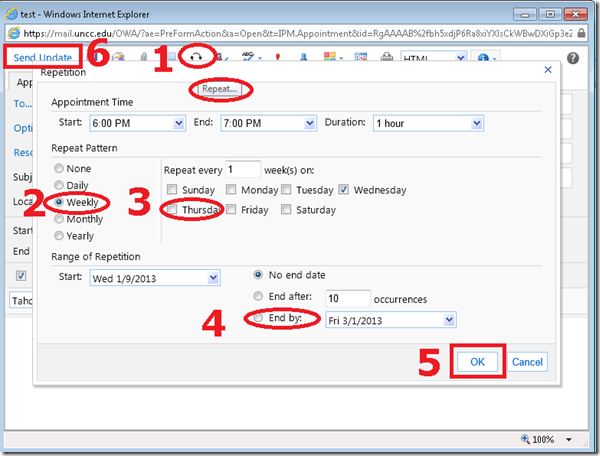
- In the window of your class booking, do these steps (use your own class times, not the ones in the example)
- note how the (1) tooltip for the “repetition” dialogue says “repeat”;
- classes meet (2) “weekly”, but more complex schedules can also be set up (“repeat every x week”)
- don’t forget to (4) “end by” the last day of classes.
- You will receive an immediate response from the LRC classroom in your NINERMAIL inbox. Check it for and report any problems that you cannot resolve to the LRC reception desk.


Categories: e-infrastructure
2010, autoaccept-agent, calendaring, FAQs, live@edu, meeting-requests, ms-e, office365, recurrence
Protected: How to share Exchange room and resource mailbox calendars
2012/09/25
Enter your password to view comments.
Protected: Why does the autoaccept-agent not send messages from on-premise equipment mailboxes to students in the Office365/live@edu cloud?
2012/09/19
Enter your password to view comments.
Protected: Why we need autoaccept messages from on-premise equipment mailboxes to students in the Office365/live@edu cloud
2012/09/19
Enter your password to view comments.
Protected: Meet the Resource Attendants and their Scheduling Assistants– or Who are these people, anyway?
2012/08/30
Enter your password to view comments.
Categories: audience-is-students, audience-is-teachers, Learning-logs
2010, 2011, 207, calendaring, live@edu, ms-exchange, outlook, outlook-live, scheduling


Questions? Read the About. Or just ask me a quick Our Databases: Resources with calendars -- Language learning material Moodle Sites, multimedia files -- films


FAQs for LRC student staff or for students or for teachers. To search our FAQs, in the browser addressbar, add after "https://plagwitz.wordpress.com/feed/?tag=faqs+/" "+TAG1" (from tag cloud below) OR "https://plagwitz.wordpress.com/feed/tag=faqs
&category_name=" "CAT1" (from category hierarchy below). OR search both categories and tags, and multiple TAGs/CATs (connect with "," for OR-search, with "+" for AND-search), like so: https://plagwitz.wordpress.com/feed/?tag=TAG1+TAG2+...TAGn&category_name=CAT1
+CAT2+...CATn"
Other ways to find help
If you cannot find it here, look there: 5,500 Language-Learning Links and Programs for learning or teaching 150 languages
Shortcuts:Our Lists, Our Maps, LRC Staff Moodle Site,LRC Project Moodle Site, 49erexpress, UNCC Moodle, Student Recordings: s:claslcslrcsanakostudent
Learning usage samples: Sanako oral exam, Kaltura webcam presentation, Dictation with speech recognition, Sanako written exam, Chinese and Japanese interactive stroke-order practice
Test the Sanako Installer, Webbrowser Popup Konfigurator for XP, or Windows7, faster LRC TeacherPC Log-in Let MS facilitate diacritics writing by installing for you US-International keyboard layout
This is my personal blog (Google+). The views expressed on these pages are mine alone and not those of my employer. The information in this weblog is provided “AS IS” with no warranties, and confers no rights.
 Thomas' Work Space