Archive
Archive for the ‘e-learning’ Category
NetOp School 6 not upgrading
2012/06/21
Leave a comment
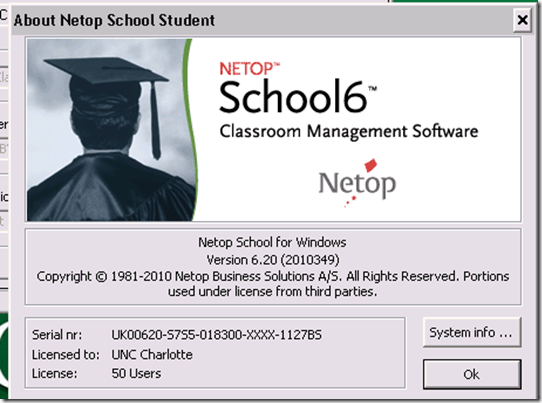
- Here is what we have:
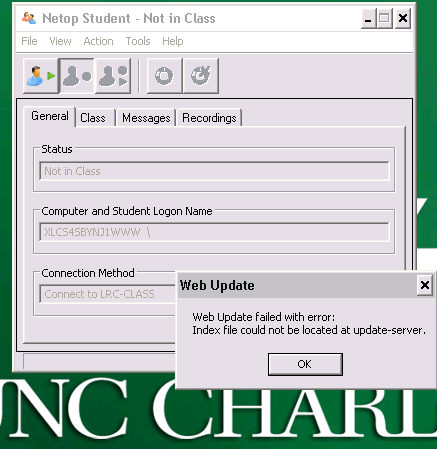
- Here is what get:

- And for the indexing servers: “ Web Update failed with error: Index file could not be located at update-server.”

Sanako Study 1200 Version 5 now allows for larger student screen thumbnails, but still limits the classroom layout size
2012/05/04
Leave a comment
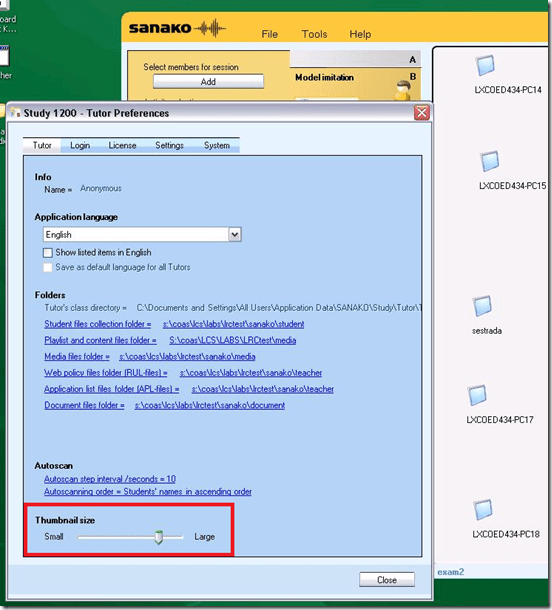
- The capability of increasing the size of the student thumbnails, to be able to easily read the MS-Word writing student exercises template that I had programmed for Sanako Lab 300 was sorely missed in version 1 and 2 of the Sanako Study 1200 software.
-
In version 5, the capability to adjust the size has been added. In Tutor.exe, Go to Menu: tools / preferences / thumbnail-size.
- Now, however, the 20 licensed student seats we have, already fill up the entire Teacher software’s screen estate since the software window cannot be spanned across our multi-monitor setup (The Sanako software seems to have this single-screen limitation built-in. Our unusual asymmetric (1280 and 1024) dual-monitor system may have something to do with it).
- Fortunately, in the newest version 5.42 for of Sanako Study, scrollbars appear and allow for panning the classroom layout window if there are more student icons/thumbnails than will fit on the screen.
- Upgrading to a screen with a larger screen resolution on the teacher computer would be even better.
- We hope to teach up to 30 students (class sizes seem to be constantly increasing, but the LRC also caters to visits of merged class sections which may be even larger than 30 students) in this large classroom setup:


LRC Workshop Demand Survey Results
2012/04/24
Leave a comment
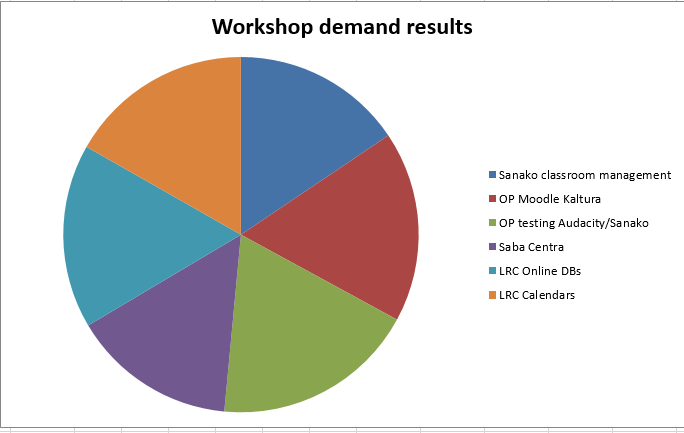
7 responded, 1 commented. OP=Oral Proficiency.
Categories: audience-is-teachers, Charts, e-infrastructure, e-languages, e-learning, Media, Polls, Visualizations, workshops
audacity, calendaring, kaltura, moodle, saba-centra
Sanako Study 1200 controlled web browsing–strict policy
2012/04/18
Leave a comment
- View an
 80-seconds screencast showing how a teacher can set up a student activity where students are only allowed to access on web site.
 - In this example, the website is a common dictionary: http://www.dict.cc which the student will be allowed to access during an exam (in lieu of a paper dictionary policy).
- Never mind that the voiceover is partially in German – the video should be self-explanatory. If not, here is a written step-by-step on Sanako controlled webbrowsing.
How a teacher uploads a video resource to Moodle using Kaltura
2012/03/20
Leave a comment
- Moodle Kaltura facilitates making segments of video (created from e.g. source DVD with the video editor of your choice) available for film studies classes, within the bounds of Fair Use and the Teach Act, since it makes video
- easily available (streamed to anywhere where Adobe-Flash runs),
- but only to those who have an account in the Moodle installation and are registered for the course
- In addition, access to the video segments can be restricted further (by choosing from the management options that Moodle affords),
- only to the teacher, for display during face-to-face teaching)
- only during a time window, for timed assignments.
- Here is a (somewhat longwinded, but authentic) demonstration of how to make a Kaltura video resource available through a Moodle course.
- The demonstration includes the server-side encoding which happens only once during teacher upload – you do not have to wait for it to finish, just if you want to check immediately, like I do on the example whether your upload went through.
Categories: documentation, e-learning, Film-studies, lms, Screencasts, service-is-evaluating-learning-tools
adobe-flash, kaltura, moodle, videos
Moodle streaming video recording assignment glitch 9
2012/03/16
Leave a comment
- Are all things Moodle Kaltura on Windows better than on iMacs?
- I don’t think so (Windows 7, IE9): Webcamera cannot be activated, hourglass. Looks like the Flash security dialogue does not make it into the foreground.


Clicker-like exercises: A comparison what the LRC has to offer
2012/03/01
Leave a comment
- PollEverywhere.com
- Sanako Study 1200
- Live Feedback
- Voting
- Exam (not currently installed)
- NetOp School: TBA
Face-to-face-teaching exam using Sanako Study 1200
2012/03/01
Leave a comment
- Sanako Exam is an add-on at additional cost and not currently available in our setup.
- Sanako Exam teacher-created content is stored locally, file management beyond that is up to the user. This makes such polls less portable, but potentially sharing within a department might be easier.
- Student Results can be identified by student, and saved.
 View here a screencast demo of how a Sanako Exam can be
- authored and
- deployed.


Questions? Read the About. Or just ask me a quick Our Databases: Resources with calendars -- Language learning material Moodle Sites, multimedia files -- films


FAQs for LRC student staff or for students or for teachers. To search our FAQs, in the browser addressbar, add after "https://plagwitz.wordpress.com/feed/?tag=faqs+/" "+TAG1" (from tag cloud below) OR "https://plagwitz.wordpress.com/feed/tag=faqs
&category_name=" "CAT1" (from category hierarchy below). OR search both categories and tags, and multiple TAGs/CATs (connect with "," for OR-search, with "+" for AND-search), like so: https://plagwitz.wordpress.com/feed/?tag=TAG1+TAG2+...TAGn&category_name=CAT1
+CAT2+...CATn"
Other ways to find help
If you cannot find it here, look there: 5,500 Language-Learning Links and Programs for learning or teaching 150 languages
Shortcuts:Our Lists, Our Maps, LRC Staff Moodle Site,LRC Project Moodle Site, 49erexpress, UNCC Moodle, Student Recordings: s:claslcslrcsanakostudent
Learning usage samples: Sanako oral exam, Kaltura webcam presentation, Dictation with speech recognition, Sanako written exam, Chinese and Japanese interactive stroke-order practice
Test the Sanako Installer, Webbrowser Popup Konfigurator for XP, or Windows7, faster LRC TeacherPC Log-in Let MS facilitate diacritics writing by installing for you US-International keyboard layout
This is my personal blog (Google+). The views expressed on these pages are mine alone and not those of my employer. The information in this weblog is provided “AS IS” with no warranties, and confers no rights.
 Thomas' Work Space