Archive
Protected: Sanako Study 1200 Final oral exam for advanced Business Spanish: A Job interview
Installing support for non-western languages in Windows XP
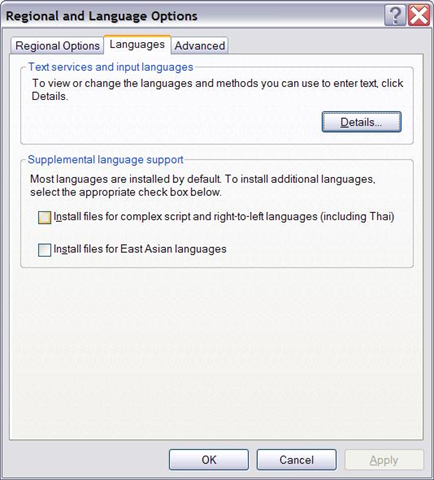
- You do not have them if your control panel / regional and language options looks unchecked like this:

- you need your Windows XP install disk
- The installer is not smart enough to find the i386 folder, nor to find all files around it.
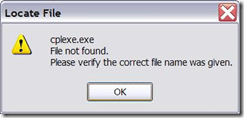
- Just point the installer to the directory manually where you located the file in question.

- The initial directory it is lookiong for is /i386/lang. The 2nd directory it is looking for is /i386.
- Additional complication: files in the install source are compressed, and their filename is altered (e.g. “.ex_” instead of “.exe”). So it is “Go figure”.
- Hm, I could have sworn this was the first thing I did here. Are downgrades being slipstreamed? I hope I did this now for the last time. Update: No, I did not…


Independent study with free language learning materials from the FSI?
The Foreign Service Institute language learning materials – consisting of scanned documents and digitized audio of multiple courses per language – were still a heavily-advertised resource when I visited the Defense Language Institute in Monterey in 2006.
It is nice to see these resources be made available for free. It is also nice to see the progress that has been made not only in technological adaptation of textbook learning materials since these materials were made available (post WW II?).
This, however, comes at a cost. If you shun it, and do not take a course that works which requires (and entitles you to the use of) a textbook, here are easily accessibleviewable learning materials for a large set of languages, including many LCTL: Amharic, Arabic, Bulgarian, Cambodian, Cantonese, Chinese, Chinyanja, Czech, Finnish, French, Fula, German, Greek, Hausa, Hebrew, Hindi, Hungarian, Igbo, Italian, Japanese, Kirundi, Kituba, Korean, Lao, Lingala, Luganda, Moré, Polish, Portuguese, Romanian, Russian, Serbo-Croatian, Shona, Sinhala, Spanish, Swahili, Swedish, Tagalog, Thai, Turkish, Twi, Vietnamese, Yoruba.
The Forums , however seem to indicate that not too many still use these options. The transformation into a (technologically superficially) more modern format here is limited to very few languages and courses (and crashed my web browser).
I2speak.com: Web-based IPA Keyboard
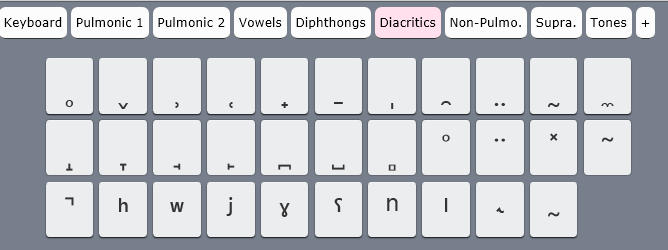
The Sciweavers Team announces http://www.i2speak.com: “an online Smart IPA Keyboard that lets you quickly type IPA phonetics without the need to memorize any symbol code. For every Roman character you type, a popup menu displays a group of phonetic symbols that share the same sound or shape beneath typed character. Use arrow keys to select the proper symbol then hit the Enter button. I2Speak also supports the following features:
1. The Sampa English Keyboard lets you type English phonetics using Roman characters according to SAMPA (Speech Assessment Methods Phonetic Alphabet) rules.
2. The IPA English Keyboard provides you with a full English phonetics keyboard. Press the symbol of interest using a suitable input device.
3. You can type directly on your physical keyboard or on the virtual on-screen keyboard using a suitable input device such as mouse or touch screen device.
4. You can change the keyboard symbols by selecting another layout from the list box located above the virtual keyboard.
5. For every keyboard layout, more symbols can be displayed by pressing the CAPS Lock.
6. When you hover the mouse over an English phonetic button, a slick tooltip will show some example English words.
7. You can save typed phonetics as an MS-Word file by clicking the Save button, copy them to clipboard using the Copy button, or post them to Twitter, Facebook, etc. by clicking the desired button.”



How to display Furigana phonetic guide for Japanese Kanji in MS-Word 2010
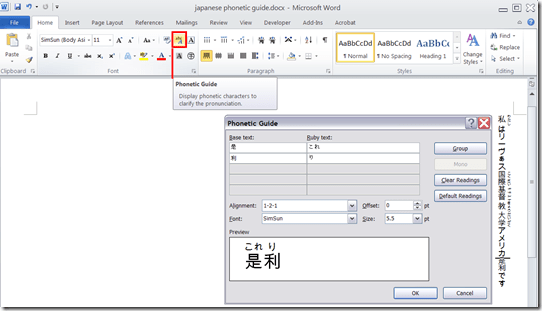
- Furigana uses Kana (usually Hiragana) to phonetically transcribe Kanji, above (for horizontally written Kanji) or to the right (if in vertical writing mode), for special characters or audiences (children and second language learners).
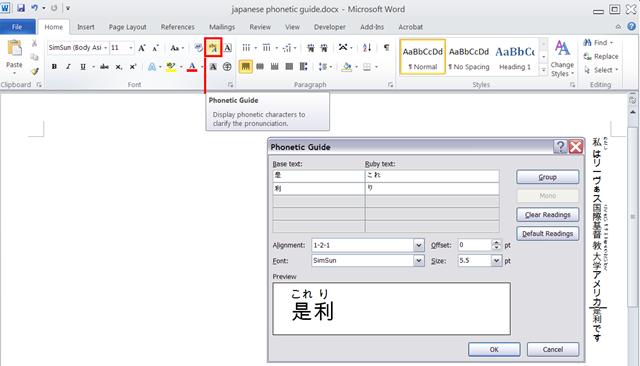
- In MS-Office, if you have a Japanese Input Method Editor selected in MS-Windows, select some Kanji and in the ribbon, under tab: home, section: font; click on the Phonetic guide, to bring up a dialogue that attempts to auto detect the furigana.
- You can make adjustments there, click “OK “to insert. Like so:
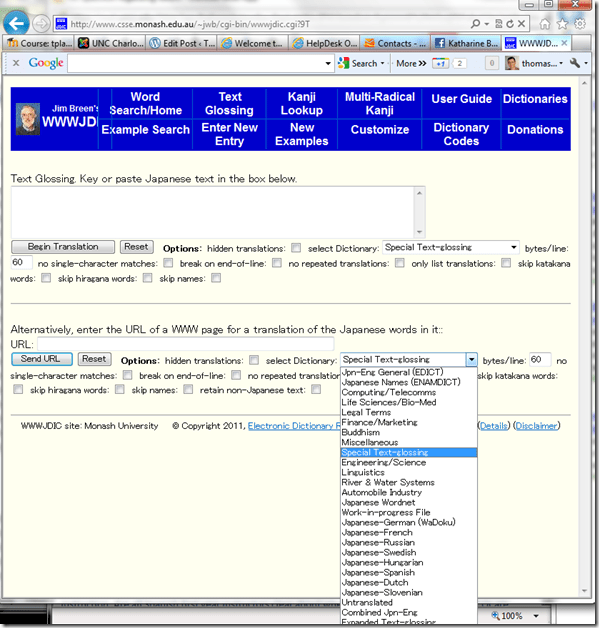
Jim Breen (Monash) Japanese-English Dictionary
Screencasts for Spring 2012 Student Staff Workshop: LRC layout,, calendaring, tutoring, example Japanese
- Here are two screencasts of my presentation:
- one for the right screen/participant screen (using the Study1200 teacher to student screen casting). Requires Windows Media Player on PC, like in the LRC: download from MS-SkyDrive.
- one for the left screen/projector, where I displayed mostly a PowerPoint. You can watch this in parallel using another player, e.g. the VLC player, like in the LRC. However, it can also stream from MS-SkyDrive.


Questions? Read the About. Or just ask me a quick Our Databases: Resources with calendars -- Language learning material Moodle Sites, multimedia files -- films


FAQs for LRC student staff or for students or for teachers. To search our FAQs, in the browser addressbar, add after "https://plagwitz.wordpress.com/feed/?tag=faqs+/" "+TAG1" (from tag cloud below) OR "https://plagwitz.wordpress.com/feed/tag=faqs
&category_name=" "CAT1" (from category hierarchy below). OR search both categories and tags, and multiple TAGs/CATs (connect with "," for OR-search, with "+" for AND-search), like so: https://plagwitz.wordpress.com/feed/?tag=TAG1+TAG2+...TAGn&category_name=CAT1
+CAT2+...CATn"
Other ways to find help
If you cannot find it here, look there: 5,500 Language-Learning Links and Programs for learning or teaching 150 languages
Shortcuts:Our Lists, Our Maps, LRC Staff Moodle Site,LRC Project Moodle Site, 49erexpress, UNCC Moodle, Student Recordings: s:claslcslrcsanakostudent
Learning usage samples: Sanako oral exam, Kaltura webcam presentation, Dictation with speech recognition, Sanako written exam, Chinese and Japanese interactive stroke-order practice
Test the Sanako Installer, Webbrowser Popup Konfigurator for XP, or Windows7, faster LRC TeacherPC Log-in Let MS facilitate diacritics writing by installing for you US-International keyboard layout
This is my personal blog (Google+). The views expressed on these pages are mine alone and not those of my employer. The information in this weblog is provided “AS IS” with no warranties, and confers no rights.
 Thomas' Work Space