Archive
Archive for the ‘service-is-any’ Category
How to automate removing MS-Office VBA project protection for multiple files
2015/12/01
Leave a comment
- Problem:
- Need VBE extensibility to implement some tools and practices of the modern SDLC.
- Software consists of not only 1000s of Word templates which are anything but DRY, but also highly protected even during what should be the SDLC
- Not solvable by VBA automaton for security reasons:
- VBE password protection (OK, there is Sendkeys, but that is considered harmful).
- digitally signed.
- Developer tab read-only protection: this one is not covered here, since it can be dealt with through regular VBA automation.
- Not solvable by VBA automaton for security reasons:
- Workaround: PowerShell for starters:
- Get Unlock-OfficeMacro.ps1 – including the addition in the comments.
- Wrap the downloaded script like so:
Get-ChildItem -Include *.do?m* -Exclude *_unlocked* -Path "G:\imf\word templates\Quarterly Releases_unprotected_ps" -Recurse |` foreach{ $_.IsReadOnly = $false $output_filename = $_.Directory.ToString() + "\" + $_.BaseName + '_unlocked' + $_.Extension .\Unlock-OfficeMacro.ps1 $_.FullName $output_filename } Exit - NextProblem: The script removes the warning dialogues on opening the altered MS-Word files remain. This still hampers automation.
- Next workaround: this script automates the GUI:
- “OK”’ing the warning dialogue: “The project file ‘C:\Users\tplagwitz\AppData\Roaming\Microsoft\Templates\documaker.dotm’ contains invalid key ‘DPx’.–Continue Loading Project?”
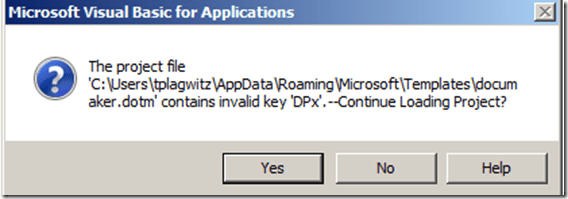
- making minor changes and saving the file (this also bypasses the "discard certificate" warning, if the file was also signed (as is my case).
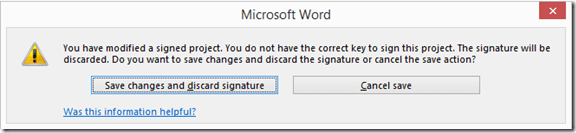
-
Prerequisites: none, other than putting your word files in a folder the script (which the script will prompt you for, and for an (optional) substring, to filter file names) .
- Limitations:
- I used to have also have, per module in the VBA project, warnings: “Microsoft Visual Basic for Applications Unexpected error (40230) ” and try to bypass these also, but since I cannot replicate the warnings, this remains untested.
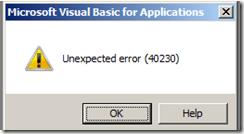
- A superior approach (enabling round tripping) would be to attempt to automate entering the password, but the traditional SendKeys approach is unreliable, and newer approaches (using SendMessage from the the Win32 API or bypassing the intended negative effects of password protection, via an in-memory substitution).
- I used to have also have, per module in the VBA project, warnings: “Microsoft Visual Basic for Applications Unexpected error (40230) ” and try to bypass these also, but since I cannot replicate the warnings, this remains untested.
- And here is the AutoIt script:
- “OK”’ing the warning dialogue: “The project file ‘C:\Users\tplagwitz\AppData\Roaming\Microsoft\Templates\documaker.dotm’ contains invalid key ‘DPx’.–Continue Loading Project?”


include <Array.au3>
#include <debug.au3>
#include <File.au3>
#include <log4a.au3>
Opt("WinTitleMatchMode", 2)
Opt("MustDeclareVars", 1)
Dim $file, $runpath, $iPID, $i, $folderpath, $pattern, $files, $filepath, $files, $ret, $oAppl, $oDoc, $sFilter
_log4a_SetEnable()
_log4a_SetOutput($LOG4A_OUTPUT_BOTH)
$pattern = InputBox("File Pattern?", "Enter file pattern,  beyond (before) *.do?m (= Files with macros), that files have to match.", "_unlocked")
$folderpath = InputBox("Where?", "Enter folder to find files in...")
$sFilter = "*" & $pattern & "*.do?m|~*,Backup*"
If Not (FileExists($folderpath) And StringInStr(FileGetAttrib($folderpath), "D")) Then
	MsgBox(1, "Error", " The path you entered does Not seem To exist Or is Not a folder. Exiting....")
	Exit
Else
	$files = _FileListToArrayRec($folderpath, $sFilter, $FLTAR_FILES, $FLTAR_RECUR, $FLTAR_SORT, $FLTAR_RELPATH)
	For $i = 1 To UBound($files) - 1
		$file = $files[$i]
		If (StringRight($folderpath, 1) <> "\") Then $folderpath = $folderpath & "\"
		$filepath = $folderpath & $file
		Local $iPID = Run('"C:\Program Files\Microsoft Office 15\root\office15\WINWORD.EXE" /q /a /m "' & $filepath & '"', "", @SW_SHOWMAXIMIZED)
		$ret = WinActivate("- Word", "")
		$ret = WinWaitActive("- Word", "", 5)
		If ($ret = 0) Then
			_log4a_debug("cannot load: " & $filepath & @TAB & @ScriptLineNumber & @CRLF)
			$ret = ProcessClose($iPID)
			ContinueLoop
		Else
			_log4a_debug("processing: " & $filepath & @TAB & @ScriptLineNumber & @CRLF)
		EndIf
		If ($ret = 0) Then _log4a_debug("failure on: " & @ScriptLineNumber & @CRLF)
		Send("{SHIFTDOWN}{SHIFTUP}")
		Sleep(100)
		Send("!{f11}")
		$ret = WinActivate("Microsoft Visual Basic for Applications", "invalid key")
		If ($ret = 0) Then _log4a_debug("failure on: " & @ScriptLineNumber & @CRLF)
		$ret = WinWaitActive("Microsoft Visual Basic for Applications", "invalid key", 5)
		If ($ret = 0) Then
			_log4a_debug("nothing to do with invalid key, will close word and continue next file: " & @ScriptLineNumber & @CRLF)
			$ret = ProcessClose($iPID)
			If ($ret = 0) Then _log4a_debug("failure on: " & @ScriptLineNumber & @CRLF)
			ContinueLoop
		EndIf
		If $ret <> 0 Then
			$ret = ControlClick($ret, "", "Button1")
			If ($ret = 0) Then _log4a_debug("failure on: " & @ScriptLineNumber & @CRLF)
		Else
			If ($ret = 0) Then _log4a_debug("failure on: " & @ScriptLineNumber & @CRLF)
		EndIf
		Sleep(1000)
		$ret = 0
		Sleep(5000)
		While (0 <> WinActivate("Microsoft Visual Basic for Applications", "Unexpected error (40230)"))
			$ret = ControlClick("[CLASS:#32770
			If ($ret = 0) Then _log4a_debug("failure on: " & @ScriptLineNumber & @CRLF)
		WEnd
		Sleep(3000)
		$ret = WinActivate("Microsoft Visual Basic for Applications", "")
		$ret = WinWaitActive("Microsoft Visual Basic for Applications", "", 5)
		If ($ret = 0) Then _log4a_debug("failure on: " & @ScriptLineNumber & @CRLF)
		If ($ret = 0) Then WinActivate("Microsoft Visual Basic for Applications", "")
		$ret = WinWaitActive("Microsoft Visual Basic for Applications", "", 5)
		If ($ret = 0) Then _log4a_debug("failure on: " & @ScriptLineNumber & @CRLF)
		$ret = ControlSend("Microsoft Visual Basic for Applications", "", "VbaWindow1", "'dummy" & @CRLF)
		If ($ret = 0) Then _log4a_debug("failure on: " & @ScriptLineNumber & @CRLF)
		Sleep(1000)
		Send("!q")
		Sleep(1000)
		Send("!{f4}")
		Sleep(1000)

		$ret = WinWaitActive("Microsoft Word", "", 5)
		If ($ret = 0) Then _log4a_debug("failure on: " & @ScriptLineNumber & @CRLF)
		If ($ret = 0) Then $ret = WinActivate("Microsoft Word", "")
		If ($ret = 0) Then _log4a_debug("failure on: " & @ScriptLineNumber & @CRLF)
		$ret = WinWaitActive("Microsoft Word", "", 5)
		If ($ret = 0) Then _log4a_debug("failure on: " & @ScriptLineNumber & @CRLF)
		If ($ret <> 0) Then
			Send("!s")
			Sleep(1000)
			$ret = WinWaitActive("Microsoft Word", "discarded", 5)
			If ($ret = 0) Then
				_log4a_debug("the certificate dialogue is not up yet", True)
				$ret = WinWaitActive("Microsoft Word", "", 5)
				If ($ret <> 0) Then
					_log4a_debug("failure with !s: " & @ScriptLineNumber & @CRLF)
					Send("{Enter}")
				EndIf
			EndIf
			Sleep(1000)
		Else
			If ($ret = 0) Then _log4a_debug("failure on: " & @ScriptLineNumber & @CRLF)
		EndIf
		$ret = WinWaitActive("Microsoft Word", "discarded", 5)
		If ($ret = 0) Then _log4a_debug("failure on: " & @ScriptLineNumber & @CRLF)
		$ret = WinActivate("Microsoft Word", "discarded")
		If ($ret = 0) Then _log4a_debug("failure on: " & @ScriptLineNumber & @CRLF)
		$ret = WinWaitActive("Microsoft Word", "discarded", 5)
		If ($ret = 0) Then _log4a_debug("failure on: " & @ScriptLineNumber & @CRLF)
		If ($ret <> 0) Then
			$ret = ControlClick("Microsoft Word", "", "Button1")
			If ($ret = 0) Then _log4a_debug("failure on: " & @ScriptLineNumber & @CRLF)
			If $ret = 0 Then Send("!d")
		Else
			If ($ret = 0) Then _log4a_debug("failure on: " & @ScriptLineNumber & @CRLF)
		EndIf
		Sleep(1000)
		Send("{BACKSPACE}")
		Sleep(1000)
		Send("^s")
		Sleep(3000)
		ProcessClose($iPID)
		Sleep(1000)
	Next
	Sleep(1000)
EndIf
Categories: audience-is-IT-staff, e-infrastructure, service-is-programming, sourcecode
ms-office, ms-powershell, openxml, protection, security, VBA, vbe
Adding APE input format support (and WMA output format) to Convert2MP3.ps
2015/11/06
Leave a comment
- FWIIW: When trying to run Paul Weterings’ script against a media folder, it failed.
- I added exception handling, to arrive at : “Exception calling “Create” with “1” argument(s): “s:\multimedia1\Piano.Sonatas\vol1\I1.ape (taglib/ape)”.
- Took me a while to realize: Taglib-sharp seems to stumble over APE file formats. Even though the taglib release notes seem to say it is supported since 2009. And even though I upgraded taglib-sharp to current version 2.1.0.0.
- Now I am simply bypassing the call to taglib-sharp for files with the APE extension, and default to a bitrate of 64 for those.
- I also
- changed the conversion direction to WMA format, including from MP3 source format.
- added an option $blndelete to not delete source files.
- No warranties of any kind. All due credit goes to Paul Weterings’ script here.
# trp: any2wma.ps1
# wma2mp3 conversion powershell script...
# dec 2010 version 1.1 Servercare, Paul Weterings
# Feb 2013 version 1.2 ServerCare, Paul Weterings, Byron &amp; Chuck, added DRM check,
# more formats and bitrate
# trp: nov 2015: using *.wma as output, added *.ape as input (and *.mp3)
Set-StrictMode -Version Latest
# Set-PSDebug -trace 1
$blndelete = $true # $false # control whether originals get deleted after some success conversionchekc - good idea, but not yet
# Where are we?
# $loc = Get-Location
$loc = $PSScriptRoot # trp
# $tag = $tag = $loc.Path + "\MPTag" # trp: not really? butr this syntax apears more often , is this ps' append to existing variable
# trp:
$tag = $tag = $loc + "\MPTag" # trp: not really? butr this syntax apears more often , is this ps' append to existing variable
# Import MPTag module
# See: http://powershell.com/cs/media/p/9129/download.aspx
$errorcountbefore = $error.count
Import-Module $tag
If ($error.count &gt; $errorcountbefore)
{
Write-host "trp:" + $lastexitcode + \n + $error[0]
}
# Use Windows Media Player
# See: http://msdn.microsoft.com/en-us/library/ee485348.aspx
$errorcountbefore = $error.count
$mpobj = New-Object -ComObject wmplayer.ocx
If ($error.count &gt; $errorcountbefore)
{
Write-host "trp:"+ $lastexitcode + \n + $error[0]
}
$tool = "ffmpeg.exe" # trp: done:test:can i have ffmpeg in $env:Path?$loc.path+"\ffmpeg.exe"
$successcounter = $failurecounter = 0
# This is the root folder where script looks for the music, adjust this to your liking.#
# #
$strBaseDir = "S:\multimedia1\Piano.Sonatas" # ape
#
########################################################################################
$objParent = Get-ChildItem $strBaseDir -recurse -Include *.aac, *.flac, *.m4p, *.ogg, *.ra, *.rm,`
*.ram, *.raw, *.wav, *.mp3, *.ape
# trp: now target instead: *.wma
# todo: *.m4a,
foreach ($child in $objParent)
{
trap {
Write-Warning ('Failed to access "{0}" : {1} in "{2}"' -f $child.FullName, $_.Exception.Message, $_.InvocationInfo.ScriptName)
continue
}
# trp: exclude .ape from taglib-sharp and set default bitrate of 64k
if ($child.Fullname.EndsWith(".ape"))
{
$bitrate = 64
}
else
{
# Use the MPTag library to get the correct bitrate
$libmedia = Get-MediaInfo $child.Fullname
$bitrate = $libmedia.Properties.AudioBitrate
# sometimes the bitrate is reported way to high... anything over 192 gets lowered.
# adjust if wanted/needed
if ($bitrate -gt 192)
{
$bitrate = 192
}
}
# trp : work around Get-MediaInfo not working
if (!$bitrate) # yes = null-valued expression
{
$bitrate = 64
}
"-----------------------------------------------------------------------------"
"- Processing: " + $child.FullName + " at Bitrate $bitrate"
$media = $mpobj.newMedia($child.Fullname)
$protected = $media.getItemInfo('Is_Protected')
# Some files, such as flac or ogg may have the protection attribute empty
if ($protected)
{
$prot = [System.Convert]::ToBoolean($protected)
}
else
{
$prot = $false
}
if (!$prot)
{
$strInName = $child.FullName
$strOutName = $child.DirectoryName + "\" + $child.BaseName + ".wma" # trp ".mp3"
# The argument string that tells ffmpeg what to do...
# The generic syntax is:
# ffmpeg [global options] [[infile options][‘-i’ infile]]...
# {[outfile options] outfile}...
#
# -i filename (input) :: -i &lt;string&gt; :: input file name
# -y (global) :: -y :: Overwrite output files without asking.
# -acodec codec (input/output) :: -acodec libmp3lame :: Set the audio codec.
# This is an alias for -codec:a.
# trp: acodec wmav2 A..... wmav2 Windows Media Audio 2
# :: -ab 128k :: Set bitrate in bits to constant 128k bit rate
# -ac[:stream_specifier] channels (input/output,per-stream) :: -ac 2 ::
# Set the number of audio channels. For output streams it is set by default
# to the number of input audio channels. For input streams this option only
# makes sense for audio grabbing devices and raw demuxers and is mapped to the
# corresponding demuxer options.
# -ar[:stream_specifier] freq (input/output,per-stream) :: -ar 44100 ::
# Set the audio sampling frequency. For output streams it is set by default
# to the frequency of the corresponding input stream. For input streams this
# option only makes sense for audio grabbing devices and raw demuxers and is
# mapped to the corresponding demuxer options.
# :: $mp3name :: Output name
# file:///C:/ffmpeg-git-1eabd71-win32-static/doc/ffmpeg.html
# trp: $arguments = '-i ' + '"'+$strInName +'"' +' -y -acodec libmp3lame -ab ' + $bitrate`
$arguments = '-i ' + '"'+$strInName +'"' +' -y -acodec wmav2 -ab ' + $bitrate`
+'k -ac 2 -ar 44100 ' + '"' + $strOutName+ '"'
# This is where the conversion takes place
# trp:debug
Write-Warning "$tool + `r`n"
Write-Warning "$arguments + `r`n"
Invoke-Expression "$tool $arguments"
# Lets see what we just converted, did everything go OK?
$objOutFile = get-item $strOutName
# if conversion went well the mp3 file is larger than 0 bytes, so remove the original file,
# otherwise leave the wma file &amp; remove the (zero length) mp3 file
if (!$strOutName.Length -gt 0) # no success converting -&gt; delete failed converted file
{
echo "----- removing $strOutName"
Remove-Item -LiteralPath $strOutName
$failurecounter++
}
else # success converting
{
$successcounter++
if ($blndelete) # delete original requested
{
# you might want to consider moving the original file to
# anther location instead of removing it.
# Allowing you time to manually check if the conversions went OK
echo "----- removing $strInName"
Remove-Item -LiteralPath $strInName
}
}
}
else # $prot
{
"! File " + $child.FullName + " is DRM protected, skipping..."
$failurecounter++
}
}
# We are done, so lets inform the user what the success rate was.
Echo "Processing completed, $successcounter conversions were succesfull `
and $failurecounter were not."
How to prevent OneNote from crashing when hovering over search results
2015/10/28
Leave a comment
- Problem: In a strange new development, my OneNote crashes (multiple times, until things eventually become stable again) when I search my notebooks from the upper right search box. Specifically, as soon as I hover my mouse over the search results display.
- My environment: OneNote 2013 32-bit on Windows 7 64-bit. These are notebooks on a network share, and they are updated from multiple machines. Not aware of any recent changes to my mouse settings or drivers.
- My Workaround: Navigate the search results using the keyboard. This seems to prevent those crashes.
How to split an Excel workbook into one file per sheet with VBA (reworked)
2015/09/24
1 comment
- There are other code snippets on stackoverflow.com, but I went with the top match in the Google search.
- Couldn’t get it to work (error # 424 Object required on xWS.copy in Excel 2013, with the VBA run from a separate utilities workbook) until I made these changes:
'TRP reworked http://www.extendoffice.com/documents/excel/628-excel-split-workbook.html
Sub Workbook_Split() 'Updated by TRP 20150924

    Dim xPath As String
    Dim myWorkSheet As Worksheet
    xPath = Application.ActiveWorkbook.Path 'the source workbook needs be saved first
    Application.ScreenUpdating = False
    Application.DisplayAlerts = False

    For Each xWS In ActiveWorkbook.Sheets    'trp: replaced ThisWorkbook.Sheets
        'trp: replaced xWS.Copy 'toask: this fails with 424: object required
        Set myWorkSheet = xWS
        myWorkSheet.Copy 'If you don't specify either Before or After, Microsoft Excel creates a new workbook that contains the copied sheet.
        Application.ActiveWorkbook.SaveAs FileName:=xPath & "\" & myWorkSheet.Name & ".xlsx"
        'trp: replaced xWS.Name & ".xls"
        Application.ActiveWorkbook.Close False    'trp:savechanges:=False
    Next
    Application.DisplayAlerts = True
    Application.ScreenUpdating = True
End Sub
Categories: service-is-programming
MS-Excel, VBA, worksheets
How to easily rearrange your sections via the headings in MS-Word’s Navigation Pane
2015/07/19
Leave a comment
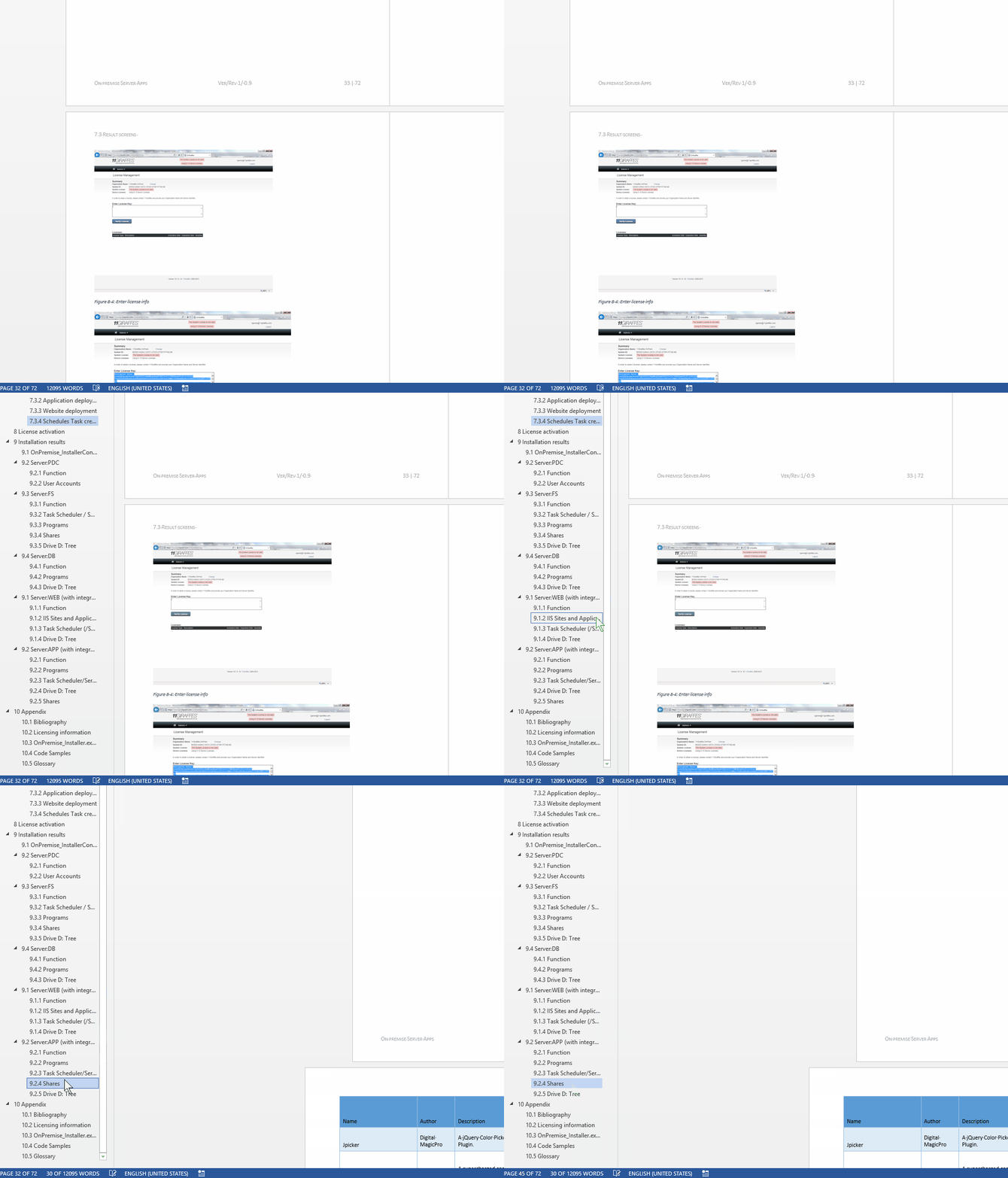
- Short answer Show Navigation (from ribbon ./ View), then Drag&drop/

- Maybe obvious, but had escaped me so far – I thought such ease would only come only with outline view – what a great feature!
Categories: service-is-documenting
2013, headings, MS-Word, navigation-pane
Which UML diagram types are in most demand?
2015/06/07
Leave a comment
- From a recent spot check of over 500 job postings on Indeed.com that mention both “UML” and “diagram”, the following picture emerges:
- There is clearly a Big 4 of UML diagram types, and they are – in order of frequency –
- sequence,
- use-case,
- activity and
- (the only structural diagram type that “counts”) class diagram.
-
UML Diagram Type Count of type activity 19.33% class 15.33% communication 6.00% component 2.67% interaction 1.33% network-architecture 1.33% object 2.00% sequence 23.33% state 8.00% timing 0.67% use-case 20.00% Grand Total 100.00% - It seems you could in practice cover “80%’ of UML with these four diagram types. Even state and communication (collaboration) diagrams are an already very distant 5th and 6th (but get you up to a coverage of about 95%).
- Notably, the majority of UML diagram types – at least in this sample set – do not figure at all:
| Count of type | Diagram |
| 0 | Behavioral state machine |
| 0 | Collaboration use |
| 0 | Composite structure |
| 0 | Deployment |
| 0 | Information flow |
| 0 | Interaction overview |
| 0 | Internal structure |
| 0 | Manifestation |
| 0 | Model |
| 0 | Package |
| 0 | Profile |
| 0 | Protocol state machine |
Note: The vast majority of mentions did not need any, but I attempted some translations of the raw data on indeed.com:
| indeed.com | counted as |
| action | activity |
| collaboration (1) | communication (2) |
| data flow | information flow |
| domain model | class diagram |
| object models | object |
| state charts | state machine |
| process flow | 1 not counted |
| swim lane | sequence |
| prototypes | 1 not counted |
Categories: service-is-documenting
UML
How to ease editing work in MS-Word by automating search/replace operations
2015/05/08
Leave a comment
- If you frequently have to edit documents according to a large number of editorial rules and regulations
- and if you can partially automate these edit operations (or at least highlight suspicious passages for human review) with Word’s search/replace,
- I can recommend an add-in that can automate even the repeated search/replace operations (like the 57 in the video below)
- and even help you manage your search/replace strings and regular expressions in a spreadsheet which it can load from:
- Greg Maxey’s VBA Find & Replace Word Add-in. See it in action (click for full size):

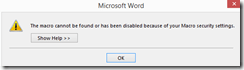
TwoThree Caveats: :- At this point, I cannot get the add-in to work only in Word 2010. Even if I lower Macro security and allow programmatic access to the VBA project, when trying to launch the add-in from the ribbon, Word 2013 complains: “The macro cannot be found or has been disabled due to your macro security settings”:
 .
. - The automation is only as good as your underlying search/replace operations. (Hint: “Some people, when confronted with a problem, think ‘I know, I’ll use regular expressions.’ Now they have two problems.”)
- I think I will refrain from search/replace during “Tracking changes” – as in the video – , and rather use “Compare documents” after the replace operations – too many quirks otherwise…
- At this point, I cannot get the add-in to work only in Word 2010. Even if I lower Macro security and allow programmatic access to the VBA project, when trying to launch the add-in from the ribbon, Word 2013 complains: “The macro cannot be found or has been disabled due to your macro security settings”:


Categories: service-is-documenting
2010, 2013, add-ins, automation, MS-Excel, MS-Word, regular-expressions, replacing, VBA
How to define your own conditional content marker “Internal” for Doxygen
2015/05/06
Leave a comment
- Doxygen comes with a built-in conditional content marker \internal the outputting of which can be controlled with the switch INTERNAL_DOCS in Doxygen’s config file.
- However, I could not get this to work as advertised in Doxygen 1.8.8.
- In cases of similar feature breakage, users are commonly advised to fix the error in the Doxygen source. If you, like I did, lack the time for that, here is a simple workaround which uses another built-in feature that an be controlled via Doxygen’s config file:
- Define as one of the:
ALIASES = "myinternal=\if myinternal <HR><kbd><em>" \ "endmyinternal= </em></kbd> \endif" # HTML is optional, intended to make internal information stand out clearly if outputted - Switch this ALIAS on and off using ENABLED_SECTIONS = # myinternal
- Example usage in a .dox file:
-# A high-low-high-low beep sequence followed by a low-high beep
 sequence indicates successful pairing and connection to the remote
 device.
 @myinternal tested with barcode on lower-end of cradle: gives success
 beep sequence @endmyinternal
 -# A long low, long high beep sequence indicates unsuccessful pairing.


Questions? Read the About. Or just ask me a quick Our Databases: Resources with calendars -- Language learning material Moodle Sites, multimedia files -- films


FAQs for LRC student staff or for students or for teachers. To search our FAQs, in the browser addressbar, add after "https://plagwitz.wordpress.com/feed/?tag=faqs+/" "+TAG1" (from tag cloud below) OR "https://plagwitz.wordpress.com/feed/tag=faqs
&category_name=" "CAT1" (from category hierarchy below). OR search both categories and tags, and multiple TAGs/CATs (connect with "," for OR-search, with "+" for AND-search), like so: https://plagwitz.wordpress.com/feed/?tag=TAG1+TAG2+...TAGn&category_name=CAT1
+CAT2+...CATn"
Other ways to find help
If you cannot find it here, look there: 5,500 Language-Learning Links and Programs for learning or teaching 150 languages
Shortcuts:Our Lists, Our Maps, LRC Staff Moodle Site,LRC Project Moodle Site, 49erexpress, UNCC Moodle, Student Recordings: s:claslcslrcsanakostudent
Learning usage samples: Sanako oral exam, Kaltura webcam presentation, Dictation with speech recognition, Sanako written exam, Chinese and Japanese interactive stroke-order practice
Test the Sanako Installer, Webbrowser Popup Konfigurator for XP, or Windows7, faster LRC TeacherPC Log-in Let MS facilitate diacritics writing by installing for you US-International keyboard layout
This is my personal blog (Google+). The views expressed on these pages are mine alone and not those of my employer. The information in this weblog is provided “AS IS” with no warranties, and confers no rights.
 Thomas' Work Space