Archive
Archive for the ‘Multimedia-is-any’ Category
VBA script to more easily examine the properties of your Content Control-based forms
2014/10/09
Leave a comment
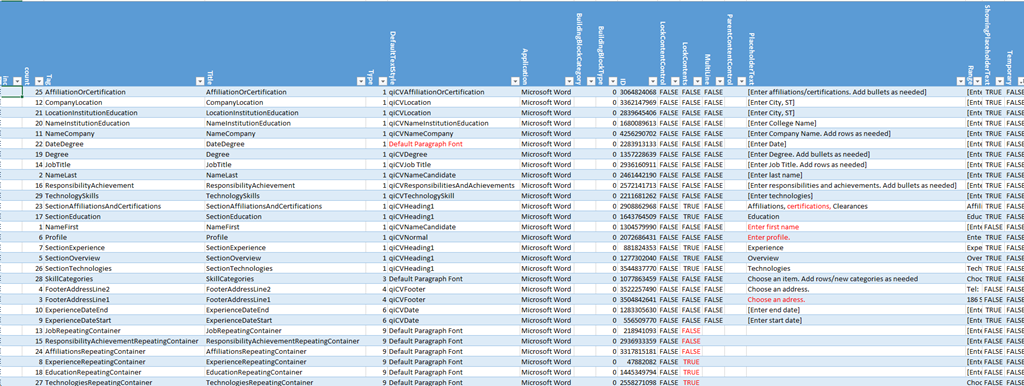
- The routine loops through the Content Controls and outputs properties as text into the VBA-Editor immediate window,
- from where it can be easily converted into an Excel-table which makes it easy t o spot and mark inconsistencies and outright oversights, like so:

Sub ccPropertiesPrint()
On Error Resume Next
Dim strHeadings, strProps As String
Dim count As Integer
Dim response

strHeadings = strHeadings & "~" & "count"
strHeadings = strHeadings & "~" & "Tag"
strHeadings = strHeadings & "~" & "Title"
strHeadings = strHeadings & "~" & "Type"
strHeadings = strHeadings & "~" & "DefaultTextStyle"
strHeadings = strHeadings & "~" & "Application"
strHeadings = strHeadings & "~" & "BuildingBlockCategory"
strHeadings = strHeadings & "~" & "BuildingBlockType"
'strHeadings = strHeadings & "~" & "Checked"
'strHeadings = strHeadings & "~" & "Creator"
'strHeadings = strHeadings & "~" & "DateCalendarType"
'strHeadings = strHeadings & "~" & "DateDisplayFormat"
'strHeadings = strHeadings & "~" & "DateDisplayLocale"
'strHeadings = strHeadings & "~" & "DateStorageFormat"
'strHeadings = strHeadings & "~" & "DropdownListEntries"
strHeadings = strHeadings & "~" & "ID"
strHeadings = strHeadings & "~" & "LockContentControl"
strHeadings = strHeadings & "~" & "LockContents"
strHeadings = strHeadings & "~" & "MultiLine"
'strHeadings = strHeadings & "~" & "Parent"
strHeadings = strHeadings & "~" & "ParentContentControl"
strHeadings = strHeadings & "~" & "PlaceholderText"
strHeadings = strHeadings & "~" & "Range"
strHeadings = strHeadings & "~" & "ShowingPlaceholderText"
strHeadings = strHeadings & "~" & "Temporary"
'strHeadings = strHeadings & "~" & "XMLMapping"
Debug.Print strHeadings
  If ActiveDocument.ContentControls.count > 0 Then
    For Each oCC In ActiveDocument.ContentControls
    'debug
    'If oCC.Type = 9 Then 'debug: repeating
count = count + 1
If count = 50 Then
'dim response = vbmsgboxresponse
    Exit For
End If

' useless cannot access immediate window If count = 15 Then response = MsgBox("paused", vbOKOnly) End If
strProps = "" 'start over
strProps = strProps & "~"
strProps = strProps & count 'CStr(count)
strProps = strProps & "~"
strProps = strProps & CStr(Replace(Replace(oCC.Tag, Chr(13), "#"), Chr(10), "#"))
strProps = strProps & "~"
strProps = strProps & CStr(Replace(Replace(oCC.Title, Chr(13), "#"), Chr(10), "#"))
strProps = strProps & "~"
strProps = strProps & CStr(Replace(Replace(oCC.Type, Chr(13), "#"), Chr(10), "#"))
strProps = strProps & "~"
strProps = strProps & CStr(Replace(Replace(oCC.DefaultTextStyle, Chr(13), "#"), Chr(10), "#"))
strProps = strProps & "~"
strProps = strProps & CStr(Replace(Replace(oCC.Application, Chr(13), "#"), Chr(10), "#"))
strProps = strProps & "~"
strProps = strProps & CStr(Replace(Replace(oCC.BuildingBlockCategory, Chr(13), "#"), Chr(10), "#"))
strProps = strProps & "~"
strProps = strProps & CStr(Replace(Replace(oCC.BuildingBlockType, Chr(13), "#"), Chr(10), "#"))
'strProps = strProps & "~"
'strProps = strProps & CStr(Replace(Replace(oCC.Checked, Chr(13), "#"), Chr(10), "#"))
'strProps = strProps & "~"
'strProps = strProps & CStr(Replace(Replace(oCC.Creator, Chr(13), "#"), Chr(10), "#"))
'strProps = strProps & "~"
'strProps = strProps & CStr(Replace(Replace(oCC.DateCalendarType, Chr(13), "#"), Chr(10), "#"))
'strProps = strProps & "~"
'strProps = strProps & CStr(Replace(Replace(oCC.DateDisplayFormat, Chr(13), "#"), Chr(10), "#"))
'strProps = strProps & "~"
'strProps = strProps & CStr(Replace(Replace(oCC.DateDisplayLocale, Chr(13), "#"), Chr(10), "#"))
'strProps = strProps & "~"
'strProps = strProps & CStr(Replace(Replace(oCC.DateStorageFormat, Chr(13), "#"), Chr(10), "#"))
'strProps = strProps & "~"
'strProps = strProps & CStr(Replace(Replace(oCC.DropdownListEntries.count, Chr(13), "#"), Chr(10), "#"))
strProps = strProps & "~"
strProps = strProps & CStr(Replace(Replace(oCC.ID, Chr(13), "#"), Chr(10), "#"))
strProps = strProps & "~"
strProps = strProps & CStr(Replace(Replace(oCC.LockContentControl, Chr(13), "#"), Chr(10), "#"))
strProps = strProps & "~"
strProps = strProps & CStr(Replace(Replace(oCC.LockContents, Chr(13), "#"), Chr(10), "#"))
strProps = strProps & "~"
strProps = strProps & CStr(Replace(Replace(oCC.MultiLine, Chr(13), "#"), Chr(10), "#"))
'strProps = strProps & "~"
'strProps = strProps & CStr(Replace(Replace(oCC.Parent, Chr(13), "#"), Chr(10), "#"))
strProps = strProps & "~"
strProps = strProps & CStr(Replace(Replace(oCC.ParentContentControl, Chr(13), "#"), Chr(10), "#"))
strProps = strProps & "~"
strProps = strProps & CStr(Replace(Replace(oCC.PlaceholderText, Chr(13), "#"), Chr(10), "#"))
strProps = strProps & "~"
strProps = strProps & CStr(Replace(Replace(oCC.Range, Chr(13), "#"), Chr(10), "#"))
strProps = strProps & "~"
strProps = strProps & CStr(Replace(Replace(oCC.ShowingPlaceholderText, Chr(13), "#"), Chr(10), "#"))
strProps = strProps & "~"
strProps = strProps & CStr(Replace(Replace(oCC.Temporary, Chr(13), "#"), Chr(10), "#"))
'strProps = strProps & "~"
'strProps = strProps & CStr(Replace(Replace(oCC.XMLMapping, Chr(13), "#"), Chr(10), "#"))
Debug.Print vbCrLf & strProps & vbCrLf
'End If 'oCC.Type=9  then 'debug: repeating
 Next
 End If
End Sub
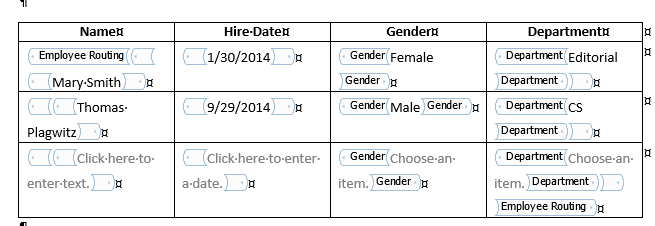
We can nest controls in repeating content controls, including repeating content controls
2014/10/06
Leave a comment
- Just saying, since it seems not easy to find within web search results the ones that nest nesting….
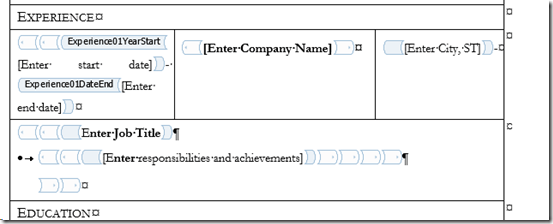

- Have not tried accessing the results in OpenXML yet which will have to be done via the control ID
- since repeating:

- does not autoincrement the titles and tags.

- since repeating:


Categories: animated-GIFs, e-infrastructure, service-is-documenting
2013, content-controls, MS-Word
Request to download the digital audio lab classroom audio configuration on the fly, program and source for Windows XP
2014/08/22
Leave a comment
UPDATE: A Windows7 (and Vista) version is in the works, check back for a new post here.


Back to description of reset of classroom audio configuration on the fly program
Windowing system infinite loop on windows 8.1
2014/08/05
Leave a comment
-
Rather annoying, no getting out of this loop, endless window foreground switching, but also unclear about the screen resolution, it seems. Ha
-
Oh, wait, I changed the dpi scaling, but chose to not log off, has that got something to do with this? Well, I have seen this loop behavior before, and I also frequent get terrible slowdowns which I have not been able to do root cause analysis for (also video-related? or network? )
-
Either way, likely related frequent explorer crashes which downgrade from aero. Sometimes I lose Aero’s advanced task scheduler completely, here I have a screenshot of it just coming back:

-
Have not been able to find other similar problem / but reports – something wrong with my setup then? (never mind that my camera has its own infinite loop auto focus bug.

Categories: Glitches&Errors, Screencasts, Uncategorized
aero, ms-windows
A Project Management Life Cycle–with some communication problems
2014/07/20
Leave a comment


Categories: animated-GIFs, e-infrastructure, Glitches&Errors, service-is-project-managing
Protected: LRC calendars requirements and configuration management
2014/07/15
Enter your password to view comments.
Protected: LRC à la carte I: The teacher’s Vade mecum
2014/07/15
Enter your password to view comments.
Categories: audience-is-teachers, cheat-sheets, documentation, Documents, training
How to sort a Pivot table by a calculated field column
2014/07/12
Leave a comment
(Click on image for original size version, now bigger.)

Categories: animated-GIFs, e-infrastructure, mental-notes
2013, MS-Excel, pivot-tables


Questions? Read the About. Or just ask me a quick Our Databases: Resources with calendars -- Language learning material Moodle Sites, multimedia files -- films
FAQs for LRC student staff or for students or for teachers. To search our FAQs, in the browser addressbar, add after "https://plagwitz.wordpress.com/feed/?tag=faqs+/" "+TAG1" (from tag cloud below) OR "https://plagwitz.wordpress.com/feed/tag=faqs
&category_name=" "CAT1" (from category hierarchy below). OR search both categories and tags, and multiple TAGs/CATs (connect with "," for OR-search, with "+" for AND-search), like so: https://plagwitz.wordpress.com/feed/?tag=TAG1+TAG2+...TAGn&category_name=CAT1
+CAT2+...CATn"
Other ways to find help
If you cannot find it here, look there: 5,500 Language-Learning Links and Programs for learning or teaching 150 languages
Shortcuts:Our Lists, Our Maps, LRC Staff Moodle Site,LRC Project Moodle Site, 49erexpress, UNCC Moodle, Student Recordings: s:claslcslrcsanakostudent
Learning usage samples: Sanako oral exam, Kaltura webcam presentation, Dictation with speech recognition, Sanako written exam, Chinese and Japanese interactive stroke-order practice
Test the Sanako Installer, Webbrowser Popup Konfigurator for XP, or Windows7, faster LRC TeacherPC Log-in Let MS facilitate diacritics writing by installing for you US-International keyboard layout
This is my personal blog (Google+). The views expressed on these pages are mine alone and not those of my employer. The information in this weblog is provided “AS IS” with no warranties, and confers no rights.
 Thomas' Work Space