Archive
How to type phonetic symbols on a computer
- Web-based On-screen-keyboards (point-and-click; low learning curve, but no fast typing speed; typing into a textbox from where you can copy/paste the result into other programs):
- http://westonruter.github.com/ipa-chart/keyboard/: Sounds are systematically organized. Suitable for learners, but also good for teacher demonstrations.

- Partially based on keyboard shortcuts: http://www.ipatrainer.com/user/site/index.php?pageID=ipawriter:

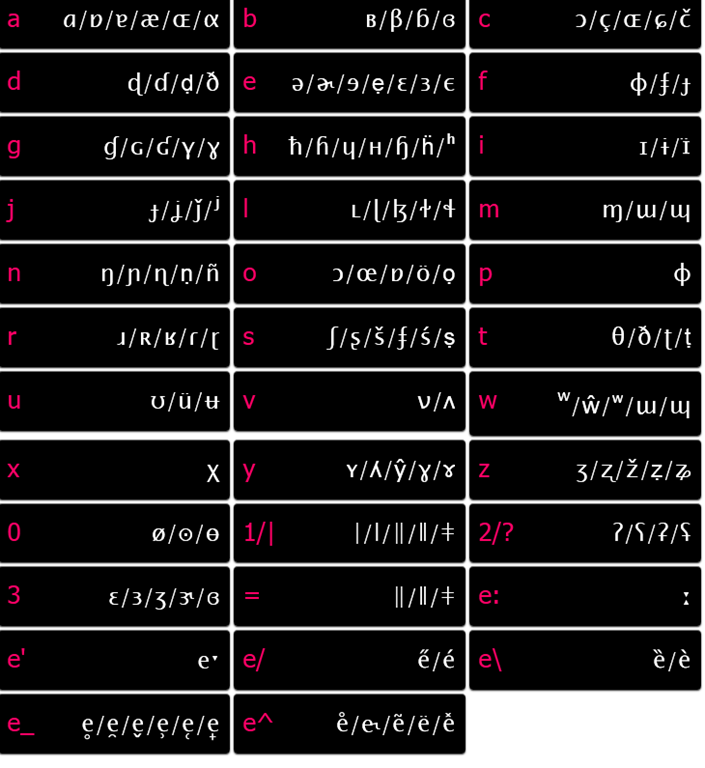
- http://ipa.typeit.org/full/: Other than the English version, the full version includes non-English sounds. The interface is optimized for fast typing (sorted by keyboard key). Presumably better for teachers using a screen projector as a whiteboard.

- i2speak.com (reviewed here earlier):


- Update: Richard Ishida’s seems also impressive,

- and you can use phonetics terminology to get characters selected, like so:

- http://ipa.typeit.org/full/: Other than the English version, the full version includes non-English sounds. The interface is optimized for fast typing (sorted by keyboard key). Presumably better for teachers using a screen projector as a whiteboard.
- http://westonruter.github.com/ipa-chart/keyboard/: Sounds are systematically organized. Suitable for learners, but also good for teacher demonstrations.
- Windows-based:
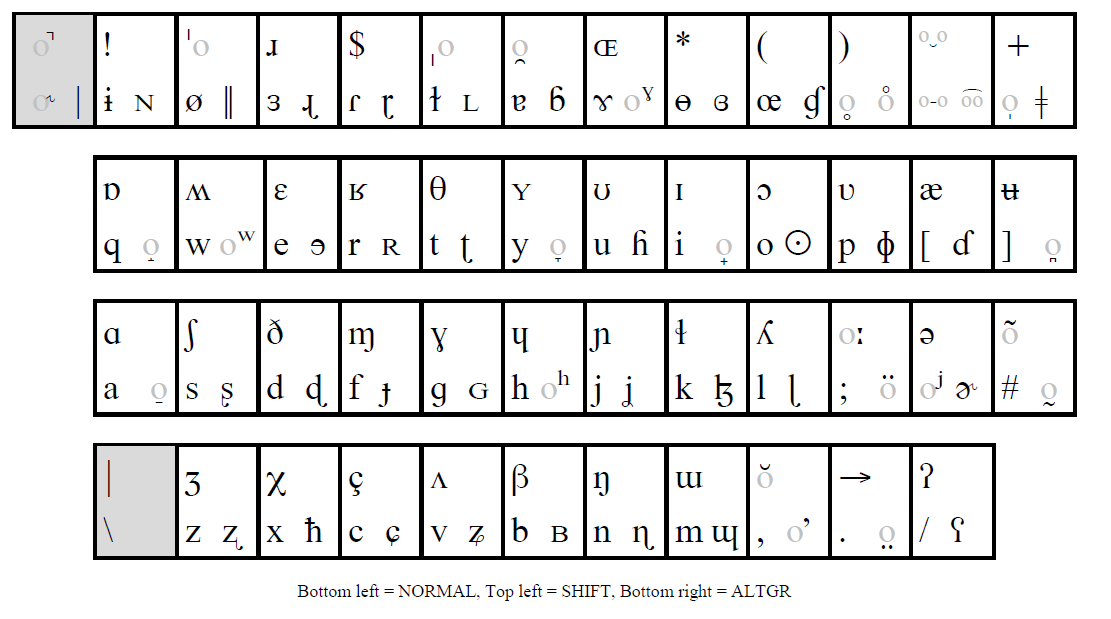
- http://www.phon.ucl.ac.uk/resource/phonetics/: MS-Windows keyboard layout. May be good for even faster typing, if you can memorize the keyboard layout or add keyboard stickers (we unfortunately have too many languages vying for our hardware keyboard space already). Requires download & installation (may be added to the LRC keyboards during next imaging if we receive enough requests).
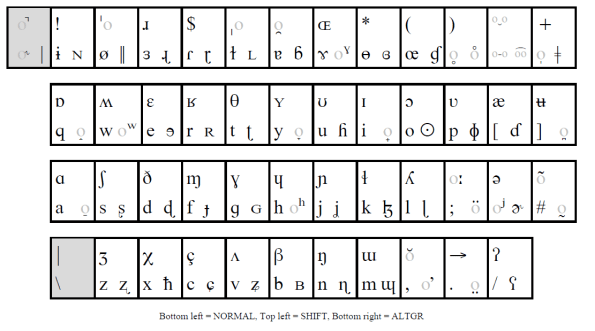
- http://staff.washington.edu/dmontero/IPACharmap/.

- http://sourceforge.net/projects/allchars/: If you are use to the ALT+### method of entering characters and are still on XP, this may be for you: You can generate your own keyboard shortcuts for phonetic characters.
- MS-Word:
- http://email.eva.mpg.de/~bibiko/downloads/uniqoder/uniqoder.html: Allows to select IPA-Symbols from a toolbar. Untested.
- http://www.phon.ucl.ac.uk/resource/phonetics/: MS-Windows keyboard layout. May be good for even faster typing, if you can memorize the keyboard layout or add keyboard stickers (we unfortunately have too many languages vying for our hardware keyboard space already). Requires download & installation (may be added to the LRC keyboards during next imaging if we receive enough requests).
- There are also always X-Sampa and CXS and ASCII-IPA: ways of writing IPA in plain ASCII messages – but yet another thing to teach novices in phonetics may be a bridge too far.




How to create screencasts of student presentations for the language learner ePortfolio in the digital audio lab
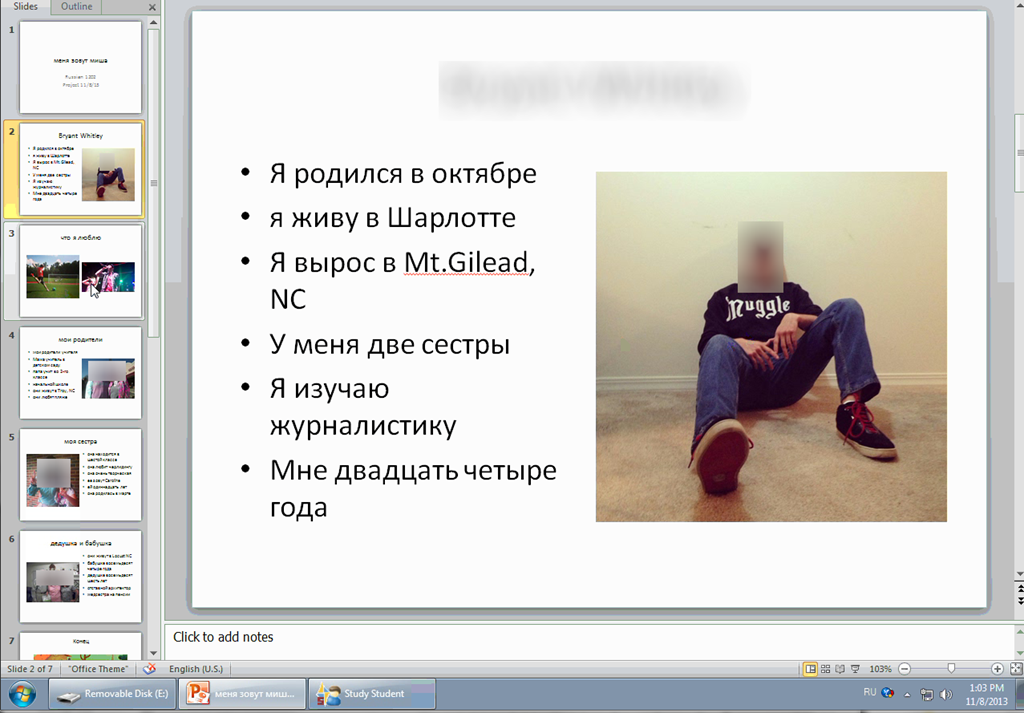
- Students can now easily video-record their own screens during class presentations – not only when using PowerPoint; instead students could demo a website, like their Facebook page.
- Last year, we were limited to PowerPoint’s record slideshow with timing and narration feature, and either send the PPSX (small, but requires the PowerPoint viewer) or the “Save as” video (new in PowerPoint 2010; computing intensive and large file size).
- Now with MS-Community Clips, screencasts are
- minimal effort to create (keyboard shortcut WIN+ALT+R or T; save on desktop; drag/drop into Sanako homework folder)
- and little effort to distribute:
- Students could have uploaded to a Moodle’ file upload assignment (default file size limit: 64MB) or Kaltura file upload assignment (not sure whether there is a size limit). This seems more suitable for assignments with screencasts recordings.
- In this instance
- Sanako collected the Homework files to the Sanako share,
- my langlabemailer emailed them as attachment (so far tested to allow for 25MB attachment size, the equivalent of 7-8 minute screencast, a hefty space to fill in L2! We also established: 45MB is too much…
 ) to the originating student and teacher, for review, grading –
- and – provided it passes muster as an attractive and significant piece – possibly for re-use in the student’s language learner ePortfolio.
- In addition,
- Before the presentations, the teacher easily collaborated on proof-reading the slide decks of individual students, by using the Sanako Remote control screen sharing feature.
- During the presentation, students followed more closely – which seemed to increase their attention and comprehension -, thanks to audio and screen being shared to them from the presenter, using the Sanako’s “Model student” feature.

How to find out whether you have access to your classroom early (e.g. for setup tasks), by using the R25 calendar
- Go to http://calendar.uncc.edu/, and follow these steps:
- (1) switch to view by “locations” instead of (the default) “events”,
- (2) select your building,
- (3) find your classroom,
- (4) see whether it is blocked=booked before your class (hover over the block to see by what) –

- in order to browse to your classroom’s schedule – for example, you could also just (5) search for your classroom.
- Sorry, unlike in the LRC calendars from MS-Exchange, here
- no direct links to your room’s schedule;
- no simple flexible booking, even though there seems to be a need for one-time bookings (AFAIK, I did not venture behind the screen after top menu: “Reservation request” since I do not know how to answer its question).

Proposing for a free Moodle audio recorder: Technical options and faculty needs survey results
- Current popular options for a free Moodle audio recorder:
- Nanogong is a popular, feature-rich and simple recorder that go entangled in the recent java politics and security scares. Since the company has a non-free offering, chances are higher it will get updated to address these security warnings. It seems the long-term outlook for java in the enterprise is excellent, but i cannot judge the long term outlook for java as a client/in-browse solution.
- Poodle which played the 2nd fiddle to Nanogong for most of the time, seems to have caught up to Nanogong based on the above. that it is "server based" – but on theirs, not ours – Poodle has a freemium business model (could be an issue). Does this include the audio compression load? Does this have FERPA implications (and can they be resolved like with Kaltura)?
- Paul Nicholls has a number of flash-based popular audio recorder plugins , where record assignment submission seems to have superseded record assignment type for newer versions of Moodle, and assignment type offers student recording, while Record Audio repository complements this with teacher recording (and the same interface; i am not sure i understand which end user setup is required for repository).
- In the results of faculty survey on learning needs (sum of 0-centered Likert-scale), I find notable
- that teacher recording is considered almost as vital as student recording, and
- that most faculty even would be willing to deal with some complexity for the additional learning features that some of these recorders offer (Nanogong especially).
|
Question_text |
Rank |
|
It is important that my students can record their speech in my Moodle course (without need for separate software and file upload). |
14 |
|
It is important that the setup work that the teacher has to do before being able to assign audio recorder is minimal. |
13 |
|
It is that the teacher can record her voice in Moodle (without need for separate software and file upload), providing oral instead of written cues or feedback. |
11 |
|
Simplicity is more important to me than feature richness (controlling volume, limiting the amount of time a student can record, maximum number of recordings, Recordings can be slowed down or sped up , Peer review of recordings). |
7 |
|
I expect my students to have a microphone connected to or built-in to their home computer. |
5 |
|
It is important that other media than audio can be "recorded" (video (outside of Kaltura), webcam snapshots, whiteboard drawings). |
5 |
Best way I found to merge WordPress.com tags
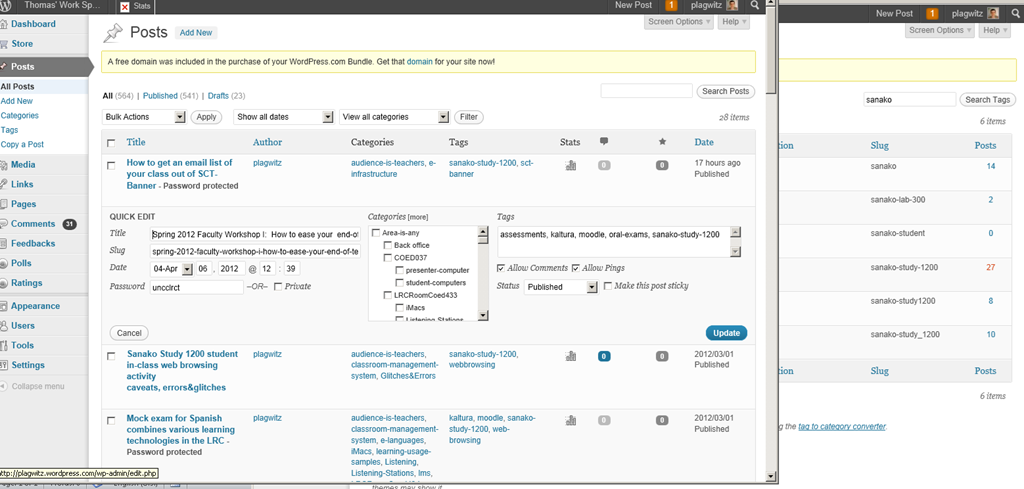
I am talking about merging spurious variant tags into one canonical form. This is a workaround for the fact that you cannot just update when the update could require wordpress.com to merge the article set form the old tag into an existing article set under the new tag. The work around involves accessing the spurious tags from the admin / tags interface (window on the right); then opening the "posts" for each spurious tag in a new window. In the posts window to the left, do the "quick edit". I tried saving myself some deleting in the left window by, after opening the left window, deleting the tag in the right window; but the old tag has already been preloaded for the Quick edit into the left window . Well, Quick edit makes it pretty painless. Is a global search/replace for wordpress.com conceivable? Warning: Don’t hit "Edit" after deleting the tag and try to go back – you will have to hunt for your posts manually.
How to work around “You do not have the permission to view discussions in this forum” in Moodle 2
- Problem: My student staff (not sure which subset, but more than 1) gets this error in a development course that I use as a groupware when they access a news forum (that they are even force-subscribed to).
![image_thumb[12]](https://thomasplagwitz.com/wp-content/uploads/2013/10/image_thumb12_thumb1.png?w=600&h=451 "image_thumb[12]")
![CAM03124_thumb[4]](https://thomasplagwitz.com/wp-content/uploads/2013/10/cam03124_thumb4_thumb.jpg?w=600&h=451 "CAM03124_thumb[4]")
- The answers for “you do not have the permission to view discussions in this forum moodle” can be found here: I actually had to deal with this issue within the last few months. I found that to allow users to see the “News” section on the front page, you must override the role to allow: mod/forum:viewdiscussion
- Do not seem to apply here: In https://moodle2.uncc.edu/admin/roles/permissions.php?contextid=466096, Permitted students are already allowed to “View discussionsmod/forum:viewdiscussion”
- Permitted students should probably have permissions also to “Reply to newsmod/forum:replynews”
![image_thumb[10]](https://thomasplagwitz.com/wp-content/uploads/2013/10/image_thumb10_thumb1.png?w=546&h=1389 "image_thumb[10]")
- Also for one of the student in question (I have spotchecked only 2), I can see no suspicious activity missing:
![image_thumb[7]](https://thomasplagwitz.com/wp-content/uploads/2013/10/image_thumb7_thumb.png?w=375&h=554 "image_thumb[7]")
- Root cause:
- Students have no role in a Moodle2 Development type course .
- Workarounds:
- Assign students a role manually (tedious, and you can only assign “course manager”.
- Change the course type to Project (but then you cannot quiz students).
- Solution: a more flexible design of Project and Development courses in a future version of Moodle?
![image_thumb[12]](https://thomasplagwitz.com/wp-content/uploads/2013/10/image_thumb122.png "image_thumb[12]")
![CAM03124_thumb[4]](https://thomasplagwitz.com/wp-content/uploads/2013/10/cam03124_thumb4.jpg "CAM03124_thumb[4]")
![image_thumb[10]](https://thomasplagwitz.com/wp-content/uploads/2013/10/image_thumb102.png "image_thumb[10]")
![image_thumb[7]](https://thomasplagwitz.com/wp-content/uploads/2013/10/image_thumb71.png "image_thumb[7]")
How to upload a folder with many files in Moodle 2–the ultimate training
- …using animated .gifs. Different speed? 0.25sec,0.5sec, 0.75sec, 1sec, , 2sec, 3sec, 4sec, 5sec, 6sec, 7sec, 8sec, 9sec, 10sec. 1.5sec

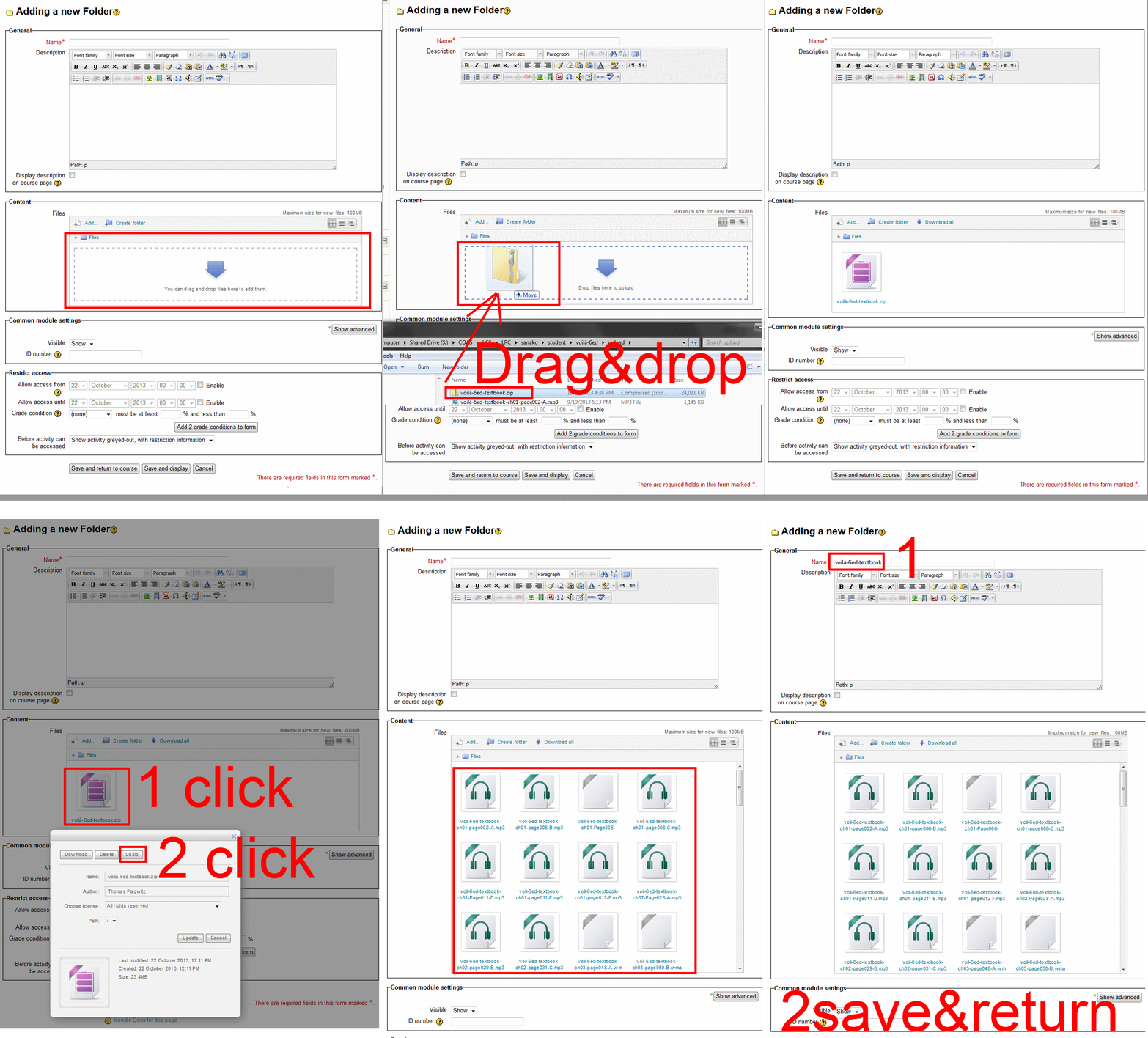
- And the answer is: You now can simply drag-and-drop a zip file (provided you are using a recent web browser). Start with “Turn editing on”, “Add resource”, “Folder”, and then proceed like so:
- Easy enough, but you can still save time: If your folder is reusable not only between terms, but also teachers (sections etc.), I suggest doing this in our Moodle metacourses (once).
- If you want to use an existing instead of adding a new folder, a slightly different way to manage your multiple files upload in Moodle 2 is described here.


Questions? Read the About. Or just ask me a quick Our Databases: Resources with calendars -- Language learning material Moodle Sites, multimedia files -- films


FAQs for LRC student staff or for students or for teachers. To search our FAQs, in the browser addressbar, add after "https://plagwitz.wordpress.com/feed/?tag=faqs+/" "+TAG1" (from tag cloud below) OR "https://plagwitz.wordpress.com/feed/tag=faqs
&category_name=" "CAT1" (from category hierarchy below). OR search both categories and tags, and multiple TAGs/CATs (connect with "," for OR-search, with "+" for AND-search), like so: https://plagwitz.wordpress.com/feed/?tag=TAG1+TAG2+...TAGn&category_name=CAT1
+CAT2+...CATn"
Other ways to find help
If you cannot find it here, look there: 5,500 Language-Learning Links and Programs for learning or teaching 150 languages
Shortcuts:Our Lists, Our Maps, LRC Staff Moodle Site,LRC Project Moodle Site, 49erexpress, UNCC Moodle, Student Recordings: s:claslcslrcsanakostudent
Learning usage samples: Sanako oral exam, Kaltura webcam presentation, Dictation with speech recognition, Sanako written exam, Chinese and Japanese interactive stroke-order practice
Test the Sanako Installer, Webbrowser Popup Konfigurator for XP, or Windows7, faster LRC TeacherPC Log-in Let MS facilitate diacritics writing by installing for you US-International keyboard layout
This is my personal blog (Google+). The views expressed on these pages are mine alone and not those of my employer. The information in this weblog is provided “AS IS” with no warranties, and confers no rights.
 Thomas' Work Space