Archive
Archive for the ‘audience-is-teachers’ Category
How a teacher can use Sanako voice insert to easily add spoken comments to students’ Sanako oral proficiency exams
2012/04/25
Leave a comment
- All other things equal (given a limited amount of time), teachers can provide more and better corrective feedback on student oral proficiency recordings if, during their grading, they could easily insert their own oral comments into the students’ recordings (delivered as MP3 files to teachers’ desktops after Sanako oral exams).
- Both the Sanako Tutor and Student Player have a voice insert mode that is much easier and quicker to use than (albeit not free as) editing the student audio in Audacity (which we still recommend for bare-bone viewing/listening because of Audacity’s capability of loading and displaying multiple tracks simultaneously).
- Fortunately, Sanako tutor/student player are available on the teacher/student station PCs in the LRC (the latter’s insert function is available when the PC connected to the running Sanako Tutor on the teacher station).
- How easy and fast is it to use this? As you can see in this demo screencast on how to use Sanako voice insert to add spoken comments into your students’ Sanako oral exams
 , voice insert only requires:
 - a click on the voice insert button in the center, whenever a user wants to speak during listening,
- and, from the top left menu, a “file”/ “save as” at the end.
- In a next step – not only during the grading process –, how easy is it to distribute student recordings made with Sanako to students? That is TBA:a different story.
LRC Workshop Demand Survey Results
2012/04/24
Leave a comment
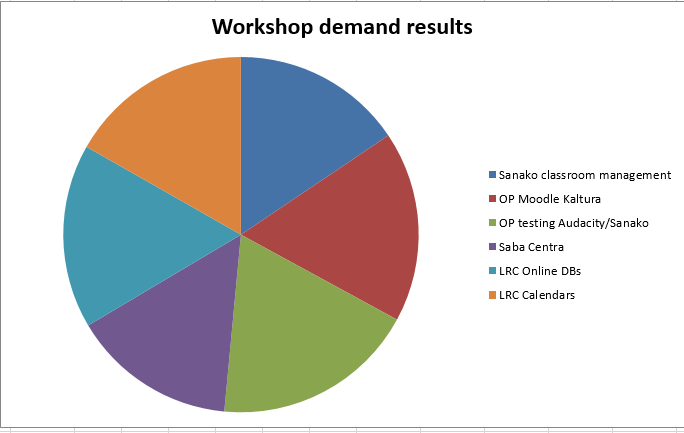
7 responded, 1 commented. OP=Oral Proficiency.
Categories: audience-is-teachers, Charts, e-infrastructure, e-languages, e-learning, Media, Polls, Visualizations, workshops
audacity, calendaring, kaltura, moodle, saba-centra
Protected: Sanako Study 1200 Final oral exam for advanced Business Spanish: A Job interview
2012/04/19
Enter your password to view comments.
Categories: Advanced, Arabic, audience-is-teachers, classroom-management-system, English, Farsi, French, German, Greek (modern), Hindi, Italian, Japanese, Korean, learning-usage-samples, Listening, LRCRoomCoed434, Mandarin, multimedia-recording, Photos, Polish, Portuguese, Presenter-Computer, Russian, Screencasts, Spanish, Speaking, step-by-step-guides, Student-Computers, Swahili, Videos, Yoruba
oral-exams, sanako-study-1200
Sanako Study 1200 controlled web browsing–strict policy
2012/04/18
Leave a comment
- View an
 80-seconds screencast showing how a teacher can set up a student activity where students are only allowed to access on web site.
 - In this example, the website is a common dictionary: http://www.dict.cc which the student will be allowed to access during an exam (in lieu of a paper dictionary policy).
- Never mind that the voiceover is partially in German – the video should be self-explanatory. If not, here is a written step-by-step on Sanako controlled webbrowsing.
Final Cut Pro Introduction
2012/04/13
Leave a comment
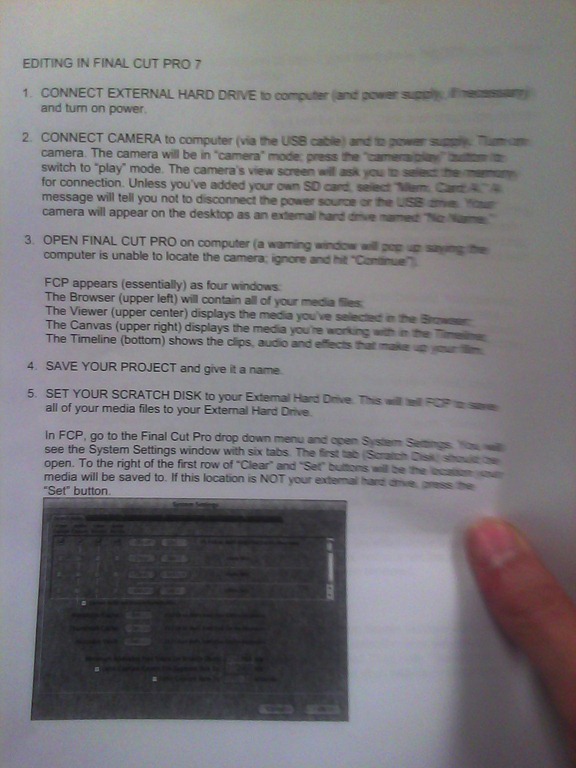
(A handout from the Film Studies program – click on photo for larger view)


Humanities and Technology Unconference @davidson.edu on 5/5/2012 (register by 4/15/2012)
2012/04/12
Leave a comment
- THATCampPiedmont, hosted at Davidson College, announces:
- “THATCamp stands for “The Humanities and Technology Camp.” It’s an unconference: an open, inexpensive meeting where humanists and technologists of all skill levels learn and build together in sessions proposed on the spot.
- If you’re interested in the Humanities; or,
- if you’ve just begun thinking about your research or teaching in conjunction with technology; or,
- if you’re accomplished using or interpreting technology; or,
- if you’ve been wondering why the digital humanities have been garnering so much attention at professional conventions…
- …you will likely find it fascinating to participate in the THATCamp we are hosting here.
- Participants meet the morning of the event and decide what to talk about.”
- Limit: 75 registrations.
Categories: announcements, audience-is-students, audience-is-teachers
thatcamp


Questions? Read the About. Or just ask me a quick Our Databases: Resources with calendars -- Language learning material Moodle Sites, multimedia files -- films


FAQs for LRC student staff or for students or for teachers. To search our FAQs, in the browser addressbar, add after "https://plagwitz.wordpress.com/feed/?tag=faqs+/" "+TAG1" (from tag cloud below) OR "https://plagwitz.wordpress.com/feed/tag=faqs
&category_name=" "CAT1" (from category hierarchy below). OR search both categories and tags, and multiple TAGs/CATs (connect with "," for OR-search, with "+" for AND-search), like so: https://plagwitz.wordpress.com/feed/?tag=TAG1+TAG2+...TAGn&category_name=CAT1
+CAT2+...CATn"
Other ways to find help
If you cannot find it here, look there: 5,500 Language-Learning Links and Programs for learning or teaching 150 languages
Shortcuts:Our Lists, Our Maps, LRC Staff Moodle Site,LRC Project Moodle Site, 49erexpress, UNCC Moodle, Student Recordings: s:claslcslrcsanakostudent
Learning usage samples: Sanako oral exam, Kaltura webcam presentation, Dictation with speech recognition, Sanako written exam, Chinese and Japanese interactive stroke-order practice
Test the Sanako Installer, Webbrowser Popup Konfigurator for XP, or Windows7, faster LRC TeacherPC Log-in Let MS facilitate diacritics writing by installing for you US-International keyboard layout
This is my personal blog (Google+). The views expressed on these pages are mine alone and not those of my employer. The information in this weblog is provided “AS IS” with no warranties, and confers no rights.
 Thomas' Work Space