Archive
Room and Equipment handling using MS-Exchange Resource Mailboxes: Configuration with OWA instead of PowerShell
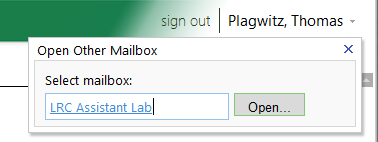
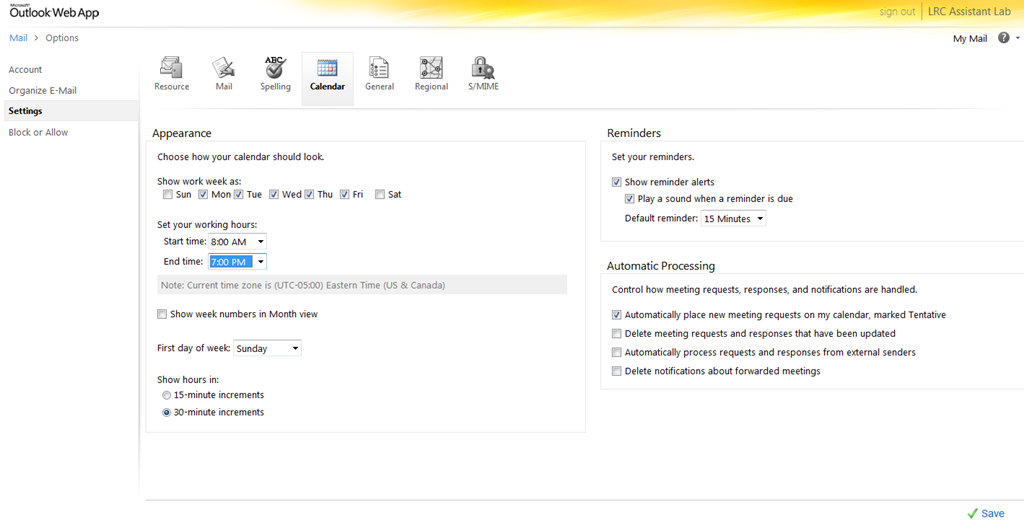
- As once can easily find documented for MS-Exchange 2007, if you are the owner of the mailbox, you can use the OWA-feature “open other mailbox”.

- As impersonated user for this mailbox
 , you can access the “Options / Settings”:
 - for the “resource” scheduling
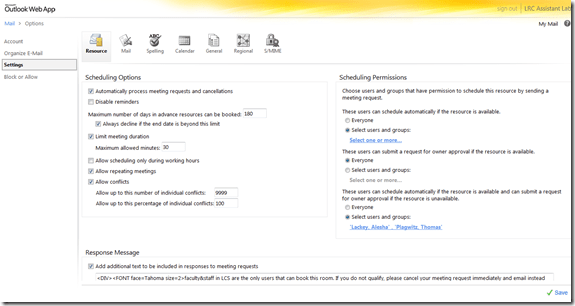
- for its “calendar”

- This is maybe not as much fun as PowerShell’s Set-MailboxCalendarSettings and set-CalendarProcessing (click as you go, no batching), but easier on your MS-Exchange admin
 and especially practical for quick modifications and tests,

Room and Equipment handling using MS-Exchange Resource Mailboxes: What the parameter AddNewRequestsTentatively means
-
It is an instruction to the calendarattendant, that seems to be conjured up by automateprocessing: autoupdate, but also, now together with, but still separate from, the resource booking assistant, by automateprocessing: autoaccept
-
It is an instruction relating only to meeting requests, not to meetings. But it is not the calendarattendant, but rather the resource booking assistant that decides what is to remain a request and what not (= what is to be accepted or denied, and thus to stop being a mere request and be promoted to a meeting). if there are no (mere) requests (since all requests, for whatever other settings, are either auto-accepted or auto-denied, so effectively automatically rendered into non-(not anymore) requests, the AddNewRequestsTentatively will have no effect on the calendar. It is these other settings, that may allow requests to remain requests. Even though the parameter name may sound like it is doing this, it is NOT AddNewRequestsTentatively that will turn off/override these other settings to make all incoming requests remain requests. It is rather automateprocessing: autoupdate (or a combination of automateprocessing: autoaccept and allbookinpolicy: $false and Allrequestinpolicy: $true (and even more so AllRequestOutOfPolicy: $true) that would do that.
-
However, the latter is the combination if have for pseudo-rooms where it is important that the delegate can collate requests in a calendar-format when deciding which to accept/deny, instead of having to cobble together a picture from forwarded meeting request messages.
-
Organizer can make a request (out of policy: maxduration), and it appears on the organizers calendar
![outlook test AddNewRequestsTentatively true automateprocessing not autoupdate maxduration outfofpolicy lrc calendar this looks tentative_thumb[1]](https://thomasplagwitz.com/wp-content/uploads/2011/08/outlook-test-addnewrequeststentatively-true-automateprocessing-not-autoupdate-maxduration-outfo3.png?w=141&h=39 "outlook test AddNewRequestsTentatively true automateprocessing not autoupdate maxduration outfofpolicy lrc calendar this looks tentative_thumb[1]")
-
It appears on the room calendar for the delegate as tentative
![owa test AddNewRequestsTentatively true automateprocessing not autoupdate maxduration outfofpolicy lrc calendar this looks not tentative_thumb[1]](https://thomasplagwitz.com/wp-content/uploads/2011/08/owa-test-addnewrequeststentatively-true-automateprocessing-not-autoupdate-maxduration-outfofpol3.png?w=142&h=55 "owa test AddNewRequestsTentatively true automateprocessing not autoupdate maxduration outfofpolicy lrc calendar this looks not tentative_thumb[1]")
-
It appears in the scheduling assistant as tentative, for others to see
![owa test AddNewRequestsTentatively true scheduling assistant _thumb[1]](https://thomasplagwitz.com/wp-content/uploads/2011/08/owa-test-addnewrequeststentatively-true-scheduling-assistant-_thumb1_thumb.png?w=244&h=94 "owa test AddNewRequestsTentatively true scheduling assistant _thumb[1]")
![outlook test AddNewRequestsTentatively true automateprocessing not autoupdate maxduration outfofpolicy lrc calendar this looks tentative_thumb[1]](https://thomasplagwitz.com/wp-content/uploads/2011/08/outlook-test-addnewrequeststentatively-true-automateprocessing-not-autoupdate-maxduration-outfo2.png "outlook test AddNewRequestsTentatively true automateprocessing not autoupdate maxduration outfofpolicy lrc calendar this looks tentative_thumb[1]")
![owa test AddNewRequestsTentatively true automateprocessing not autoupdate maxduration outfofpolicy lrc calendar this looks not tentative_thumb[1]](https://thomasplagwitz.com/wp-content/uploads/2011/08/owa-test-addnewrequeststentatively-true-automateprocessing-not-autoupdate-maxduration-outfofpol2.png "owa test AddNewRequestsTentatively true automateprocessing not autoupdate maxduration outfofpolicy lrc calendar this looks not tentative_thumb[1]")
![owa test AddNewRequestsTentatively true scheduling assistant _thumb[1]](https://thomasplagwitz.com/wp-content/uploads/2011/08/owa-test-addnewrequeststentatively-true-scheduling-assistant-_thumb1.png "owa test AddNewRequestsTentatively true scheduling assistant _thumb[1]")
Room and Equipment handling using MS-Exchange Resource Mailboxes: What the parameter AllowConflict means
-
NOT TRUE HERE? More info here, search “AllowConflicts”.
-
Is required for a practically very desirable feature in handling of recurring meeting requests: A conflict exception still allows the basic recurrent meeting go through I found a helpful flowchart
 , see bottom left for effect of Allowconflicts.
 -
what will the effect be on non-recurring meeting requests? Will conflict in.stances (there are only instances with non-recurring meeting requests) still be denied? From the flowchart and when allowconflicts comes into play (only after automateprocessing: autoaccept (it does not come into play with automateprocessing:autoupdate) immediately before thresholds ) and that it still does not allow actual conflicts, it appears to me that allowconflicts should have been called “allow-a-recurring-meeting-request-to-be-not-outright-denied-if-it-has-conflict-instances-that-have-to-be-denied-(always-by-the-autoaccept-agent)-as-long-as-not-the-ConflictPercentageAllowed-and-MaximumConflictInstances-numbers-are-also-exceeded”. it was, however, with good reason not called: “allowdoublebooking” J
- That much about the theory. Now the Test results for AllowConflicts $true
-
What works: Allowconflicts does not prompt the autoprocessing: autoaccept (calendar booking assistant) to allow actual conflict instances (double bookings)) from recurring meeting requests.
-
What does not seem to work, but is not important right now: thresholds for conflict amounts are ignored, even if both are crossed
-
MaximumConflictInstances= 5
-
ConflictPercentageAllowed= 25% guides the calendar booking assistant in deciding whether a recurring meeting request gets
-
(10 conflict instances out of 20) still get accepted,
-
-
Room and Equipment handling using MS-Exchange Resource Mailboxes with Autoprocessing: AutoAccept and ForwardtoDelegates
- Autoprocessing: AutoAccept automates managing (blocking, sharing information on the block, unblocking) resources for users (those that can BookInPolicy, or AllBookInPolicy).
- At least as long as the policies that resource mailboxes allow you to define and the user groups that can be and have been set up in your MS-Exchange environment.
- AdditionalResponse can aid in avoiding some of the problems, if the requesters collaborate.
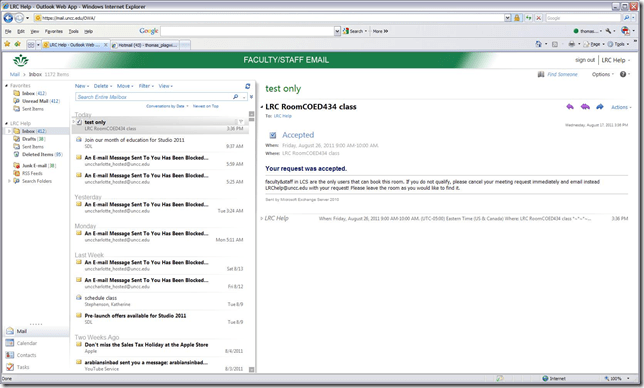
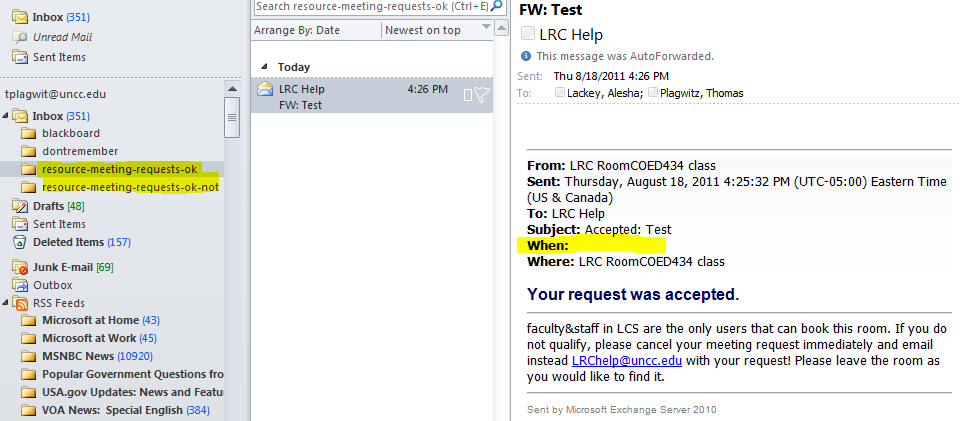
- Here is an example of an automated autoaccept message with an additional response:
- Forwardtodelegates
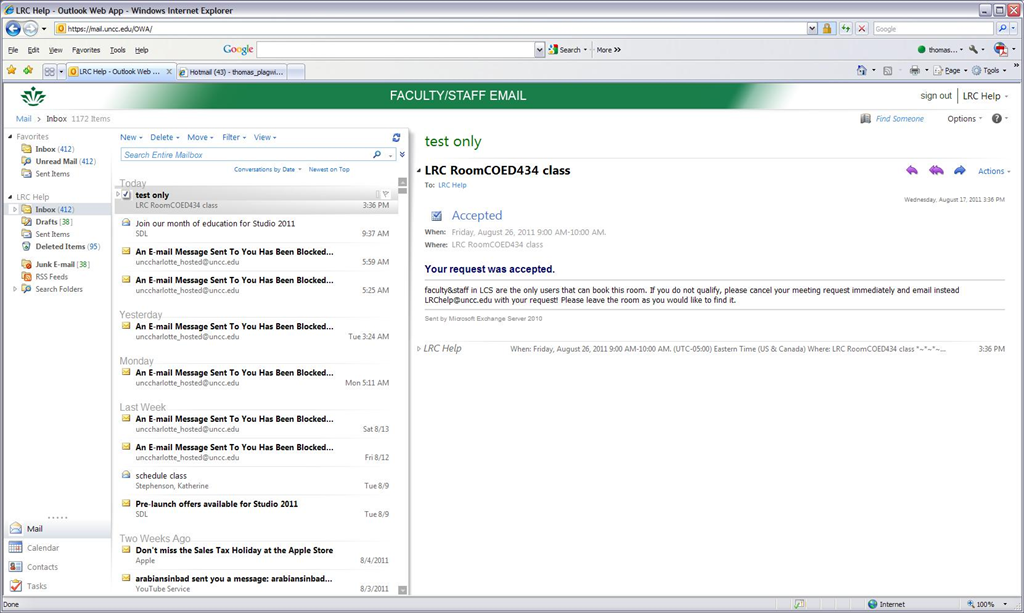
- forwards requests, saving delegates the effort to monitor the resource mailbox and calendar, like so:

- Not only that, it seems to also forward accepted requests, useful for creating a paper-trail, e.g. for future reporting needs (Q:can the entire history of a request, including all changes be monitored this way?).

- This forwardtodelegates seems to work reliably, and you can filter notifications with a rule into the “digital paper-trail” folder:

- I notice a few gotchas with forwardtodelegates , however:
- Not all requesters will have their requests forwarded: If your requester is a delegate, or her account even only linked to that of a delegate, it seems no notification message is forwarded to delegates (at least for in-policy requests).
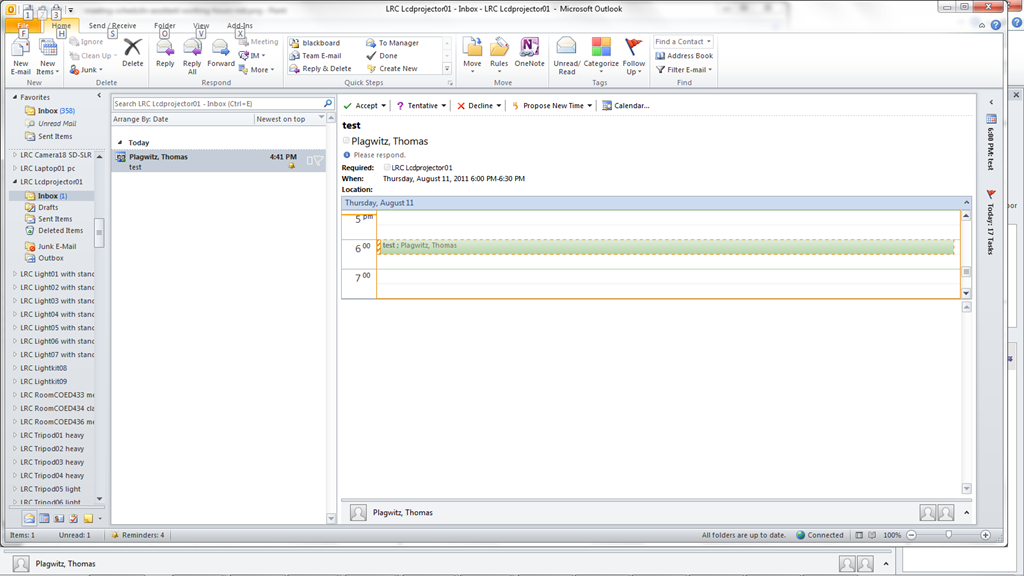
- As you can see in the above screenshots, the forwardtodelegates seems to omit meeting time requested (bug?) which you can track down by opening the calendar of the resource and search for the the meeting title, both of which are included in the notification message.
- forwards requests, saving delegates the effort to monitor the resource mailbox and calendar, like so:

Moodle metacourses, part II: The technology
One of the most missed business requirements for a LMS in version 1 of Moodle has been lack of support for sharing files across courses. This has been addressed by the e-Repository API in version 2 of Moodle, which, however, we will not have in the foreseeable future. In version 1, metacourses have been the most widely used workaround.
The technical concept behind a metacourse in Moodle seems to be best described like so: “A child course gives its [student - TBA:teachers need to be added manually, but fortunately do not change as frequently as students] enrolments [= access to] to the parent course” or meta course, which has no enrolment of its own. In practice, this can go either way: Using metacourses, one can “populate many [meta]courses [= building blocks of content (e.g. chapters, weeks, can even be separate, but required courses with different teachers – TBA: then exclude the teacher role from being added with enrolments, in Admin/Users/User Policies , flexibly combinable to make up a specific version of your regular course] from one enrollment or one [meta]course from many enrollments [= many sectional regular courses that need access to the same content]”. Either assign to many metacourses [= building blocks] 1 child course each, or vice versa assign 1 metacourse many child courses [=sectional regular courses].
For base Moodle version 1.9 administration information, simply watch the first half-minute of this screencast, or read this extract from the Moodle documentation:
“To change a course to a meta course, set "Is this a meta course?" question to yes in the course settings.”

(Note that this option will disappear as soon as the course has an enrolment!)

In your metacourse “you can link [=”associate”] to or unlink from (add or delete) "child" courses by the course Administration menu. This icon and link only appears in meta courses: “

How to make a metacourse visible: “Making a metacourse visible before the metacourse is properly setup can cause Moodle to return ‘This course does not allow public access'(…) Verify that the linked "child" course(s) exists. “
Note: Metacourses may be set to inactive and unavailable to enrolled students until the teacher activates the metacourse.
Note: It takes some time for the meta-enrollment to apply (time depends on the setting for the cron-job).
How to handle metacourse teacher role enrollments: Certain roles can be excluded from being passed on as enrollment from child courses to metacourses. For our shared resource courses, this does not make sense (in the contrary, since any teacher from the child course may want to manage resources contained in the metacourses – this does not to be coordinated between teachers of similar child courses.).
TBA: How to handle metacourse enrollments across terms: Our metacourse shells will stay across the term, while enrollment will be automatically dropped with the child courses “going out of scope”.
Language Lab Web Portal, University of Michigan – Dearborn
For lack of even an LMS – which in post-secondary language lab environments in the US in the “noughties” commonly has had to double as CMS and Groupware -, the lab web portal in the post title had to fulfill many functions.
While the technically most advanced features probably was full text search against both database and file system (uploaded documents) – which I could relatively easily implement thanks to MS-SQL-Server and a limited number of database tables –, I liked best the collaborative building of a bank of language learning exercises using authentic materials, i.e. interactive websites from the target culture.
A few sample illustrations of the use in both language lab and affiliated computerized classrooms you can see here:




The list below links to a series screencasts of the Language Lab Web Portal that I made for training and demonstration purposes. They show the language lab web portal software in action:




Questions? Read the About. Or just ask me a quick Our Databases: Resources with calendars -- Language learning material Moodle Sites, multimedia files -- films


FAQs for LRC student staff or for students or for teachers. To search our FAQs, in the browser addressbar, add after "https://plagwitz.wordpress.com/feed/?tag=faqs+/" "+TAG1" (from tag cloud below) OR "https://plagwitz.wordpress.com/feed/tag=faqs
&category_name=" "CAT1" (from category hierarchy below). OR search both categories and tags, and multiple TAGs/CATs (connect with "," for OR-search, with "+" for AND-search), like so: https://plagwitz.wordpress.com/feed/?tag=TAG1+TAG2+...TAGn&category_name=CAT1
+CAT2+...CATn"
Other ways to find help
If you cannot find it here, look there: 5,500 Language-Learning Links and Programs for learning or teaching 150 languages
Shortcuts:Our Lists, Our Maps, LRC Staff Moodle Site,LRC Project Moodle Site, 49erexpress, UNCC Moodle, Student Recordings: s:claslcslrcsanakostudent
Learning usage samples: Sanako oral exam, Kaltura webcam presentation, Dictation with speech recognition, Sanako written exam, Chinese and Japanese interactive stroke-order practice
Test the Sanako Installer, Webbrowser Popup Konfigurator for XP, or Windows7, faster LRC TeacherPC Log-in Let MS facilitate diacritics writing by installing for you US-International keyboard layout
This is my personal blog (Google+). The views expressed on these pages are mine alone and not those of my employer. The information in this weblog is provided “AS IS” with no warranties, and confers no rights.
 Thomas' Work Space