Archive
File renaming utilities
When working with foreign language (learning) digital media files electronic repositories, typical problems include having to:
- adding metadata information to the filename
- handling of foreign language characters in filenames across operating and file systems, including code pages
A good file renaming utility can work wonders in such situations.
I have been using the excellent BRU (Bulk rename utility) for a while, and always liked its flexibility – which is apparent from in its (initially somewhat intimidating) UI:

Now I found to my surprise, and confirmed with the help of the support forum, that the foreign language character support is lacking from BRU’s Regular Expression implementation.
Enter Renamer, another file renaming utility, which features a stable and beta version, pdf documentation and a wiki.
As you can see in the following screenshot, Renamer makes it possible, using Unicode character codes in Regular Expressions, to replace e.g. all Mandarin characters in a filename.

Renamer also has in-built support for common tasks like cleaning up filenames by stripping common tags, transliterating foreign alphabets or adding file numbering (serializing).
Both utilities are free and highly recommended, but also see TBA:part II for limitations.
UPDATE:

Keyboards not loading on pc35

Did this PC get out of synch? It was out of sync with the JAVA also.
Configuring UNCC staff (MS-Exchange 10) email on Android 4.1.2


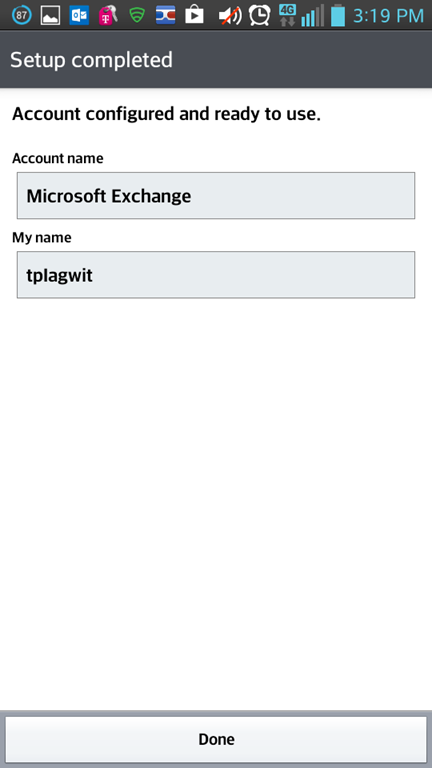

May come in useful not only during initial setup… I had trouble sorting out the webpages addressing different versions, and translating the picture-less instructions, an so have others when they come to the LRC for help. May this help some.
Our Drupal now allows Add to Calendar links.
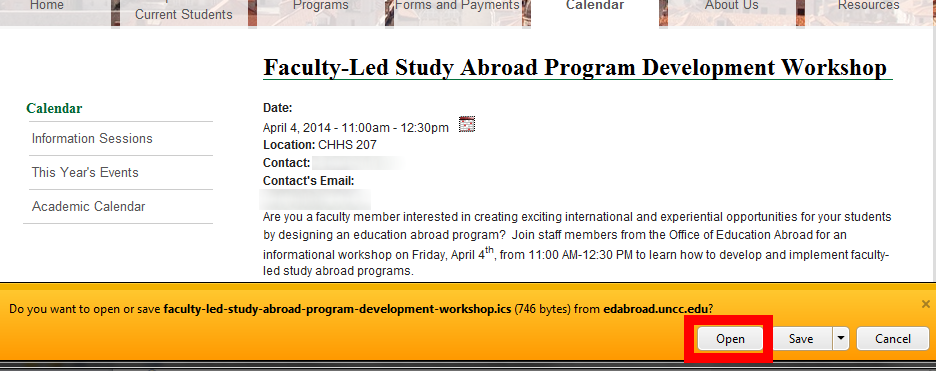
- Neat: Click on the calendar icon at the end of the date line:

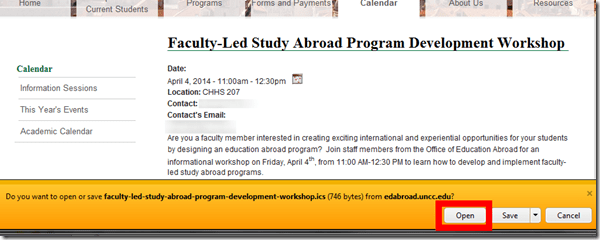
- When prompted, Click open (which will stat your default file association for ICS files, likely MS-Outlook):
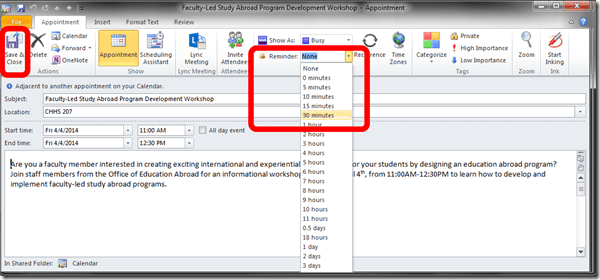
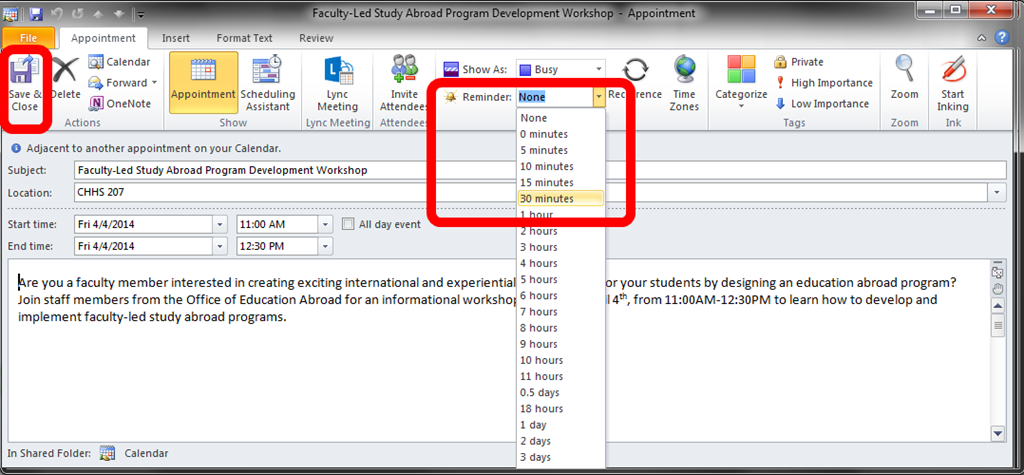
- if necessary, add a suitable reminder, and click””save&close”
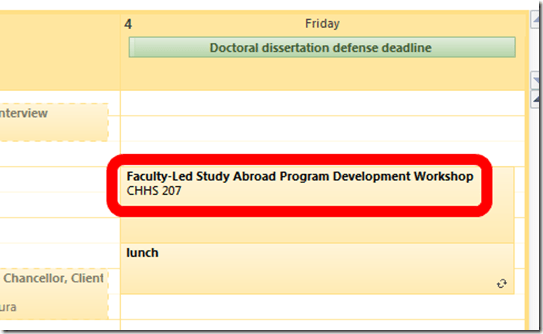
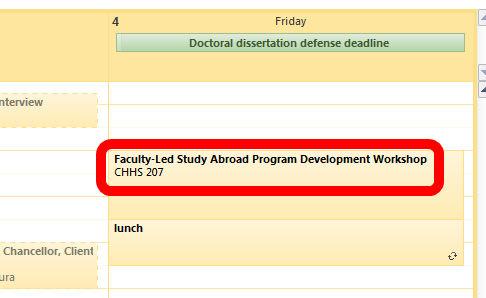
- Your appointment, with location, will be put in your calendar and come alive when you need the reminder(and where, if you connect your other, home and mobile devices to MS-Exchange):
- But as of yet, not everybody seems to be using this handy facility (I find myself manually copying over info into manually created appointments).
- Unfortunately, this is still only a static ICS file, not a subscription which would be automatically updated in your calendar if the originator/organizer changes the schedule.

Why meeting organizers should cancel meetings from their calendar and not by email
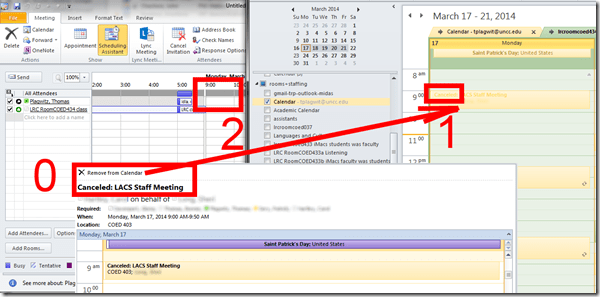
- Because cancelling from the calendar like in video2 here sends the meeting participants not only a (0)message, which includes a handy “Remove from calendar” button,
- but also – in case they fail to see the message – a (1) “Cancelled” indicator on their calendars,
- while third parties who want to schedule a meeting with the meeting participants, see those participants (including an Rooms that “participate”) as (2) free/available during the time slot of the cancelled meeting,
- as you can see in this example:

Windows Live Writer can once again load more than 500 WordPress posts without “Invalid Server Response”
Evidence:

Version (recently updated – thank you! This bug bugged me a lot, I am chatty):Version 2012 (Build 16.4.3522.110). Not sure it is not server-related, but consider upgrading on download.live.com if you still see this error on the metaWeblog.getRecentPosts from XmlRpc server: 


Questions? Read the About. Or just ask me a quick Our Databases: Resources with calendars -- Language learning material Moodle Sites, multimedia files -- films


FAQs for LRC student staff or for students or for teachers. To search our FAQs, in the browser addressbar, add after "https://plagwitz.wordpress.com/feed/?tag=faqs+/" "+TAG1" (from tag cloud below) OR "https://plagwitz.wordpress.com/feed/tag=faqs
&category_name=" "CAT1" (from category hierarchy below). OR search both categories and tags, and multiple TAGs/CATs (connect with "," for OR-search, with "+" for AND-search), like so: https://plagwitz.wordpress.com/feed/?tag=TAG1+TAG2+...TAGn&category_name=CAT1
+CAT2+...CATn"
Other ways to find help
If you cannot find it here, look there: 5,500 Language-Learning Links and Programs for learning or teaching 150 languages
Shortcuts:Our Lists, Our Maps, LRC Staff Moodle Site,LRC Project Moodle Site, 49erexpress, UNCC Moodle, Student Recordings: s:claslcslrcsanakostudent
Learning usage samples: Sanako oral exam, Kaltura webcam presentation, Dictation with speech recognition, Sanako written exam, Chinese and Japanese interactive stroke-order practice
Test the Sanako Installer, Webbrowser Popup Konfigurator for XP, or Windows7, faster LRC TeacherPC Log-in Let MS facilitate diacritics writing by installing for you US-International keyboard layout
This is my personal blog (Google+). The views expressed on these pages are mine alone and not those of my employer. The information in this weblog is provided “AS IS” with no warranties, and confers no rights.
 Thomas' Work Space