Archive
How to reveal your Skydrive/Office online cloud storage URL with SkyDrive Simple Viewer
A useful tool is SkydriveViewer which can reveal the URL of your MS-Office online Skydrive if you provide your Windows Live online credentials:
![skydrivesimpleviewer-url_thumb[1]](https://thomasplagwitz.com/wp-content/uploads/2011/05/skydrivesimpleviewer-url_thumb1.png "skydrivesimpleviewer-url_thumb[1]")
Download it from the SkyDrive Simple Viewer Codeplex site.
How to rip an audio CD in MS-Windows with Windows Media Player
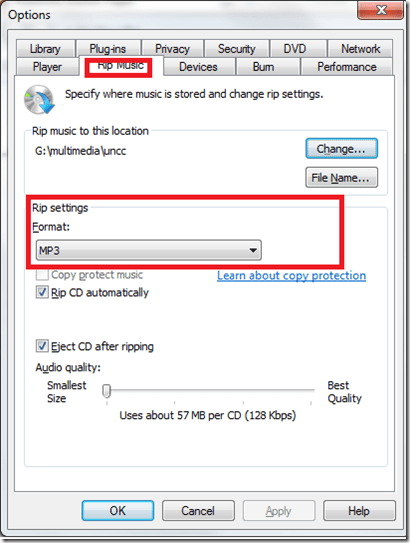
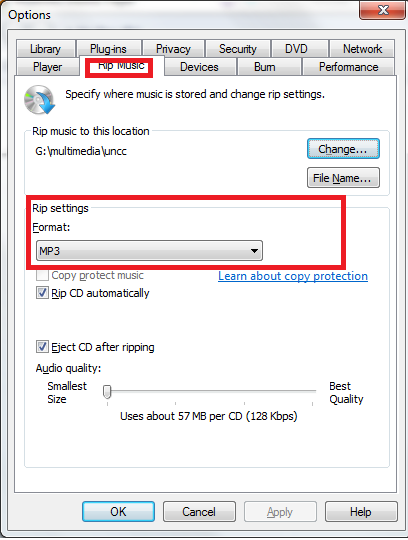
- Windows Media Player has CD-ripping capabilities built-in, WMA-format used to be the only option and is still the default in Windows 7, but can be changed under menu:”tools” / “options”/ tab:”rip music”
Study 1200 Pairing
In the Sanako Lab300, Group conference and Pairing were separate activities in the digital audio lab.
In the Sanako Study1200, pairing (and recording) students is an option under the discussion activity, as you can see here:

Potential Moodle-compatible replacements for Wimba Voice
With the demise of Wimba Voice on campus, Languages and Culture Studies lost some of their online learning acitivities and are still looking for a replacement, perferably within Moodle.
I have looked through some options and would recommend the following applications for a test install:
1. NanoGong, free (as in kittens). More info here:
2. WebSwami, a language learning platform, not free, and can also record video, and do much more. More info here:
Introduction of NanoGong, free open source voice recorder for Moodle
- This is a brief summary outline of NanoGong (which has just been upgraded to version 4.1, which includes an installation file for our current Moodle version 1.9.8), would be a good audio recording add-on for language learning to install in our Moodle learning system. What follows is compiled from various online sources:
- “NanoGong is an applet that can be used by someone to record, playback and save their voice, in a web page. When the recording is played back the user can speed up or slow down the sound without changing it. The speeded up or slowed down version of the recorded sound can be saved to the user’s hard disk, if he/she wishes
- There are special features for programmers, such as the ability to show or hide parts of the NanoGong interface or to completely control what the applet does.
- The NanoGong applet has been released as an open source project since version 3. The picture below shows the NanoGong applet with all components shown. “
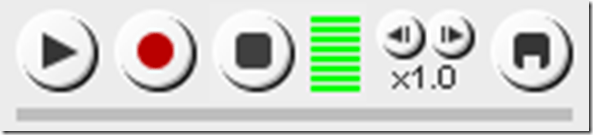
- “NanoGong provides a very simple and transparent voice support for Moodle. Using a NanoGong activity and a NanoGong filter NanoGong provides two different types of voice support for Moodle”:
- “An extended HTML editor which supports voice-enriched content”, “ enabling a voice recording option for virtually any Moodle activity entry that uses the wysiwyg toolbar”, as you can see here:

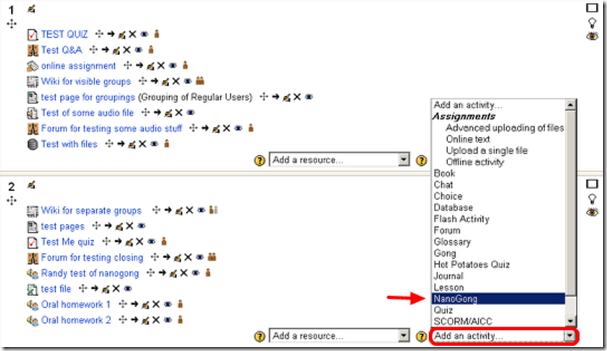
- ”A NanoGong activity which allows students to submit voice messages to their teachers”:
- Questions remain:
- You can customize the recorder applet: Need to check whether this includes the timestretching capability, given that language teachers can be averse to student-controlled,
- Need to check for capability of downloading batches of submissions from the student class and grade it with time-saving techniques, like described here using Audacity. A more sophisticated example that testifies to the same features required to get graders adopt increasing audio student submissions was Web Audio Lab, an authoring system for developing interactive audio-based language courses (Language Resource Center, Cornell University. 2003-2007):

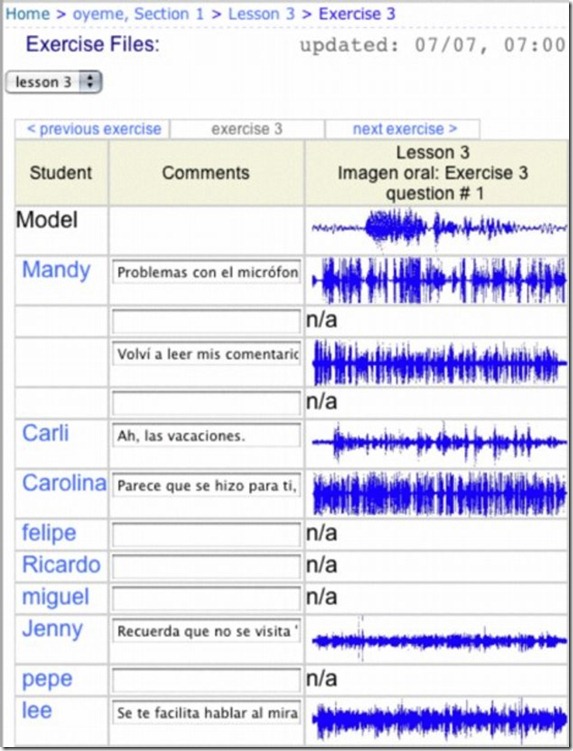
- How could one implement a dual-track recorder using NanoGong, with the program track providing aural cues for a more natural oral interaction?
- Requires JAVA (test compatibility).
- There is no Moodle 2.0 version yet.
- NanoGong seems “a derivative of the Gong standalone voice board” – without similar requirements and issues? Gong can also be integrated into Moodle, seems more advanced, but also much more difficult to implement (requires a tomkat server; problems have been reported with losing course deletion functionality in Moodle, the authentication pass-through not working from Moodle and the audio graph not working in Moodle).
- As with any open source project, there are some move Ifs.
- However, Nanogong seems the free audio recording plug-in for Moodle which is currently most favored.


Moodle: Video Assignment
Kaltura has been integrated into our Moodle system to enable video upload as an assignment type. Teachers can upload videos already now. It seems that students will be able to upload videos starting with the fall term.
Video source can be a webcam which could be interesting for language proficiency assessment, including – if the pieces can be gotten out of Moodle and into an ePortfolio system – to demonstrate longitudinal progression in proficiency.
The videos get stored on the Kaltura servers and redelivered in form of a Flash plug-in – in between happens a transcoding so that results are not available immediately. You can see us waiting for it at the end of this Kaltura video assignment upload screencast demo:
UNCC showed off our use of Kaltura at Educause 2011. You can see example applications quoted in the attached Kaltura use slide deck.
Finally, here is a test and walk-through of an elementary language course homework assignment using Kaltura.
Sanako Study 1200
Study 1200 is the top of the line Sanako language learning product which comes in a number of lesser versions (Study 700, Study 500). You can get a feel for what this product does from this raw video from footage, shot during a vendor demonstration at EUROCALL 2009: Sanako-study-1200-version45-demo-eurocall.AVI. Or search this blog for other examples of using the Study 1200.
LCR Calendars and Scheduling
Obsolete since FALL 2011, instead see here.
LRC scheduling Crunch-time:
Faculty need to schedule exams in the LRC, communicate this to students in a timely manner and avoid conflicts with other LRC events.
While the LRC staff lost editing access to the LRC Website, including its calendar (they underlying software is being upgraded from Joomla to Drupal).
That’s why we roll out our new LRC scheduling service early.
It takes advantage of Outlook Desktop edition (2007 for the PC, 2011 for the MAC) and Outlook Web Access for MS-Exchange 2010 (for faculty/staff), and of the calendar web app of live@edu (for students).
live@edu and Outlook 2011 (MAC) are being introduced by the university over the summer.
Outlook 2007 (PC) faculty and any student who uses a web calendar are already ready to roll.
Faculty/Staff, including LRC permanent staff, can view, add and change LRC bookings directly, and coordinate them with their personal and Moodle class calendars: Read more in “Calendaring: How teachers can reserve and schedule classes in the LRC” (includes path in your Outlook to get to the LRC calendars).
Students, including LRC student staff, can view the LRC bookings from their web calendar. Read more in “Calendaring: How students can view the LRC schedules” (includes web links to LRC calendars)
Here is what you get:



Questions? Read the About. Or just ask me a quick Our Databases: Resources with calendars -- Language learning material Moodle Sites, multimedia files -- films


FAQs for LRC student staff or for students or for teachers. To search our FAQs, in the browser addressbar, add after "https://plagwitz.wordpress.com/feed/?tag=faqs+/" "+TAG1" (from tag cloud below) OR "https://plagwitz.wordpress.com/feed/tag=faqs
&category_name=" "CAT1" (from category hierarchy below). OR search both categories and tags, and multiple TAGs/CATs (connect with "," for OR-search, with "+" for AND-search), like so: https://plagwitz.wordpress.com/feed/?tag=TAG1+TAG2+...TAGn&category_name=CAT1
+CAT2+...CATn"
Other ways to find help
If you cannot find it here, look there: 5,500 Language-Learning Links and Programs for learning or teaching 150 languages
Shortcuts:Our Lists, Our Maps, LRC Staff Moodle Site,LRC Project Moodle Site, 49erexpress, UNCC Moodle, Student Recordings: s:claslcslrcsanakostudent
Learning usage samples: Sanako oral exam, Kaltura webcam presentation, Dictation with speech recognition, Sanako written exam, Chinese and Japanese interactive stroke-order practice
Test the Sanako Installer, Webbrowser Popup Konfigurator for XP, or Windows7, faster LRC TeacherPC Log-in Let MS facilitate diacritics writing by installing for you US-International keyboard layout
This is my personal blog (Google+). The views expressed on these pages are mine alone and not those of my employer. The information in this weblog is provided “AS IS” with no warranties, and confers no rights.
 Thomas' Work Space