Archive
Posts Tagged ‘wordpress’
How to retroactively remove comment option from WordPress posts
2013/10/07
Leave a comment
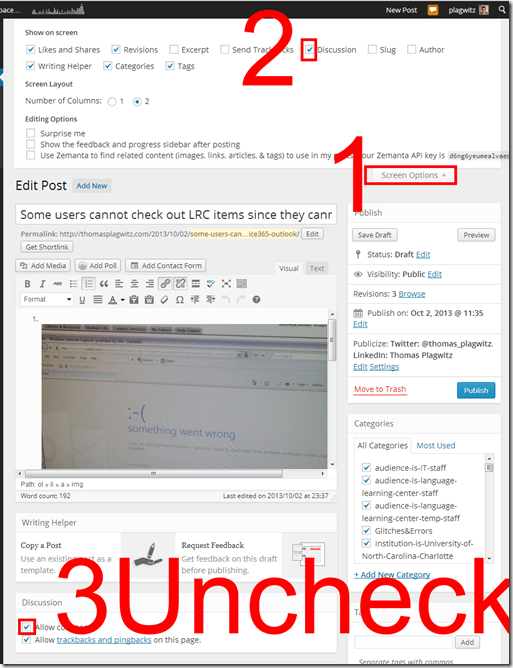
- Unchecking “Allow comments” does not affect past posts (you had better find that out early in your blogging career – I did not …)
- To disable comments for past posts, you have to uncheck “Allow comments”in each one of them.
- To even show “Allow comments” in the post editing interface, do this:

Categories: audience-is-teachers, documentation, e-infrastructure, Screenshots
wordpress
Design options for the departmental WordPress-based website using Widgets and Pages
2013/07/28
Leave a comment
- For layout design:
- Go to http://[yo r site’s URL here]/wp-admin, e.g. http://lrc.unc.edu/wp-admin, and log in (you need site admin privileges , like I have for the LRC site).
- In the left-hand menu, click on “appearance”/ “widgets”
- You should see this:

- to design your right sidebar, follow the instructions on top of the widget list (i.e. drag and drop, then unfold the widget in question by clicking on the down arrow to the right
 to edit the appearance of the site.
- Go to http://[yo r site’s URL here]/wp-admin, e.g. http://lrc.unc.edu/wp-admin, and log in (you need site admin privileges , like I have for the LRC site).
- “Pages”(in the left hand menu)
- are an afterthought in wordpress which was originally based on dated posts (for a diary-like web logs), but can be useful for not time-sensitive , stable areas/sections of your site.
- You can include a bulleted or numbered list which you periodically update manually (click “edit” on the page)
- or, for frequently changing information (like lists of students), you can use a system that may have more initial learning curve, but in the long run makes updating easier
- embed an online spreadsheet from Google Apps or SkyDrive
- or embed an RSS feed like in the above example (if you have an RSS. provider).


How to workaround SkyDrive embed codes not working WordPress.com
2013/06/07
3 comments
- Problem: I cannot seem to get the new embed code that SkyDrive offers now to work on wordpress.com.
- Cause: No idea. Guess somebody did not get the memo? Hope it is not me.

- Workaround:
- Old skydrive embed code still works in wordpress (E.g. https://thomasplagwitz.com/tag/lists+resources/), but is a completely different syntax than what skydrive offers for embedding now (insert office code into [] to try it out):
- office width="750" height="1300" src="http://r.office.microsoft.com/r/rlidExcelEmbed?su=10634757809471938&Fi=SD25C841818181C2!126&kip=1&AllowTyping=True&Item=Table2&wdHideGridlines=True&wdDownloadButton=True"
- However, you can still convert the current embed into the old one:
- by inserting the new parameter values into the old ones:
- "cid" becomes "su" and
- "resid" becomes "Fi" .
- This example successfully embeds into a WordPress.com code now. (insert office code into [] to try it out):
- office width="750" height="1300" src="http://r.office.microsoft.com/r/rlidExcelEmbed?su=4FA3329905D7E1CE&Fi=4FA3329905D7E1CE%2162359&kip=1&AllowTyping=True&Item=Table2&wdHideGridlines=True&wdDownloadButton=True"
- No we seem to have been here before, so we shall see how long this workaround lasts.
How to upload files into WordPress and link them to articles
2013/05/02
Leave a comment
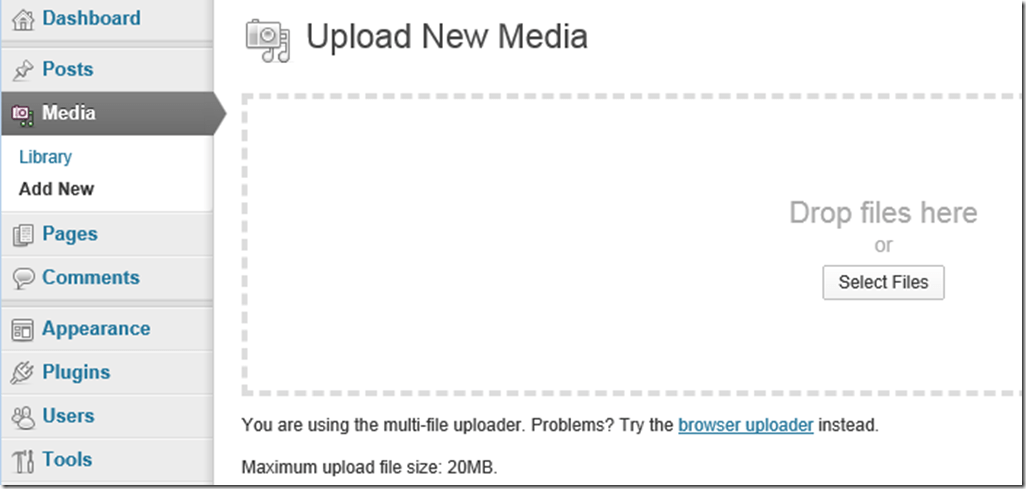
- In the WordPress “Dashboard” (the landing page after you login as WordPress Admin), in the left menu, click menu item : “Media” / “Add New”., and drag&drop (or browse and select them).
-
-
The upload success is visible immediately:
-

-
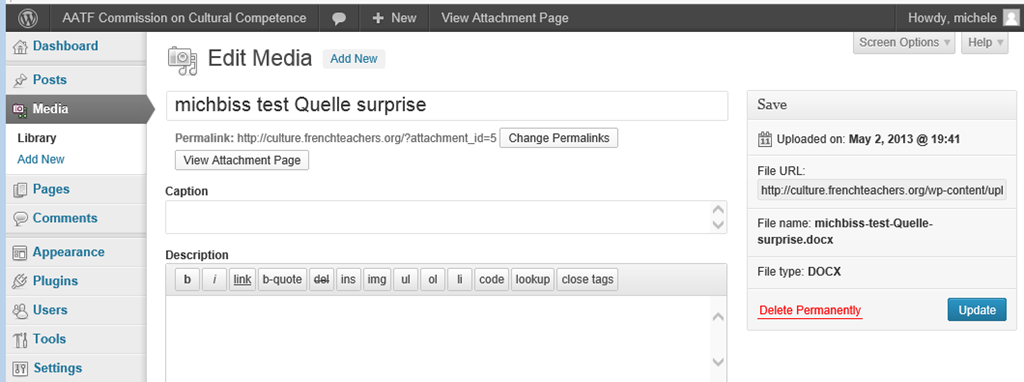
In the media library, after uploading media, on the “edit media”, there is an opportunity for adding metadata to files
-

-
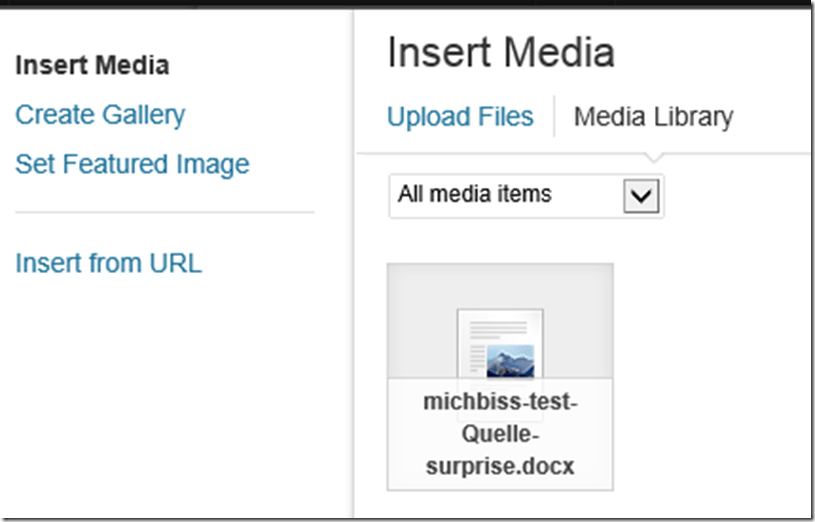
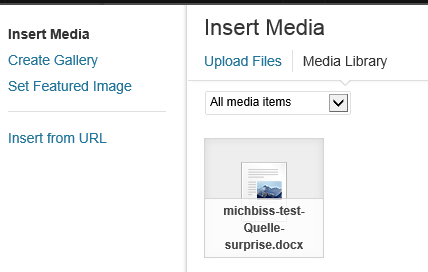
How do you link files from an article? Click on button: “Add media”, and drag&drop files. How about previously uploaded files? Click on button: “Add media”, tab:”media library” (instead of the default tab:”upload files”) , ad find your previously uploaded file in the list.
-


Categories: documentation, e-infrastructure
media-library, uploading, wordpress
SkyDrive Embedding
2012/12/18
Leave a comment
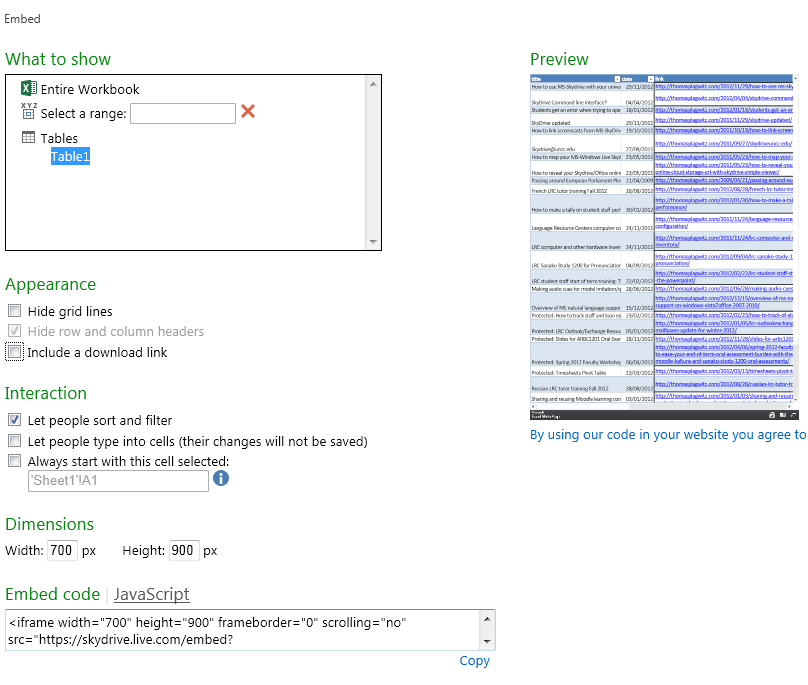
Excel: tab:File/ 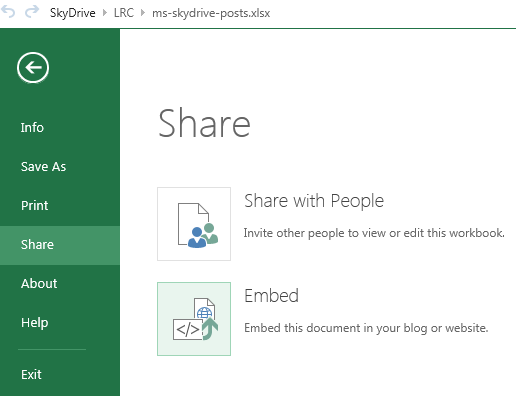
Categories: e-infrastructure
MS-OneDrive, wordpress
Download WordPress blog post overview into Excel table
2012/03/15
Leave a comment
See what I mean:  Downloading and browsing the full content XML is of course more powerful than this.
Categories: blog, documentation, Screencasts, service-is-documenting
MS-Excel, wordpress
How to efficiently find help on this blog
2011/06/10
Leave a comment
- Searching
- Full-text search: quick, even though dumb (“Computers are only machines…”). It may not return the most relevant results.

- Human-curated search: The author adds metadata to his posts as he sees fit. The metadata vocabulary is somewhat stable from past experience, but may change (”The author is only a human.”
 ). You effectively execute a humanly-curated search when clicking in the right column on either
- a tag link, e.g.
 https://plagwitz.wordpress.com/tag/moodle/
 - a category link, e.g.

- a tag link, e.g.
- Humanly-curated and Boolean AND search combined: This can be powerful in drilling down to an answer to a specific problem – provided there is one on the blog.
- Even though there is no easily clickable interface for this, by building URLs in the web browser address bar
 , combining tags or categories with the plus-sign, you can execute an AND-search against multiple tags(or categories) on WordPress.com
 - Example: https://plagwitz.wordpress.com/tag/moodle+erepository/ finds posts that the author related to both Moodle and eRepository. This can be especially useful for searching the FAQs: https://plagwitz.wordpress.com/tag/faq+[add your problem-technology-tag here, e.g. Audacity]/
- Even though there is no easily clickable interface for this, by building URLs in the web browser address bar
- Full-text search: quick, even though dumb (“Computers are only machines…”). It may not return the most relevant results.
- Notifications: Subscribe to RSS-feeds to receive timely updates on the topics that matter most to you. Both
- WordPress.com, providing RSS-feeds for all categories and tags (click on a tag or category link and find the
 icon, it will link to the RSS feed – Example: https://plagwitz.wordpress.com/tag/moodle/feed/) – watch either the webpage or your browser GUI for orange RSS icons you can click on to initiate a subscription -and also for multiple categories/tags (even though this feature is even better hidden, you need to construct a URL in your browser address bar. Example: https://plagwitz.wordpress.com/tag/moodle+erepository/feed/). If you want to go beyond our own metadata, WordPress allows also for subscribing to your own searches via RSS: “To keep up with your favorite search results we offer an RSS feed for all search results. Simply click the Follow this search via RSS link in the side bar of any search results page to subscribe to updates in the search result”, consult the WordPress search documentation.
 - and MS-Outlook, making RSS-subscriptions look familiar like email (of importance in certain environments), greatly facilitate this.
- WordPress.com, providing RSS-feeds for all categories and tags (click on a tag or category link and find the
- Text-messaging: Get synchronous human help through the Moodle-Wimba Room link.


Categories: blog, e-infrastructure, service-is-documenting
categories, FAQs, meta, metadata, rss, searching, tags, text-messaging, wimba-classroom, wordpress


Questions? Read the About. Or just ask me a quick Our Databases: Resources with calendars -- Language learning material Moodle Sites, multimedia files -- films


FAQs for LRC student staff or for students or for teachers. To search our FAQs, in the browser addressbar, add after "https://plagwitz.wordpress.com/feed/?tag=faqs+/" "+TAG1" (from tag cloud below) OR "https://plagwitz.wordpress.com/feed/tag=faqs
&category_name=" "CAT1" (from category hierarchy below). OR search both categories and tags, and multiple TAGs/CATs (connect with "," for OR-search, with "+" for AND-search), like so: https://plagwitz.wordpress.com/feed/?tag=TAG1+TAG2+...TAGn&category_name=CAT1
+CAT2+...CATn"
Other ways to find help
If you cannot find it here, look there: 5,500 Language-Learning Links and Programs for learning or teaching 150 languages
Shortcuts:Our Lists, Our Maps, LRC Staff Moodle Site,LRC Project Moodle Site, 49erexpress, UNCC Moodle, Student Recordings: s:claslcslrcsanakostudent
Learning usage samples: Sanako oral exam, Kaltura webcam presentation, Dictation with speech recognition, Sanako written exam, Chinese and Japanese interactive stroke-order practice
Test the Sanako Installer, Webbrowser Popup Konfigurator for XP, or Windows7, faster LRC TeacherPC Log-in Let MS facilitate diacritics writing by installing for you US-International keyboard layout
This is my personal blog (Google+). The views expressed on these pages are mine alone and not those of my employer. The information in this weblog is provided “AS IS” with no warranties, and confers no rights.
 Thomas' Work Space