Archive
Posts Tagged ‘sanako-slh-07’
Testing and semi-automatically changing the Sanako student audio configuration
2013/12/09
Leave a comment
- Problem
- We have had teacher complaints about too much background noise from neighboring students being recorded in our Sanako Study 1200, with SLH-07 headsets.
- In addition, upon looking through some recordings as samples for a workshop, I found cases of clipping audio, especially in pair recordings.
- We are using the default settings for the Sanako SLH-07 headset. However, the default recording level (67) seems high.
- Solution approach
- We need to test
- many other settings quickly for these recording levels. We use my sanakoaudioconfigonthefly utility for this
- in an acoustically realistic environment: 5 Lab assistants site in tight lab area and read out sample English text during a Sanako reading activity
- Reading practice
- Todo: Pairing
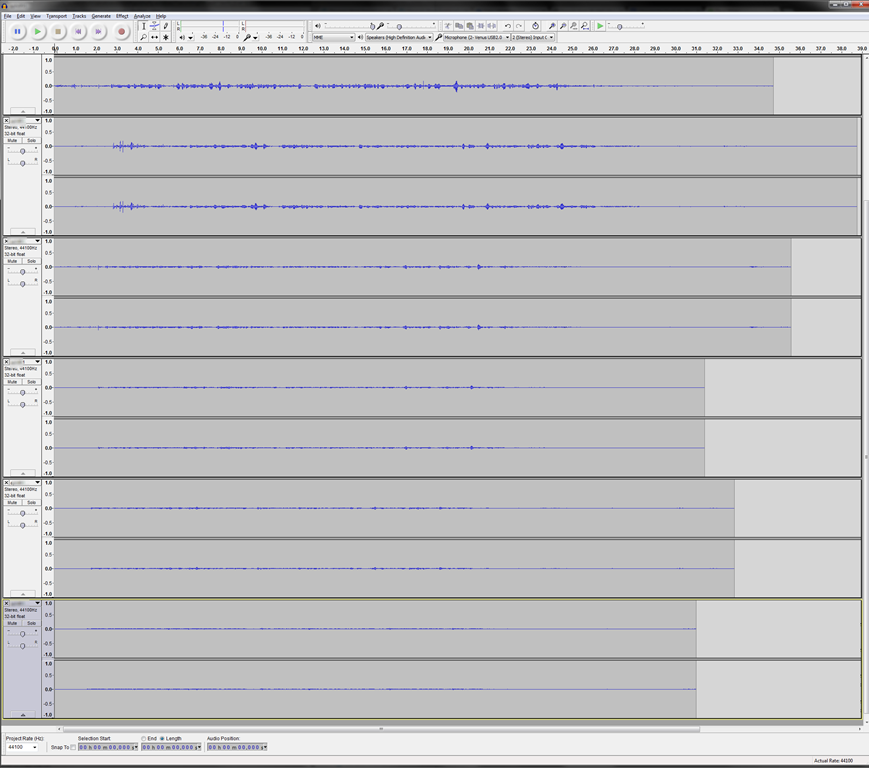
- Here is a “window” into the recorded results set, a student’s audio recording shown in Audacity at various (but all lowered) recording levels from (visible) 30 to 5, you can see the diminishing waveform amplitude.

- The waveform per se is not conclusive. You will have to listen in and compare, especially to evaluate background noise (the original complaint – we have no and will not be able to go back to language lab carrels). The Sanako SLH-07 headset microphones are supposed to be highly directional. However, our students to not always wear the headsets properly. And our acoustics is marred by large (almost 50%) window spaces and a tight positioning of the student seats.
- Any test recording is only as good as it can mimic the acoustics during an actual class session which we did as much as we could with only 6 concurrent LRC staff. This means unfortunately some more testing will have to spill into actual classes, but this test is a start.
- We need to test
Static noise on sanako headsets
2013/11/08
Leave a comment
We seem to have one of these outages in ever class recently. Not sure, whether it is the hardware – the headphone seems not always have static, but frequently. What would be a good way to test this before class, or – to not have to log in individually on all lab computers – at beginning of class?
Categories: digital-audio-lab, Glitches&Errors, hardware, headphones
sanako-slh-07, sanako-study-1200
How to quickly check if onboard audio is disabled on student PCs with Sanako headsets
2013/07/05
Leave a comment
- Sanako Study 1200 works best with its own Sanako SLH-07 headsets (they include a USB soundcard). When using these, it is best to completely disable the analog or other sound chip/card that came with your system (onboard). Usually, you can do this in the BIOS.
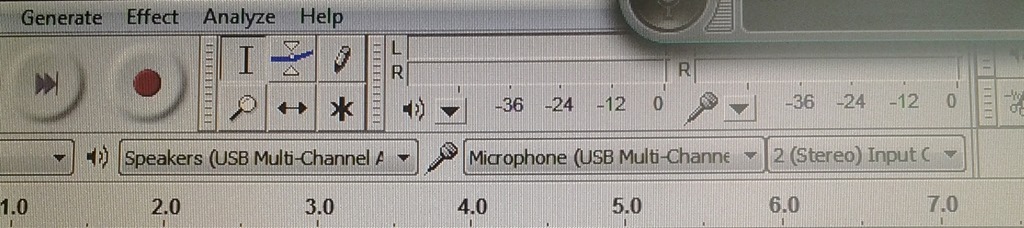
- Before you venture in there, an easy check on which computers is necessary is possible thanks to Audacity displaying the sound card options: Start Audacity form the desktop and look in the dropdowns under the top menu which sound devices Audacity has detected on the system:
- This example is form a PC where I had to fix it:
 . Audacity should not see the SoundMax if it has been disabled in the BIOS.
 - And this is what audacity should see (the USB sound card that comes with the Sanako SLH-07):
- This example is form a PC where I had to fix it:



Questions? Read the About. Or just ask me a quick Our Databases: Resources with calendars -- Language learning material Moodle Sites, multimedia files -- films


FAQs for LRC student staff or for students or for teachers. To search our FAQs, in the browser addressbar, add after "https://plagwitz.wordpress.com/feed/?tag=faqs+/" "+TAG1" (from tag cloud below) OR "https://plagwitz.wordpress.com/feed/tag=faqs
&category_name=" "CAT1" (from category hierarchy below). OR search both categories and tags, and multiple TAGs/CATs (connect with "," for OR-search, with "+" for AND-search), like so: https://plagwitz.wordpress.com/feed/?tag=TAG1+TAG2+...TAGn&category_name=CAT1
+CAT2+...CATn"
Other ways to find help
If you cannot find it here, look there: 5,500 Language-Learning Links and Programs for learning or teaching 150 languages
Shortcuts:Our Lists, Our Maps, LRC Staff Moodle Site,LRC Project Moodle Site, 49erexpress, UNCC Moodle, Student Recordings: s:claslcslrcsanakostudent
Learning usage samples: Sanako oral exam, Kaltura webcam presentation, Dictation with speech recognition, Sanako written exam, Chinese and Japanese interactive stroke-order practice
Test the Sanako Installer, Webbrowser Popup Konfigurator for XP, or Windows7, faster LRC TeacherPC Log-in Let MS facilitate diacritics writing by installing for you US-International keyboard layout
This is my personal blog (Google+). The views expressed on these pages are mine alone and not those of my employer. The information in this weblog is provided “AS IS” with no warranties, and confers no rights.
 Thomas' Work Space