Archive
Print to PDF with PDF Creator
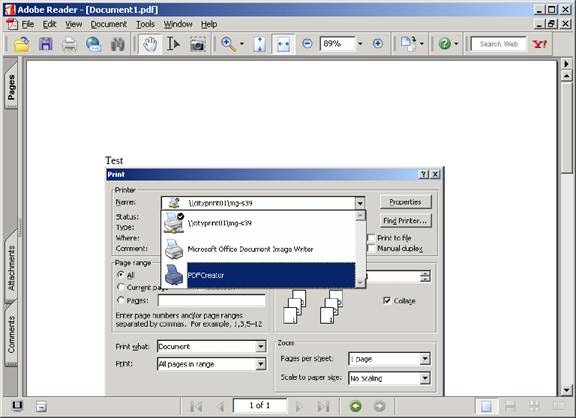
For creating PDFs, we now have PDFCreator installed in Moorgate. It appears as a printer driver, so print whatever document you want converted, and choose “PdfCreator” as the printer.
Test

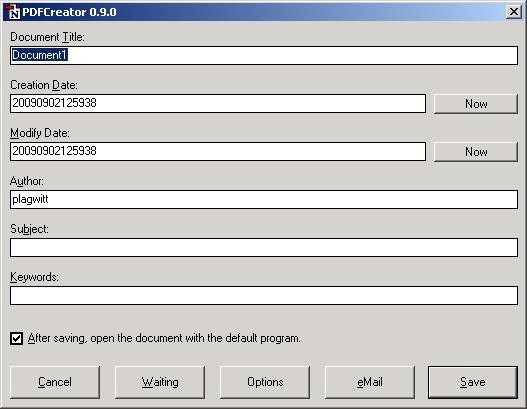
A dialogue will come up which will allow you to change some settings for the pdf file you are going to create.
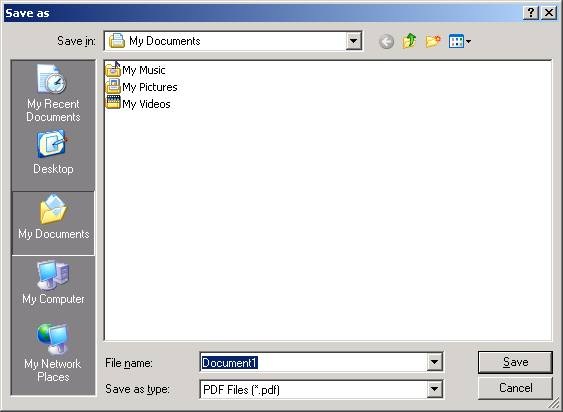
The next dialogue will ask you where you want to save your pdf file.
Here is the result file:

And here it is opened with Acrobat Reader:
PdfCreator has limitations, like it does not create hot links. Once Office 2007 is installed in Moorgate, I would recommend using its built-in “Save as PDF” feature instead.
Adobe-PDF support
Students often need to convert PDF files to Word, beyond having to select and copy/paste page by page in Acrobat Reader, text (preserve formatting, images, tables), including deleting carriage returns.
Re the latter, AFAIK even Acrobat Full cannot retain paragraphs without breaking it up line by line with carriage returns. This seems to be inherent to the nature of pdf as a page drawing language concerned with representation, not content.
Most students also need to convert from Word to PDF, e.g. for their CVs.
The Moorgate software image does not only seem to include “Acrobat Reader 9, but also an unspecified “PDF conversion utility” which seems to be PdfCreator 0.9 (see http://www.pdfcreator.de.vu). I explain using it here.
There are a number of other free pdf-creators around, with varying abilities, like primopdf, winpdf, bullzip… If you find something better, add a comment here.
There is also a free “Create PDF” service at http://www.acrobat.com/, limited to 5 pdfs (per email address?), and a conversion from pdf to html at http://www.adobe.com/products/acrobat/access_onlinetools.html.
KDE office on Linux is said to be able to convert PDF to editable formats.
Gmail and Google docs can view PDF documents as HTML in the browser.
Note that Office 2007 can convert Word to PDF (and much more) and that HE Students can buy all of Office 2007 Ultimate at a hardly more than nominal fee (< £40) through http://www.microsoft.com/student/discounts/theultimatesteal-uk/default.aspx.
University staff can get Microsoft Software for a nominal fee under the Work “at home” license agreement, see here.
For further study, refer to http://en.wikipedia.org/wiki/List_of_PDF_software#Converters_5


Questions? Read the About. Or just ask me a quick Our Databases: Resources with calendars -- Language learning material Moodle Sites, multimedia files -- films


FAQs for LRC student staff or for students or for teachers. To search our FAQs, in the browser addressbar, add after "https://plagwitz.wordpress.com/feed/?tag=faqs+/" "+TAG1" (from tag cloud below) OR "https://plagwitz.wordpress.com/feed/tag=faqs
&category_name=" "CAT1" (from category hierarchy below). OR search both categories and tags, and multiple TAGs/CATs (connect with "," for OR-search, with "+" for AND-search), like so: https://plagwitz.wordpress.com/feed/?tag=TAG1+TAG2+...TAGn&category_name=CAT1
+CAT2+...CATn"
Other ways to find help
If you cannot find it here, look there: 5,500 Language-Learning Links and Programs for learning or teaching 150 languages
Shortcuts:Our Lists, Our Maps, LRC Staff Moodle Site,LRC Project Moodle Site, 49erexpress, UNCC Moodle, Student Recordings: s:claslcslrcsanakostudent
Learning usage samples: Sanako oral exam, Kaltura webcam presentation, Dictation with speech recognition, Sanako written exam, Chinese and Japanese interactive stroke-order practice
Test the Sanako Installer, Webbrowser Popup Konfigurator for XP, or Windows7, faster LRC TeacherPC Log-in Let MS facilitate diacritics writing by installing for you US-International keyboard layout
This is my personal blog (Google+). The views expressed on these pages are mine alone and not those of my employer. The information in this weblog is provided “AS IS” with no warranties, and confers no rights.
 Thomas' Work Space