Archive
Protected: Meet the Resource Attendants and their Scheduling Assistants– or Who are these people, anyway?
Foreign language support in LRC MS-Office 2010
- A full set of proofing tools is available, thanks to MS-Office Language Packs installed on the Windows 7 computers, for all non-classical languages studied here:
-
Language Native name Arabic العربية Chinese (Simplified) 中文(简体) Chinese (Traditional) 中文 (繁體) English English French français German Deutsch Greek Ελληνικά Hebrew עברית Hindi हिंदी Italian italiano Japanese 日本語 Korean 한국어 Polish polski Portuguese (Brazil) Português Portuguese (Portugal) português Russian Русский Spanish español - Some languages have only limited features provided by the MS-Language Interface Pack:
-
KiSwahili Kiswahili Persian (Farsi) فارسی Yoruba ede Yorùbá
Setting time zone for all and for all misconfigured OWA users
live@edu/Office365 Exchange in the cloud does not seem to allow setting a default time zone, but rather leaves it to the user to change the time zone (defaulting to the time zone the cloud server is in that the user happens to hit) on first login – in the world I operate in, большая ошибка!
How to use the cmdlet set-MailboxRegionalConfiguration with parameter TimeZone to change the time zone of all your mailboxes is nicely explained on the blog How Exchange Works here, including screenshot and PowerShell command.
Unfortunately such an operation is reported to have needed 3 days for updating all mailboxes in an educational live@edu installation with 30000 users… You can restrict the mailboxes touched by examining first which are not in your local time zone (consult the MS TimeZone table for syntax, e.g. US “Eastern Standard Time”):
$mymailboxes = get-mailbox
ForEach ($examinedmailbox in $mymailboxes){
$regionalconfig = get-MailboxRegionalConfiguration –identity $examinedmailbox.identity
if ($regionalconfig.timezone -ne “Eastern Standard Time”){
Set-MailboxRegionalConfiguration -identity $examinedmailbox.identity -TimeZone “Eastern Standard Time” -confirm:$false
}
}
Why does MS-OneNote fail to linkify my URLs properly?
If this is a bug, it seems a pretty basic one:
 ,
,
for a 3rd generation software plus a service pack:  . Unless I am doing something wrong, of course (I only paste those links). It is not a link length issue, not all links break at the same length (94 would be an odd length in a binary world anyway). If it is a special character, I fail to see it.
Supporting Hebrew – A running log
- We are getting questions about what support for learning and using Hebrew the LRC can offer. Currently, none locally (beyond our online list of CALL tools), but this was a timely reminder to bear in mind this summer when:
- setting up Windows 7.
- setting up Office 2010.
LRC Calendars setup, documentation and training
I have written dozens of posts on the MS-Exchange/Outlook/OWA/Ninermail calendaring system that I set up for room reservation, equipment circulation, and staff timetabling in the LRC, the most recent 50 of which you also can view here – which should display like below in Firefox feed display. If you use Internet Explorer which has a nicer RSS feed display, you get to a list of articles where you cannot only browse, but search within the search results:

Remember to switch to a 32-bit web browser if your SkyDrive online documents fail to open in MS-Office 2010.
- I would have thought that in this day and age, usage metrics data would have prompted MS to put that problem root and resolution – open the web page and the “Open in [Excel/Word/PowerPoint]" in a 32-bit browser - more prominently in the error messages .
- Instead, if using a 64-bit browser, you may be seeing
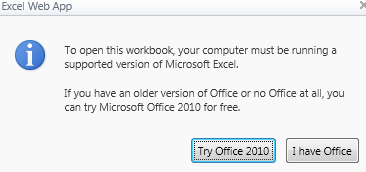
- this:
 (“To open this workbook, your computer must be running a supported version of Microsoft Excel. If you have an older version of Office or no Office at all, you can try Microsoft Office 2010 for free")
 - or this
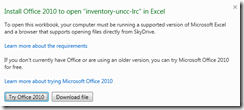 (“Install Office 2010 to open [your filename] in Excel. To open this workbook your computer must be running a supported version of Microsoft Excel and a browser that supports opening files directly from SkyDrive. Learn more about the requirements If you don’t currently have Office or are using an older version, you can try Microsoft Office 2010 for free. Learn more about trying Microsoft Office 2010. ”)
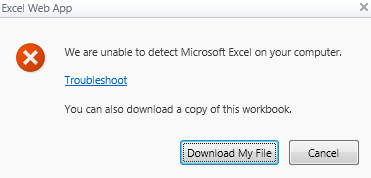
 - or this
 ("We are unable to detect Microsoft Excel on your computer. Troubleshoot You can also download a copy of this workbook).
 - If e.g. you `run this browser:
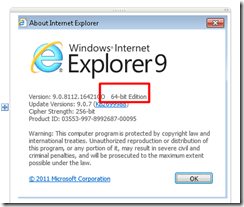
- Only if you follow the troubleshoot link, you find the 64-bitness of the browser mentioned.


How to bypass email cloaking in Joomla 2.5
- If you have URLs on your Joomla site that contain @-signs, Joomla 2.5 will mangle them, since it seems to think out of the box that these are email addresses that need to be protected (anybody else using Joomla 2.5 with MS-Exchange 2010 calendars…?).
- If you do not want to give directive {emailcloak=off} on top of the article, try url-encoding the @-sign (%40). May be more difficult for your users to memorize, though.


Questions? Read the About. Or just ask me a quick Our Databases: Resources with calendars -- Language learning material Moodle Sites, multimedia files -- films


FAQs for LRC student staff or for students or for teachers. To search our FAQs, in the browser addressbar, add after "https://plagwitz.wordpress.com/feed/?tag=faqs+/" "+TAG1" (from tag cloud below) OR "https://plagwitz.wordpress.com/feed/tag=faqs
&category_name=" "CAT1" (from category hierarchy below). OR search both categories and tags, and multiple TAGs/CATs (connect with "," for OR-search, with "+" for AND-search), like so: https://plagwitz.wordpress.com/feed/?tag=TAG1+TAG2+...TAGn&category_name=CAT1
+CAT2+...CATn"
Other ways to find help
If you cannot find it here, look there: 5,500 Language-Learning Links and Programs for learning or teaching 150 languages
Shortcuts:Our Lists, Our Maps, LRC Staff Moodle Site,LRC Project Moodle Site, 49erexpress, UNCC Moodle, Student Recordings: s:claslcslrcsanakostudent
Learning usage samples: Sanako oral exam, Kaltura webcam presentation, Dictation with speech recognition, Sanako written exam, Chinese and Japanese interactive stroke-order practice
Test the Sanako Installer, Webbrowser Popup Konfigurator for XP, or Windows7, faster LRC TeacherPC Log-in Let MS facilitate diacritics writing by installing for you US-International keyboard layout
This is my personal blog (Google+). The views expressed on these pages are mine alone and not those of my employer. The information in this weblog is provided “AS IS” with no warranties, and confers no rights.
 Thomas' Work Space