Archive
Looking forward to the Digital Humanities Unconference at UNC Charlotte
- Why I come to THATCamp Piedmont:
- I am looking for practitioners of NLP in a language and literature teaching context since I am working on Using NLP tools to automate production and correction of interactive learning material (presented at Calico 2012)
- for the Learning Exercise Creation Engines (presented at EUROCALL 2007) I developed.
- A little about myself:
- My Ph.D. thesis expanded the close reading of textual variants in the German editorial schools of Hans Zäch and the use of the computer-generated textual concordances in the interpretation and selection of textual variants into a corpus linguistic-inspired approach, that traced Leitmotifs in the work (partially first digitized by myself) of the foremost Swiss-German classic as a digital corpus using Regular Expressions programming.
- I have since applied my corpus linguistic approach to
- the use of machine translation software
- the automation of learning material creation (glossing, question generation, differentiation) on the basis of natural language processing of textual (film subtitles, news) corpora.
Code documentation for a job ticket assignment and reporting application
- JobAssignments allows for managing job tickets with easy tagging and filtering of task assignments, and for aggregate analysis and reporting.
- Originally developed only for simple tag aggregation reports (watch a demo), JobAssignments can now also analyze the tag graph:

- Click the table of contents on the right to browse the VBA documentation built with Aivosto.


If you cannot log into Windows because of accessibility dialogues offering you help
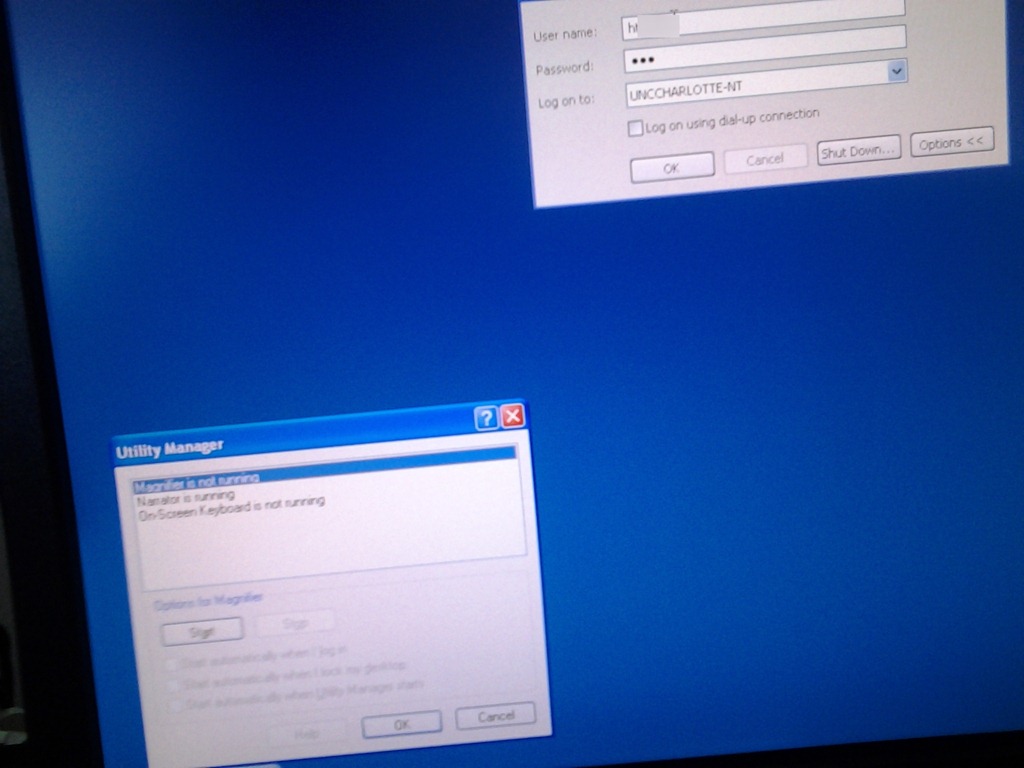
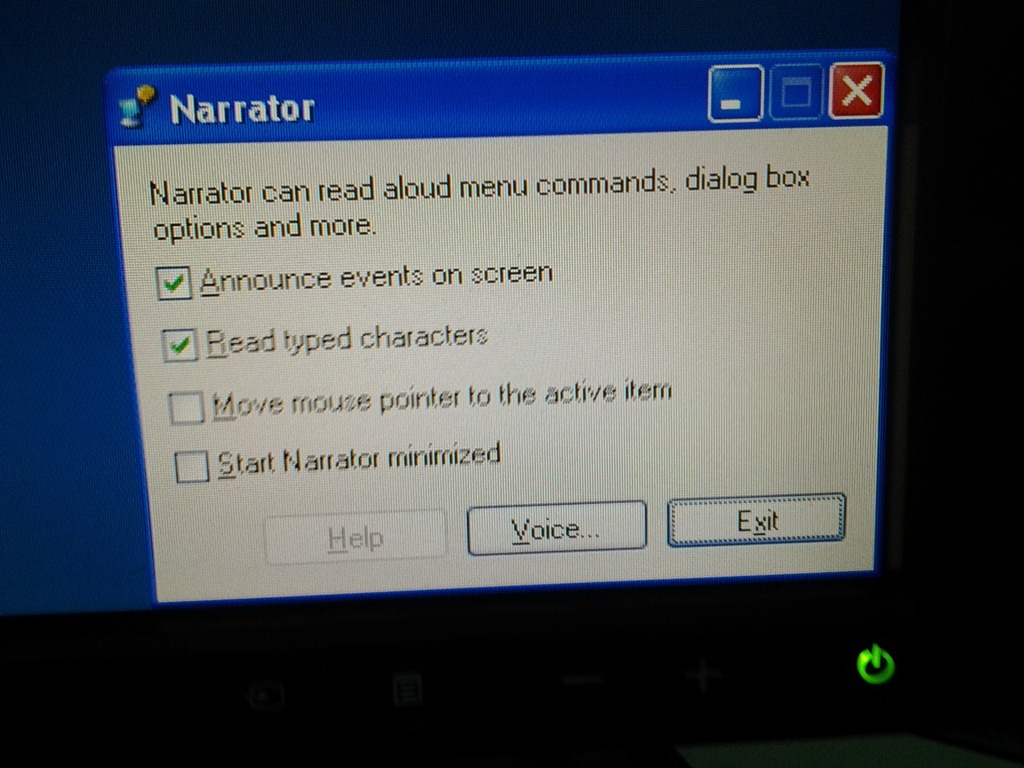
- Symptom: You cannot log in since accessibility tool dialogues (like above) come up when typing your password
- Workaround: Restart the computer (and make sure you have no item sitting on the keyboard while doing so, usual suspects: textbooks, bags). If you do not want to restart, but fix it immediately, you can read more about Windows XP accessibility features and keyboard shortcuts here.
- Root cause: You may have activated Windows accessibility features by erroneously depressing for a long time or repeatedly pressing a modifier key while the LRC computer was on the welcome screen. You may not run into this behavior from your personal computer (or read here how to disable Windows 7 Sticky and Filter Keys), but the LRC needs to be ADA compliant. Think of it as another LRC language tool that sometimes may get into your way temporarily if you do not study the language, but that you would not want to miss for the language you do study.
New keyboard shortcuts for diacritics on LRC Teacher PC
- The US international keyboard layout that has come with MS-Windows for many years (though – except in the LRC – not set as default, you need to enable it in the control panel) greatly facilitates typing of characters for most languages that use Roman script with common diacritical marks, but does not cover Pinyin and similar diacritical marks.
- Carly from Carleton, as avid a language teacher as a technologist, had the great idea to extend Microsoft’s US-international keyboard so as to include all the Pinyin tone marks (and other accents useful for linguists). Here is the upshot, extracted from her instructions, but excluding what (either shortcut or (use of common accents within Pinyin is now covered also below) purpose) has not changed from the shortcuts of the non-extended US-international keyboard that used to be the default in the LRC:
-
What you want Which keys you press (before comma is “dead” key = no result until after next key) Example acute accent, pinyin 2nd tone
‘(=apostrophe), vowel
á é í ó ú
grave accent, pinyin 4th tone
`(=grave), vowel
à è ì ò ù
macron accent, pinyin 1st tone
hyphen, vowel
ā ē ī ō ū
pinyin 3rd tone
%(=shift+5), vowel
e.g. ǎ ě ǐ ǒ ǔ
ü with pinyin tones
Accent, double-quote
e.g. ǖ ǘ ǚ ǜ
letter with dot below
; (=shift+period), letter
e.g.

letter with double acute
: (=shift+;) , o or u
ő, ű, Ő, Ű
- We are offering the extended US-international keyboard this as an optional keyboard on the teacher and student PCs with Windows 7.
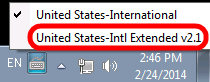
- To select the new keyboard layout, use the language toolbar, click on 2nd option:
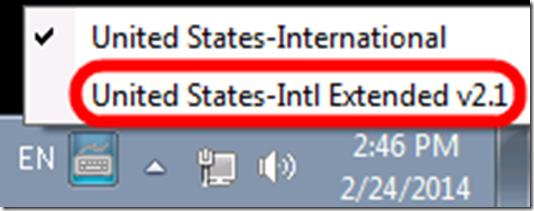
- To explore the new keyboard layout use the Windows On-screen keyboard which will let you peek ahead after your pressed a dead key.
- To bypass a special dead key (= get the normal behavior of the key), press SPACE after it.

Tivoli TEM console connect error
- Problem: I seem to have lost the capability to connect to the TEM console from my Office PC, with this error:

- Root cause : This error is due to these credentials:

- Solution: add its to the email addy.


Tivoli TEM console connect error
- Problem: I lost the capability to connect to the TEM console from my Office PC, with this error:

- Solution: Use not your username, but your full email, even if it is an alias you did not know delivered email to you (its).

LRC learning resources Moodle metacourses: Our list
UPDATE: The LRC Metacourses are being rolled over to MOODLE2. Metacourses having only an OldID are currently still unavailable in Moodle2. And the student enrollment needs to be updated manually until the end of add/drop. On the upside, teachers do not need to make course available to students anymore. The LRC can do this (Metacourses for languages saying #Ref are waiting to be rolled over, tell me if you need them)..
The following LRC Moodle metacourses for teaching materials are available to LCS and ELTI (including LRC-Resource with training materials for using language learning technology in and outside of the LRC, as well as for independent study languages).
The naming scheme follows the course abbreviations taught in the departments that the LRC supports:
These courses appear in the Training branch of the Moodle-courses tree-menu on the left (for all study programs you teach in):

The metacourse for a language (or field of study) is accessible to all students studying this language during the term of their study.


Questions? Read the About. Or just ask me a quick Our Databases: Resources with calendars -- Language learning material Moodle Sites, multimedia files -- films


FAQs for LRC student staff or for students or for teachers. To search our FAQs, in the browser addressbar, add after "https://plagwitz.wordpress.com/feed/?tag=faqs+/" "+TAG1" (from tag cloud below) OR "https://plagwitz.wordpress.com/feed/tag=faqs
&category_name=" "CAT1" (from category hierarchy below). OR search both categories and tags, and multiple TAGs/CATs (connect with "," for OR-search, with "+" for AND-search), like so: https://plagwitz.wordpress.com/feed/?tag=TAG1+TAG2+...TAGn&category_name=CAT1
+CAT2+...CATn"
Other ways to find help
If you cannot find it here, look there: 5,500 Language-Learning Links and Programs for learning or teaching 150 languages
Shortcuts:Our Lists, Our Maps, LRC Staff Moodle Site,LRC Project Moodle Site, 49erexpress, UNCC Moodle, Student Recordings: s:claslcslrcsanakostudent
Learning usage samples: Sanako oral exam, Kaltura webcam presentation, Dictation with speech recognition, Sanako written exam, Chinese and Japanese interactive stroke-order practice
Test the Sanako Installer, Webbrowser Popup Konfigurator for XP, or Windows7, faster LRC TeacherPC Log-in Let MS facilitate diacritics writing by installing for you US-International keyboard layout
This is my personal blog (Google+). The views expressed on these pages are mine alone and not those of my employer. The information in this weblog is provided “AS IS” with no warranties, and confers no rights.
 Thomas' Work Space