Archive
Archive for the ‘Film-studies’ Category
How to use MS-Skydrive with your university account here
2012/11/29
Leave a comment
- One of the benefits of live@edu is institutional access to file storage space in the cloud. You need not set anything up for that. Just go to http://skydrive.com and log in with (1) your university account, here is what you get:
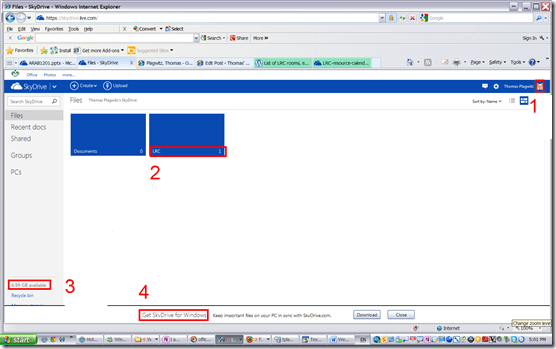
- You can create (or upload) folders and files (this one is from a long time ago, since I briefly could log in when live@edu was first introduced. Students always could log in).
- 7 GB of free space in the cloud should be plenty, including
- for teachers looking for a convenient way to bring files to the classroom beyond the limitations of the H: –drive “ My documents”
- for film students misplacing they backup hardware. No more hogging of checked out cameras just since you did not bring your portable hard drive. Just upload your clips to skydrive.com, access them from home.
- If you install the optional free Skydrive app (available ofr Windows Vista and up and MacOS X.7)
- the file size limit is expanded from 100MB to 2GB.
- files can be automatically synchronized between your classroom and home computer.
- To access files on classroom computers without the skydrive app, just use skydrive.com

Protected: Why does the autoaccept-agent not send messages from on-premise equipment mailboxes to students in the Office365/live@edu cloud?
2012/09/19
Enter your password to view comments.
Film equipment booking FAQ
2012/09/19
Leave a comment
- Do not send the meeting request to lrchelp@uncc.edu or some other person you know in the LRC, but rather send to the equipment email as listed here. Your meeting request will reach this equipment item’s “Resource Attendant who manages the item.
- Do not attempt to book equipment items that are “blocked” on the Scheduling Assistant tab of your meeting request. The Attendant currently mails acceptance responses only to permanent staff, not to students (check for booking success instead using the calendars shared with you in your NINERMAIL), but still has her Scheduling Assistant update the equipment’s publically visible calendar with the booking (tentatively for students). You may have figured by now that TBA:the Resource Attendant and her Scheduling Assistant are actually robots, “Do more with less” and all.
- Do not write in the notes field “I would like a Boom Pole as well” or similar. Nobody but robots is supposed to look at your message, and Robots cannot process this note, and they do not need to: Just add all equipment items,that you plan to check out and back in at the same time, as additional recipients in the “Resources” textbox, as listed here, so that the Resource Attendant and her Scheduling Assistant can manage the sharing of the items.
- Do not load only a single equipment piece – you would be playing a time-consuming lottery with the availability of this item. Rather, load all equivalent equipment pieces in the “Resources” field (see explanation on list of bookable items ) that you could use. E.g. if you need a Vixia camera with a heavy tripod and a microphone, load (-> list of bookable items ) LRC Camera 11-14 and all LRC Tripods 01-04. Then compare availability lines in the scheduling assistant for these items: You will find more easily one Vixia camera and one heavy tripod that fits well into your schedule. Just remember to remove the other equivalent items that do not fit as well into your schedule, before sending the meeting request.
- New memory options from Summer 2013:
- Cameras do not include sd-cards anymore. If you need an LRC sd-card, you have to check it out (and back in) separately, by adding to the “resources:” LRCsd-card##
- Have no way of getting your footage off the camera when returning equipment. Don’t hog the equipment. You can now store your footage temporarily on an LRCthumbdrive##.
Protected: Why we need autoaccept messages from on-premise equipment mailboxes to students in the Office365/live@edu cloud
2012/09/19
Enter your password to view comments.
Final Cut Pro Introduction
2012/04/13
Leave a comment
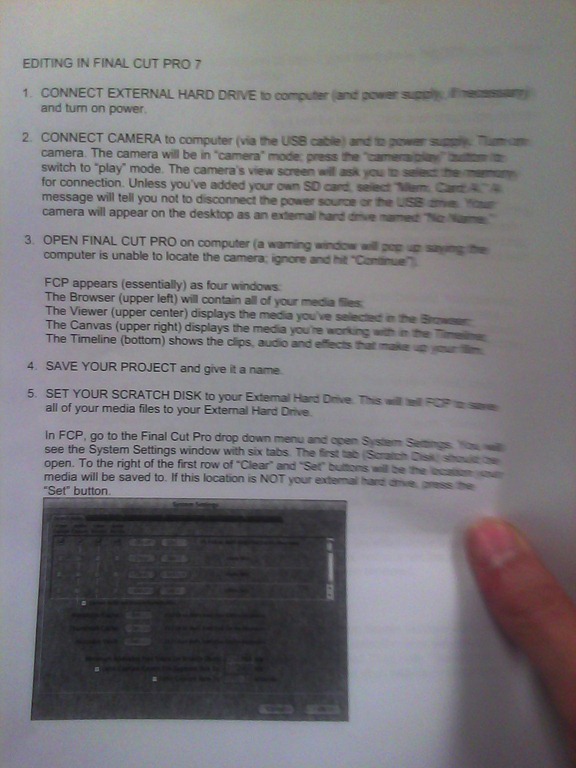
(A handout from the Film Studies program – click on photo for larger view)


How a teacher uploads a video resource to Moodle using Kaltura
2012/03/20
Leave a comment
- Moodle Kaltura facilitates making segments of video (created from e.g. source DVD with the video editor of your choice) available for film studies classes, within the bounds of Fair Use and the Teach Act, since it makes video
- easily available (streamed to anywhere where Adobe-Flash runs),
- but only to those who have an account in the Moodle installation and are registered for the course
- In addition, access to the video segments can be restricted further (by choosing from the management options that Moodle affords),
- only to the teacher, for display during face-to-face teaching)
- only during a time window, for timed assignments.
- Here is a (somewhat longwinded, but authentic) demonstration of how to make a Kaltura video resource available through a Moodle course.
- The demonstration includes the server-side encoding which happens only once during teacher upload – you do not have to wait for it to finish, just if you want to check immediately, like I do on the example whether your upload went through.
Categories: documentation, e-learning, Film-studies, lms, Screencasts, service-is-evaluating-learning-tools
adobe-flash, kaltura, moodle, videos
LRC Coed037 Film studies lab
2012/02/15
Leave a comment
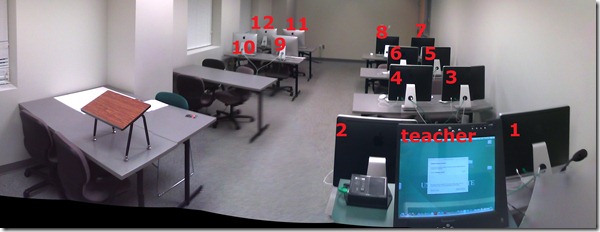
- Panorama with computer numbering in lieu of a layout

Categories: audience-is-IT-staff, audience-is-language-learning-center-manager, audience-is-language-learning-center-staff, audience-is-students, audience-is-teachers, documentation, e-infrastructure, Film-studies, Institution-is-University-of-North-Carolina-Charlotte, Photos, presenter-computer, student-computers
maps


Questions? Read the About. Or just ask me a quick Our Databases: Resources with calendars -- Language learning material Moodle Sites, multimedia files -- films


FAQs for LRC student staff or for students or for teachers. To search our FAQs, in the browser addressbar, add after "https://plagwitz.wordpress.com/feed/?tag=faqs+/" "+TAG1" (from tag cloud below) OR "https://plagwitz.wordpress.com/feed/tag=faqs
&category_name=" "CAT1" (from category hierarchy below). OR search both categories and tags, and multiple TAGs/CATs (connect with "," for OR-search, with "+" for AND-search), like so: https://plagwitz.wordpress.com/feed/?tag=TAG1+TAG2+...TAGn&category_name=CAT1
+CAT2+...CATn"
Other ways to find help
If you cannot find it here, look there: 5,500 Language-Learning Links and Programs for learning or teaching 150 languages
Shortcuts:Our Lists, Our Maps, LRC Staff Moodle Site,LRC Project Moodle Site, 49erexpress, UNCC Moodle, Student Recordings: s:claslcslrcsanakostudent
Learning usage samples: Sanako oral exam, Kaltura webcam presentation, Dictation with speech recognition, Sanako written exam, Chinese and Japanese interactive stroke-order practice
Test the Sanako Installer, Webbrowser Popup Konfigurator for XP, or Windows7, faster LRC TeacherPC Log-in Let MS facilitate diacritics writing by installing for you US-International keyboard layout
This is my personal blog (Google+). The views expressed on these pages are mine alone and not those of my employer. The information in this weblog is provided “AS IS” with no warranties, and confers no rights.
 Thomas' Work Space