Archive
Wacom Bamboo Settings for Teacher


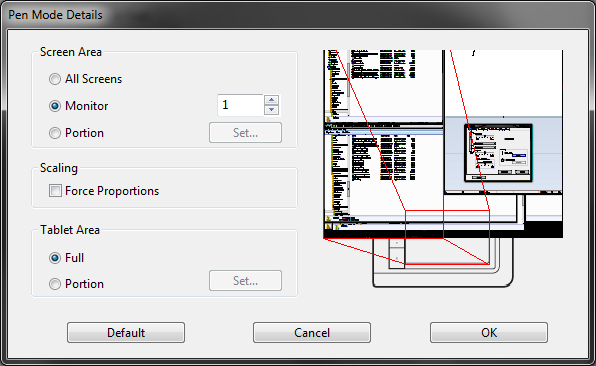
For the dual screen teacher station, it should be the student viewable monitor
Are we complicating things with touch ? We still have a mouse connected.
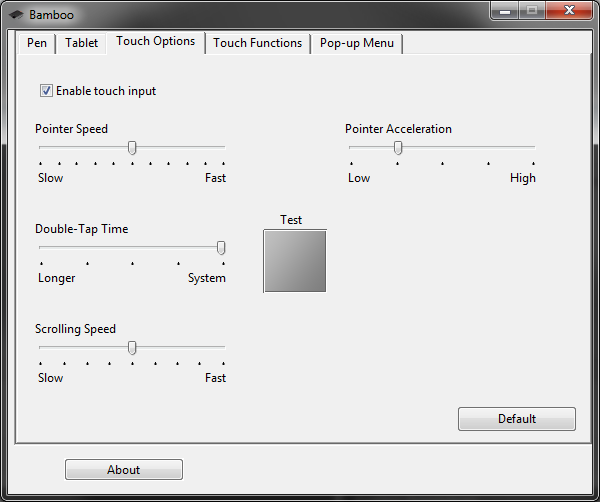

In tablet, no button allows setting to "popup menu"

Protected: Many input languages, keyboards and IMEs requested are not accessible to most LRC users
WordSmith Tools are once again not licensed
- StartingWordsmith from the desktop shortcut results in this:

- Didn’t I test and describe last summer how to fix this?

LRC Fall 2013 announcements
- The LRC has upgraded to Windows 7 and Office 2010.
- Benefits:
- Your students can use the computer interface from the default English to about 20 languages, including non-Western.
- Your students can also use speech recognition (in English, French, German, Japanese, Mandarin, and Spanish), e.g. for dictation exercises (Example videos: very bad French, decent German). Students can train the computers to their voice and take their training data with them. I’d love to explore with you possibilities for pronunciation practice with automated intelligent feedback .
- Your students can use old and new MS-Office Proofing tools.
- Caveat: W are still trying to restore some former functionality (e.g. no Google Arabic, Farsi and Russian IME etc.). Please bear with us while we deal with the new college tech infrastructure.
- Benefits:
- The LRC has upgraded its Sanako digital audio lab software.
- Because of budgetary constraints, our software agreement had to end with version 5 . This summer, the vendor presented us with a free upgrade to version 7, with compliments for my blog posts about using the Sanako.
- Benefits: We decided to implement the upgrade lest you and your students need relearn in the middle of the academic year and since Version 7 adds valuable language learning : which I would love to explore with you: Vocabulary exercises and Pronunciation exercises which make use of the computerized text-to-speech capabilities we just implemented with windows 7
- Caveats:
- We are still trying to restore the old Sanako configuration. E.g. Pairing recording is not working currently.
- I hope to upgrade my LanglabEmailer software to support the new version after the term is underway.
- For students attending distance classes with Saba Centra in the LRC, microphone audio on listening stations fixed, no more 30 minute delay when joining class.
- UNCC is upgrading to Moodle 2. The CTL is investigating how the LRC Metacourses for audio materials I created can be converted to Moodle 2. If you need the audio materials from the metacourses, we can help you upload them into your individual courses temporarily.
- Classroom AV: We found a temporary workaround for the projector image quality and are investigating permanent solutions. Currently no VHS video and doc cam display during classes (we would love to scan your text anyway and distribute them digitally).
- LRC Calendars and Booking:
- In the LRC Room and Equipment List, your will notice some new film studies equipment (calendars requested from ITS).
- We added new calendars to the Quicklinks on LRC home page : Tutors and LRC assistants. Please keep checking how we fill these open positions over the next few weeks, and use the help they can offer you.
- When booking, you can
- get help at the LRC reception desk;
- book yourself from anywhere,
- or have your “delegate” book (planned; setup requested from ITS).
- I will continue next week with the biweekly Sanako Clinic to aid teachers with their LRC class preparation. Please consult the LRC calendar if you want to drop in, or reschedule one with me for your needs.
- I am also offering LRC introductions for your class during the week 2 and 3 on a “first-come, first-served” basis, and à la carte (I suggest consulting a one-sheet menu with an overview of LRC facilities that I am preparing.) Please let me know if you are interested.
Example 6: How even a false beginner can work with foreign language Speech recognition on Windows 7 Enterprise
- Executive summary: Don’t let initial poor speech recognition results discourage your from using this feature. Results will much improve if you go through a few minutes of the built-in voice training for speech recognition. Like in the last 30 seconds of this video.
- With the upgrade to Windows 7 Enterprise in the LRC – and the continued availability of high-quality Sanako headphones on the majority of LRC PCs – , we can now offer speech recognition in a number of foreign languages – including French.
- This feature can be used for language learning exercises, including dictation, like in this example. How robust is windows 7 speech recognition?
- You can expose yourself to some embarrassingly bad French in this screencast – and that is the point. (My French is limited to a mere 2 high school years of 3-hour per week voluntary French studies, more than 30 years ago, no practice since).
- The screencast shows how even a (false) beginner can,
- 0:00-1:00: from terrible initial results,
- 11:45-12:10: considerably improve (not make perfect!) the foreign language (here French) speech recognition on Windows 7,
- 1:00-10:40: by going through the built-in voice training.
- The LRC computers are “frozen”between reboots, but students still need to train them only once, since they can back up and restore their training data easily.

- (This is not proof of the overall validity of the recognition – for that, you are better off watching this screencast with Windows 7 Enterprise speech recognition in German).
ELRA language corpora available in the LRC for research
The LRC has availed itself of a free research distribution of 55GB collection of language corpora from http://www.elra.info/, the European Language Resources Association. This “big data” should be of interest for the translation program, as well as the language learning programs, since it enables corpus linguistic approaches to language learning and automated learning material production based on natural language processing.
Here is an overview of the materials included:

A list of files included can be found here:
If you won’t use US-International keyboard layout to type diacritics on Windows, 48 61 70 70 79 42 69 72 74 68 64 61 79…
… , that is to say (decode): Happy Birthday. You are 60 years old. For with ALT+NUM code, you essentially use ASCII (ok, to be more precise: High ASCII), a mapping of human language characters to computer binary numbers that was invented on June 17, 1963.
You can continue for another 5 years. Or if you don’t mean to be hard on your brain: Friends don’t let friends bypass US-International keyboard layout.
Protected: How to configure the LangLabEmailer for your school, and share back


Questions? Read the About. Or just ask me a quick Our Databases: Resources with calendars -- Language learning material Moodle Sites, multimedia files -- films


FAQs for LRC student staff or for students or for teachers. To search our FAQs, in the browser addressbar, add after "https://plagwitz.wordpress.com/feed/?tag=faqs+/" "+TAG1" (from tag cloud below) OR "https://plagwitz.wordpress.com/feed/tag=faqs
&category_name=" "CAT1" (from category hierarchy below). OR search both categories and tags, and multiple TAGs/CATs (connect with "," for OR-search, with "+" for AND-search), like so: https://plagwitz.wordpress.com/feed/?tag=TAG1+TAG2+...TAGn&category_name=CAT1
+CAT2+...CATn"
Other ways to find help
If you cannot find it here, look there: 5,500 Language-Learning Links and Programs for learning or teaching 150 languages
Shortcuts:Our Lists, Our Maps, LRC Staff Moodle Site,LRC Project Moodle Site, 49erexpress, UNCC Moodle, Student Recordings: s:claslcslrcsanakostudent
Learning usage samples: Sanako oral exam, Kaltura webcam presentation, Dictation with speech recognition, Sanako written exam, Chinese and Japanese interactive stroke-order practice
Test the Sanako Installer, Webbrowser Popup Konfigurator for XP, or Windows7, faster LRC TeacherPC Log-in Let MS facilitate diacritics writing by installing for you US-International keyboard layout
This is my personal blog (Google+). The views expressed on these pages are mine alone and not those of my employer. The information in this weblog is provided “AS IS” with no warranties, and confers no rights.
 Thomas' Work Space