Archive
Archive for the ‘Multimedia-is-any’ Category
How to upload a folder with many files in Moodle 2–the ultimate training
2013/10/22
Leave a comment
- …using animated .gifs. Different speed? 0.25sec,0.5sec, 0.75sec, 1sec, , 2sec, 3sec, 4sec, 5sec, 6sec, 7sec, 8sec, 9sec, 10sec. 1.5sec

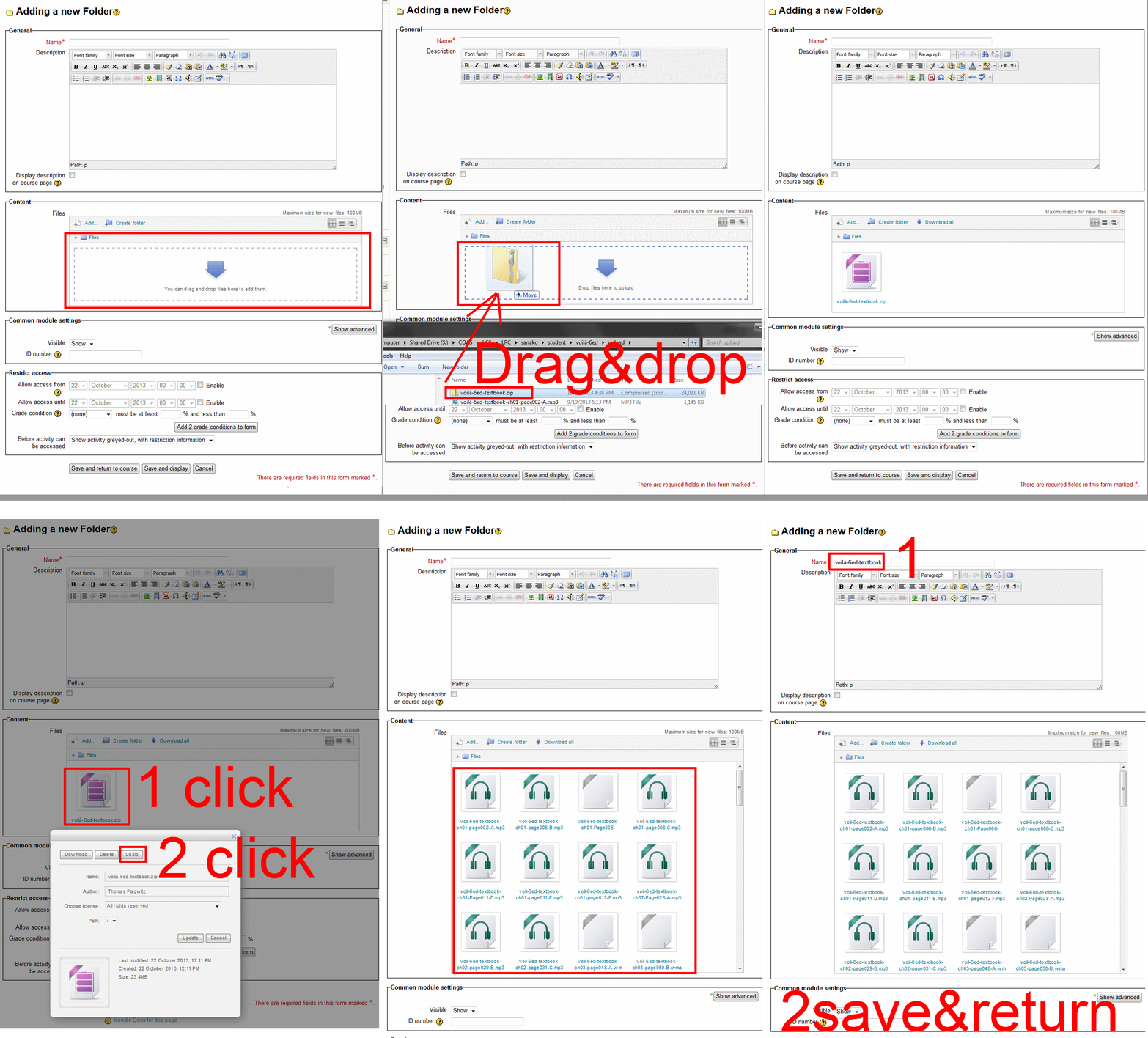
- And the answer is: You now can simply drag-and-drop a zip file (provided you are using a recent web browser). Start with “Turn editing on”, “Add resource”, “Folder”, and then proceed like so:
- Easy enough, but you can still save time: If your folder is reusable not only between terms, but also teachers (sections etc.), I suggest doing this in our Moodle metacourses (once).
- If you want to use an existing instead of adding a new folder, a slightly different way to manage your multiple files upload in Moodle 2 is described here.
Categories: animated-GIFs, audience-is-teachers, e-learning, lms, training
files, folders, moodle
How to book a resource in Office365–the ultimate training…
2013/10/14
Leave a comment

How to retroactively remove comment option from WordPress posts
2013/10/07
Leave a comment
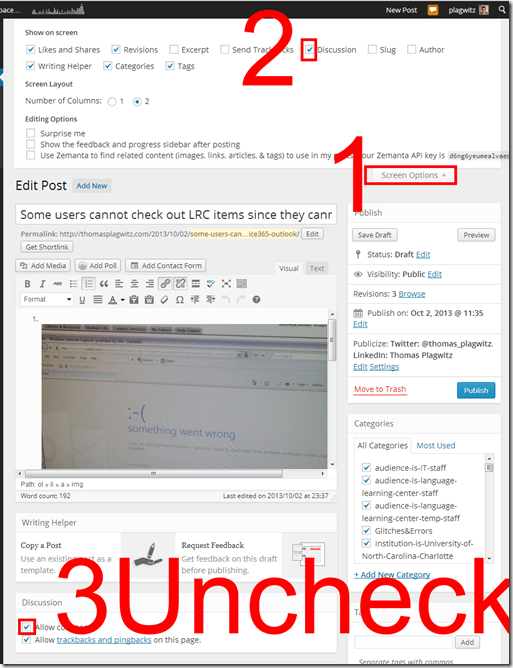
- Unchecking “Allow comments” does not affect past posts (you had better find that out early in your blogging career – I did not …)
- To disable comments for past posts, you have to uncheck “Allow comments”in each one of them.
- To even show “Allow comments” in the post editing interface, do this:

Categories: audience-is-teachers, documentation, e-infrastructure, Screenshots
wordpress
Courseworld.org offers foreign language learning video clips
2013/10/01
Leave a comment
- Over a 100 videos currently available:
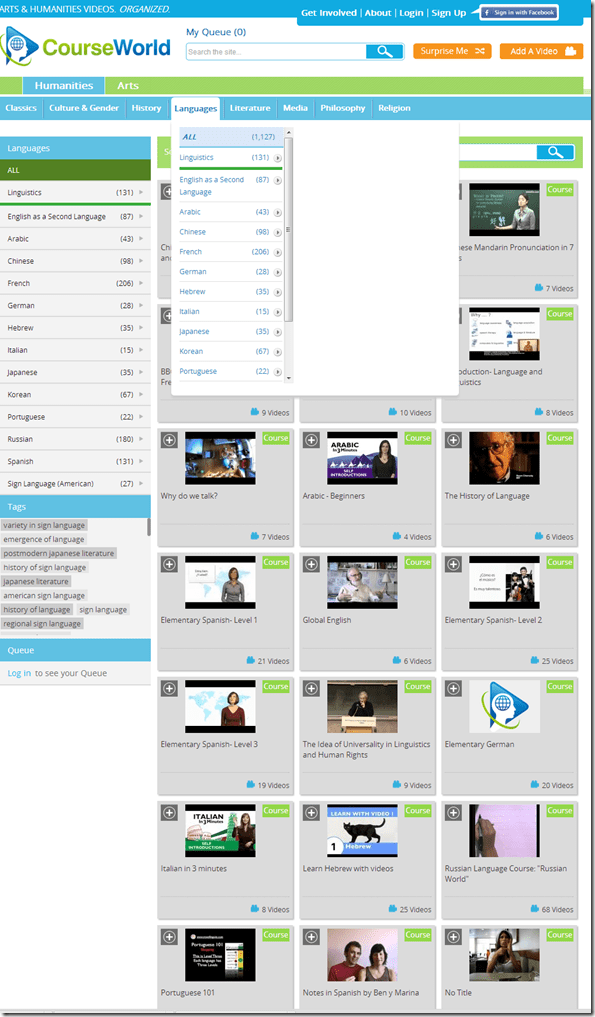
- Summaries show when you hover over a video tile:

- Can it beat YouTube.com for scope? Can it beat textbook-integrated videos for applicability? Likely not, but you may find an add-on for your course, and even more for self-study.


Categories: Arabic, audience-is-students, audience-is-teachers, e-languages, French, German, Hebrew, Italian, Japanese, Korean, Mandarin, Portuguese, Russian, Spanish, Videos, websites
self-study

What to do if university websites seem to be not working, nothing happens when you click?
2013/09/14
Leave a comment
- Try and get the popup blocker on your office or lab PC fixed here (if you are on Windows 7 here, you need to use the 64-bit version): choose "Run" – preferable to “Download” and "Open".
- Then use Internet Explorer to try again what you were trying to do on one of our websites.
- Background:
- My users have been reporting for a while problems getting simple things done on campus websites. Last week I observed a few in their office and in the LRC being stalled by mis- or non-configured popup blocker, and not noticing the cause, being flummoxed.
- The above little program configures the built-in internet explorer popup blocker to allow popups from websites that are part of our infrastructure.
- It does not attempt to configure other popup blockers, whether inside or outside of this web browser.
- The end user could also try
- (holding the key:) CTRL-click on the link where your web browsing fails.
- Or configure the popup blocker manually.
- However, it would likely be best if this were done via GPO…
Equipment circulation training with NINERMAIL meeting requests for Film studies students Fall 2013
2013/09/12
Leave a comment
Click to view screencast: .
.
Click to view handout.
First steps with the Sanako Study 1200 vocabulary test activity
2013/09/06
Leave a comment
- Click to watch an example below of the new (in version 6, we are now on 7) activity:”Vocabulary Test”
 which allows you to administer during a face-top-face-class just exactly what its name says –
 - with these benefits:
- needing no paper,
- digital contents
- “can” and reuse past tests with ease
- TBA: can you swap target and source language?
- blending automated and teacher feedback:
- the example I give below is based on what the teacher gave me: single words and very short idiomatic expression.
- You can use longer phrases (I prefer teaching and studying vocabulary in context), but then it become increasingly unlikely that the automated feedback is accurate (The automated feedback is limited to exact, up to case-insensitive string matching – now distance metrics).
- You can override the automated feedback before sending the results back to the student. This is somewhat practical, since the submitting is fast and not all students will finish at the same time, and if you provided students with the follow up activity after submission, The teacher overriding the feedback gets unpractical in large classes, so it is recommended restricting the test to short source/target language pairs. Also be clear about or minimize punctuation and, if required, the format of other metalinguistic information (gender, plural forms etc).
- Issues:
- not communicative, how can this be used or fitted in with other activities to make best use of a fully computerized face-to-face teaching environment?
- simplistic autocorrecting algorithm (case-insensitive, otherwise exact, right or wrong, my way or the highway” string matching)
- no tracking, no memory, personalization only via the other built-in Sanako personalization features (groups – to be left to the teacher to handle)
- no learning content – at least no vocabulary learning materials usable out of the box for us (TBA).


Questions? Read the About. Or just ask me a quick Our Databases: Resources with calendars -- Language learning material Moodle Sites, multimedia files -- films


FAQs for LRC student staff or for students or for teachers. To search our FAQs, in the browser addressbar, add after "https://plagwitz.wordpress.com/feed/?tag=faqs+/" "+TAG1" (from tag cloud below) OR "https://plagwitz.wordpress.com/feed/tag=faqs
&category_name=" "CAT1" (from category hierarchy below). OR search both categories and tags, and multiple TAGs/CATs (connect with "," for OR-search, with "+" for AND-search), like so: https://plagwitz.wordpress.com/feed/?tag=TAG1+TAG2+...TAGn&category_name=CAT1
+CAT2+...CATn"
Other ways to find help
If you cannot find it here, look there: 5,500 Language-Learning Links and Programs for learning or teaching 150 languages
Shortcuts:Our Lists, Our Maps, LRC Staff Moodle Site,LRC Project Moodle Site, 49erexpress, UNCC Moodle, Student Recordings: s:claslcslrcsanakostudent
Learning usage samples: Sanako oral exam, Kaltura webcam presentation, Dictation with speech recognition, Sanako written exam, Chinese and Japanese interactive stroke-order practice
Test the Sanako Installer, Webbrowser Popup Konfigurator for XP, or Windows7, faster LRC TeacherPC Log-in Let MS facilitate diacritics writing by installing for you US-International keyboard layout
This is my personal blog (Google+). The views expressed on these pages are mine alone and not those of my employer. The information in this weblog is provided “AS IS” with no warranties, and confers no rights.
 Thomas' Work Space