Archive
Example 7: Exercise dictating in German to an LRC Windows 7 computer
How can we get language students more speaking practice with qualified, but affordable feedback ? Native speaker contact remains difficult to organize even in the days of online conferencing. The LRC hosts language tutoring, but numbers are limited. Enter speech recognition, the holy grail of iCALL, much easier for learners to relate to than the voice graph that digital audio can be broken down to, and thus for a long time a standout feature of costly second-language-acquisition packages like Auralog Tell-me-More (speech recognition in English tested here) – but now the LRC has Windows 7 Enterprise (and its free add-on language packs), and another crucial prerequisite: headphones with excellent microphones.
We are setting up the new Windows 7 computers in the LRC to allow for speech recognition in Chinese, English, French, German, Japanese and Spanish. Here is an example of me using this facility for a practicing my German during a dictation exercise:
Granted, German is my native tongue; but the example text is from the online component for the final chapter of the “Treffpunkt Deutsch” 1st-year textbook in use here, which sends the readers to the website of the Swiss (-German) employment agency.
Apart from infrequent words ("Archiven") and Lehnwörtern ("Bachelor" etc.), Windows 7 speech recognition accuracy seems quite impressive. The above example was actually my first dictation, except that immediately beforehand, I invested a few minutes into the standard Windows 7 speech recognition training (aimed at training the user, although may behind the scenes teach the computer a few things about the speaker already also) and a few more minutes of voice training (this one is meant exclusively for the computer, but the user can also see it fail and why). The – rather simple trick to boost speech recognition results – certainly accessible to our students – seems to be to speak not only clearly, but also slowly, with short pauses between most words.
Speech recognition in these languages is a feature of the Windows 7 (Enterprise/Ultimate version) “language packs” that we installed and switched to – that is why the entire computer interface appears in German. Practicing the L2 with (computer—operating) “voice commands” (instead of with a mouse) is also possible, simpler than replacing the keyboard (mostly) by voice, but not as easy to devise homework exercises for.
Tips for designing exercises using speech recognition: As the example shows ("Archiven") , doing all corrections by voice can quickly become tedious. But there is no pedagogical need to have your students’ bang their heads against this wall. Instead, just ask your students to correct their automatically recognized words manually at the end of their video, after their dictation. This way both you and your students get a clear summary of what they achieved – even clearer if they dictate in MS-Word with the spell and grammar check for the language (automatic with the switch to the language pack for the language) and (using key combination CTRL+SHIFT+E) track changes. We will show you later TBA:how we now enable students to easily record their screen and TBA:upload their screencast into Moodle Kaltura.
Watching workshop screencast recordings
We added a dual-screen setup to the teacher computer. We produce two screencasts, for archiving and reviewing, per training held, one of the left and one of the right screen. On a typical desktop computer, you should be able to view both side-by-side, like so (using Windows 7 Aero Snap, just activate the right/left window and on your keyboard, press Windows key + right- or left-arrow):

We hope to have screencast recording software, video drivers and scree/projection hardware that will enable us to provide a single screencast of both screens. However, other upgrades are higher up in the priority list.
LRC Calendars setup, documentation and training
I have written dozens of posts on the MS-Exchange/Outlook/OWA/Ninermail calendaring system that I set up for room reservation, equipment circulation, and staff timetabling in the LRC, the most recent 50 of which you also can view here – which should display like below in Firefox feed display. If you use Internet Explorer which has a nicer RSS feed display, you get to a list of articles where you cannot only browse, but search within the search results:

Making audio cues for model imitation/question-response oral exams with Sanako Study 1200
We can easily record and post-process audio files in the LRC for use with the Sanako Study 1200 oral exam activities.
This can work not only for outcome exams (course- or chapter-wise), but also or formative assessment:
Think converting your textbook-based “drills” into Sanako, like repetitively recapitulating the newly acquired vocabulary item “donut” with different cues:
Example: “What can you do with [student can enter her favorite new vocabulary item for the current class] on [teacher can ask for one social web service after the other that her students likely are familiar with]?”. In response, student has to practice vocabularry item by forming sentences that fit the vocabulary item that fit like in the whiteboard example.
We can add to these recordings the features explained in the slide below.
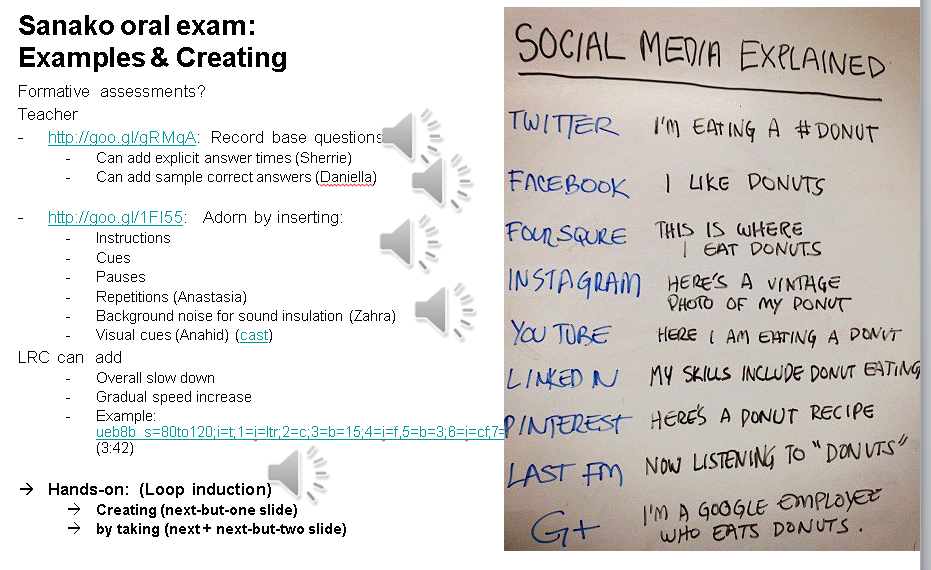
I’d be happy to play you examples from this slide – and more – in the LRC (not to be published here so that the exam files can be reused).
How to secure headphones on Lab PC
An LRC classic: In an attempt to improve, students will unplug/reseat and/or break headphone connectors, and render the LRC computers useless for even basic audio listening/recording use. In our attempt to prevent this and protect student users from themselves, here is what we have to work with on the rear of Dell Optiplex 760 (mini form factor): 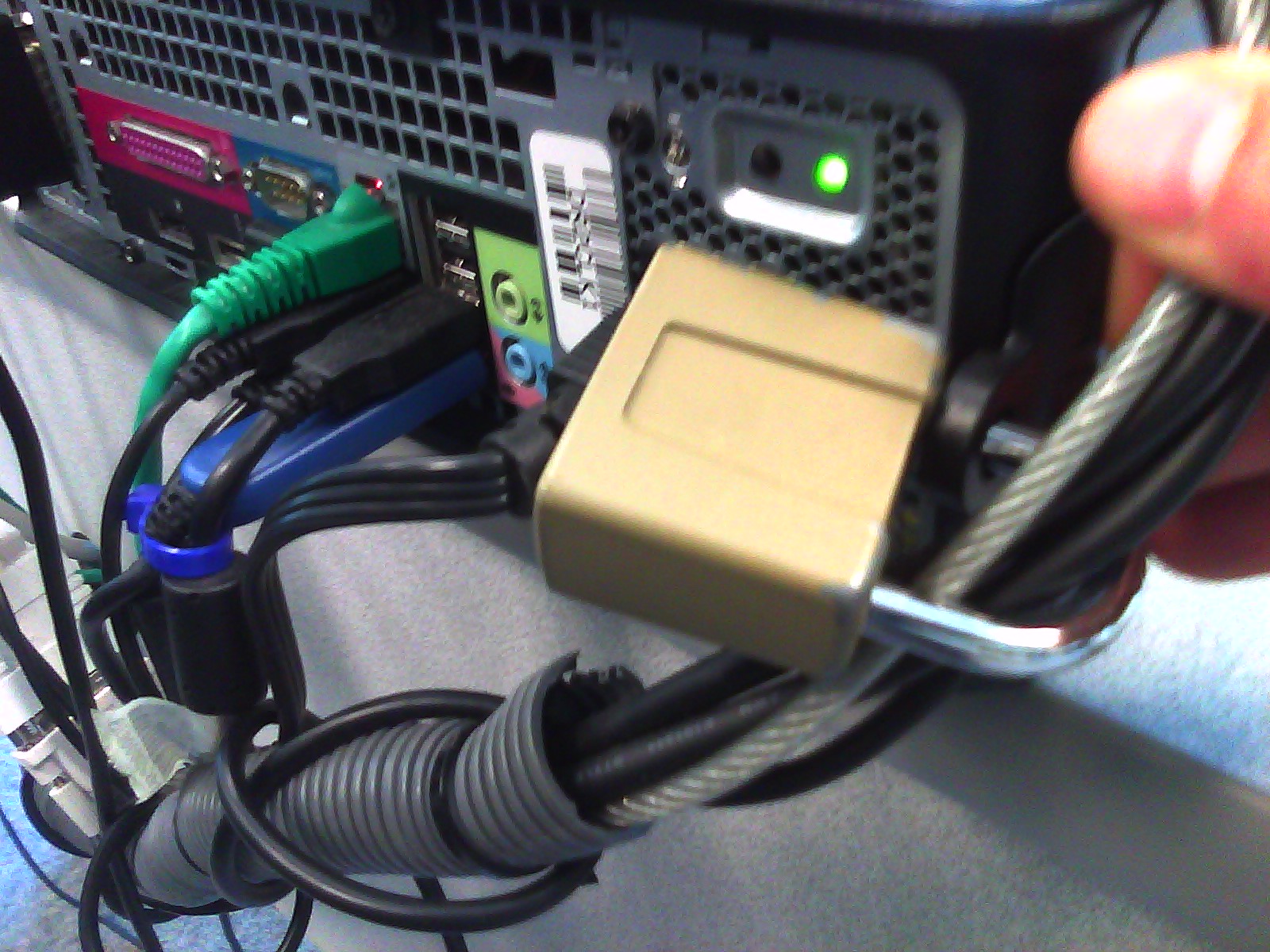 .
.
Cables tied to one another seems to be not stable neough. Maybe try, on top of the old (loop-headphone-cable-through-)washer-trick, a cable-tie looped through the rear grate openings which are closer and more accessible than the already installed lock?
Using NLP tools to automate production and correction of interactive learning materials for blended learning templates in the Language Resource Center. Presentation Calico 2012, Notre Dame University
View screencast  here.
here.
Comparison of NLP Platforms
Not really a comparison, only a notebook compiled from online sources. Not really fit for publication either, unless “sharing is caring”. You can view a larger version here.


Questions? Read the About. Or just ask me a quick Our Databases: Resources with calendars -- Language learning material Moodle Sites, multimedia files -- films


FAQs for LRC student staff or for students or for teachers. To search our FAQs, in the browser addressbar, add after "https://plagwitz.wordpress.com/feed/?tag=faqs+/" "+TAG1" (from tag cloud below) OR "https://plagwitz.wordpress.com/feed/tag=faqs
&category_name=" "CAT1" (from category hierarchy below). OR search both categories and tags, and multiple TAGs/CATs (connect with "," for OR-search, with "+" for AND-search), like so: https://plagwitz.wordpress.com/feed/?tag=TAG1+TAG2+...TAGn&category_name=CAT1
+CAT2+...CATn"
Other ways to find help
If you cannot find it here, look there: 5,500 Language-Learning Links and Programs for learning or teaching 150 languages
Shortcuts:Our Lists, Our Maps, LRC Staff Moodle Site,LRC Project Moodle Site, 49erexpress, UNCC Moodle, Student Recordings: s:claslcslrcsanakostudent
Learning usage samples: Sanako oral exam, Kaltura webcam presentation, Dictation with speech recognition, Sanako written exam, Chinese and Japanese interactive stroke-order practice
Test the Sanako Installer, Webbrowser Popup Konfigurator for XP, or Windows7, faster LRC TeacherPC Log-in Let MS facilitate diacritics writing by installing for you US-International keyboard layout
This is my personal blog (Google+). The views expressed on these pages are mine alone and not those of my employer. The information in this weblog is provided “AS IS” with no warranties, and confers no rights.
 Thomas' Work Space