Archive
Archive for the ‘Multimedia-is-any’ Category
How to batch-produce animated-GIFs in different speeds
2013/02/14
Leave a comment
As a little time saver, here is a program (64bit) that automates animated-GIF production with the free UnFreez (a bit hairy to control from AutoIT, hence the mouse-moves) for a dozen or so different speeds. Decompile if you need to adjust it, otherwise no AutoIT software is needed. All other prerequisites are explained in the startup dialogue, rename the dummy output files to your liking.
How to batch watermark your images for free with Irfanview
2013/02/13
Leave a comment

– just to be a bit more concise than this useful, but long post on yet another great feature of this free program (shout-out to Kai). Not shown here: after making your settings here, click button “Start batch”.
Categories: e-infrastructure, Screenshots, service-is-documenting
automation, IrfanView, watermarking
Looking forward to the Digital Humanities Unconference at UNC Charlotte
2013/01/29
Leave a comment
- Why I come to THATCamp Piedmont:
- I am looking for practitioners of NLP in a language and literature teaching context since I am working on Using NLP tools to automate production and correction of interactive learning material (presented at Calico 2012)
- for the Learning Exercise Creation Engines (presented at EUROCALL 2007) I developed.
- A little about myself:
- My Ph.D. thesis expanded the close reading of textual variants in the German editorial schools of Hans Zäch and the use of the computer-generated textual concordances in the interpretation and selection of textual variants into a corpus linguistic-inspired approach, that traced Leitmotifs in the work (partially first digitized by myself) of the foremost Swiss-German classic as a digital corpus using Regular Expressions programming.
- I have since applied my corpus linguistic approach to
- the use of machine translation software
- the automation of learning material creation (glossing, question generation, differentiation) on the basis of natural language processing of textual (film subtitles, news) corpora.
How to set text-to-speech to a different language on LRC Windows XP computers
2013/01/29
Leave a comment
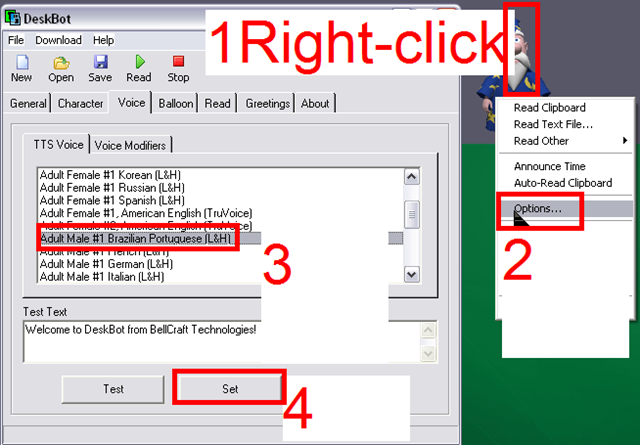
Example for Portuguese – choose your own language instead.
Categories: audience-is-students, audience-is-teachers, Screenshots, Speaking
deskbot, speech-recognition
Code documentation for a job ticket assignment and reporting application
2013/01/28
Leave a comment
- JobAssignments allows for managing job tickets with easy tagging and filtering of task assignments, and for aggregate analysis and reporting.
- Originally developed only for simple tag aggregation reports (watch a demo), JobAssignments can now also analyze the tag graph:

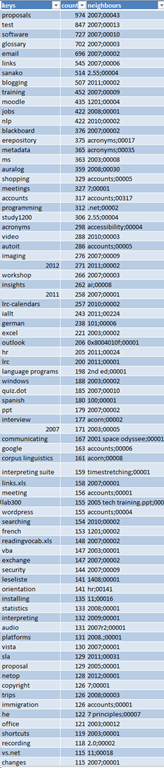
- Click the table of contents on the right to browse the VBA documentation built with Aivosto.


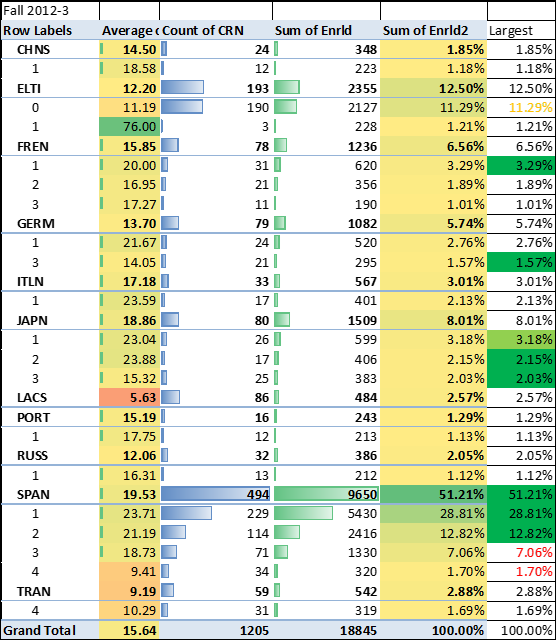
2012/3 enrolment per language in the main LRC constituent departments (LCS and ELTI)
2013/01/24
Leave a comment
How students can record their picture or photo presentations with PowerPoint 2010
2013/01/17
Leave a comment
- The screencast shows the necessary steps:

- inserting a photo album,
- presenting while recording the presentation with narration
- saving as a show (.ppsx) – make sure you have ribbon:”Slide show”/ “Play narrations” checked:

- to prepare an assignment for a Moodle single-file-upload (How a student takes a Moodle Simple file upload assignment).

Categories: Arabic, assignments, audience-is-students, documentation, e-languages, English, Farsi, French, German, Greek (modern), Hebrew, Hindi, Italian, Japanese, Korean, Latin, Mandarin, multimedia-recording, office-software, Polish, Portuguese, recording-software, Russian, Screencasts, service-is-applying-learning-tools, Spanish, Speaking, Swahili, Yoruba
2010, ms-powerpoint, narration


Questions? Read the About. Or just ask me a quick Our Databases: Resources with calendars -- Language learning material Moodle Sites, multimedia files -- films


FAQs for LRC student staff or for students or for teachers. To search our FAQs, in the browser addressbar, add after "https://plagwitz.wordpress.com/feed/?tag=faqs+/" "+TAG1" (from tag cloud below) OR "https://plagwitz.wordpress.com/feed/tag=faqs
&category_name=" "CAT1" (from category hierarchy below). OR search both categories and tags, and multiple TAGs/CATs (connect with "," for OR-search, with "+" for AND-search), like so: https://plagwitz.wordpress.com/feed/?tag=TAG1+TAG2+...TAGn&category_name=CAT1
+CAT2+...CATn"
Other ways to find help
If you cannot find it here, look there: 5,500 Language-Learning Links and Programs for learning or teaching 150 languages
Shortcuts:Our Lists, Our Maps, LRC Staff Moodle Site,LRC Project Moodle Site, 49erexpress, UNCC Moodle, Student Recordings: s:claslcslrcsanakostudent
Learning usage samples: Sanako oral exam, Kaltura webcam presentation, Dictation with speech recognition, Sanako written exam, Chinese and Japanese interactive stroke-order practice
Test the Sanako Installer, Webbrowser Popup Konfigurator for XP, or Windows7, faster LRC TeacherPC Log-in Let MS facilitate diacritics writing by installing for you US-International keyboard layout
This is my personal blog (Google+). The views expressed on these pages are mine alone and not those of my employer. The information in this weblog is provided “AS IS” with no warranties, and confers no rights.
 Thomas' Work Space