Archive
Old new problem in Sanako Study 1200 version 7 with 2 student recorder exe’s running simultaneously on client, under different user accounts?
- –
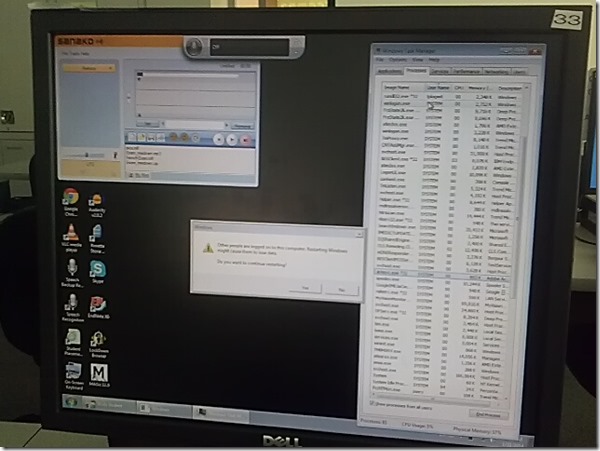
- This images is too low resolution, but I am trying to demonstrate that we still experience the same issue as in the fall: two users can be logged in simultaneously. In both cases ones was me. this can cause the language lab software to fail.
- If generally this is supposed to be prevented in our computing environment, what may be the root cause in these instances?
- I am pretty sure mstsc’ing has nothing to do with it. I do not remote into that PC usually.
- Is it possible for another user to log in when previous (administrative?) users got locked?

MS-Surface RT unboxing


Overview over speech recognition assignment possibilities in the LRC–from beginning to end
- UPDATE: now with more videos to watch.
- First switch languages, once you are in the right language:
- The speech recognition loads at startup with this window:

- or can be started from the desktop shortcut:

- To activate = make it start/stop listening, click on the microphone

- create and save individualized voice training data (only the first time you use speech recognition in the LRC),
- Watch how to train (for English, short 5 minutes);
- Watch how to back up/restore;
- beginner voice training example (long, before/after effect in speech recognition),
- homework assignment exercise design,
- Watch how (for English, with correction in MS-Word)
- dictation example.



“Server busy” dialogue on system startup and Speech recognition listening on by default
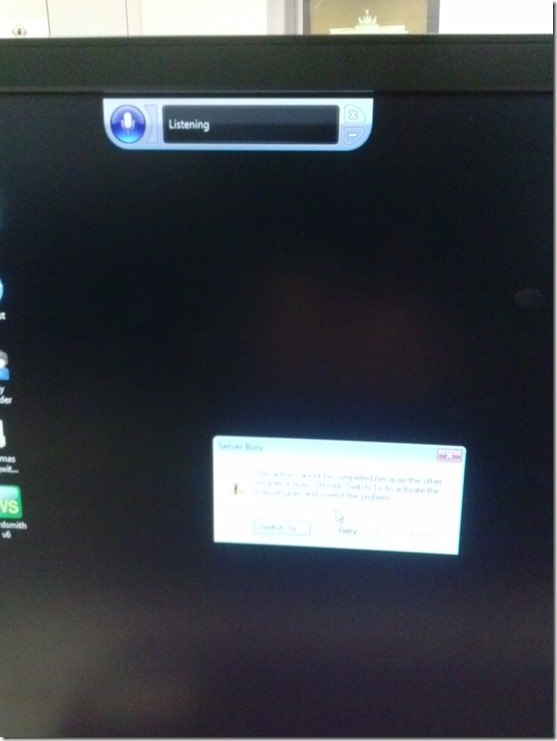
- How can one find the program that causes this error? It is not immediately obvious from the dialogue itself, including “Switch to”.
- Speech recognition should not be on (saying “listening”) by default (we have seen it freaking students out when it goes into command or typing mode).

How to move an invisible window back onto the screen in Windows
- Normally you would drag the window by its title bar into its position with the mouse – but if the window is off the screen, the mouse cannot access it.
- Here is how to use the keyboard arrow-keys to do the same, after right-clicking the window’s task bar icon:

- This example is with our Sanako student (a bug or misconfiguration we are investigating), but works with most windows on most versions of MS-Windows.

You can get the LRC’s keyboard shortcuts to write foreign language characters automatically installed on your home or office PC …
..if you click on Microsoft’s FixIt here: http://support.microsoft.com/kb/306560 (’nuff said elsewhere about US International keyboard layout) . Our British Friends seem to still type French, German, and Spanish accents the old tedious way. Maybe they find it too difficult to install the MS UK-International keyboard layout which takes care of most accents in all languages that use a Roman alphabet. I wish I could recommend them also a Microsoft FixIt installer which automatically enables the UK "international" keyboard layout option built-in to Windows. However, the FixIt version automated enablement seems only available for US International, not for UK international. If you want US International without manually configuring it (interactive video) , take advantage of MS FixIt by clicking here.
Basics of Windows Search (Windows Vista, probably Windows7) – in German
Ich könnte ohne die verbesserte Windows (als herunterladbares add-on auch für XP) Suche wohl noch leben (vegetieren! :-), aber nicht mehr arbeiten.
In MS-Vista (englisch, das müßt ihr selbst eindeutschen, aber meist gehen die die englischen Abkürzungen auch im deutschen Windows), im “control panel” kann man unter “indexing options” Feinheiten einstellen:

Man kann die Suchoptionen ändern, wenn man die “search tools” aufklappt:
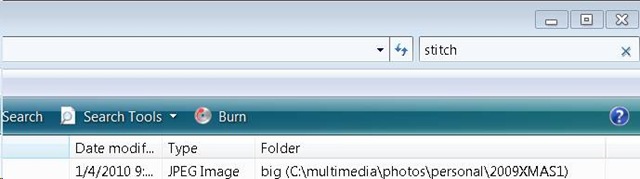
Wehttps://plagwitz.wordpress.com/wp-admin/post.php?post=6&action=editnn man mit windows taste + f eine neue Suche öffnet, hat man auch eine “Aufklappe” für “advanced search”:

Das sieht dann so aus :
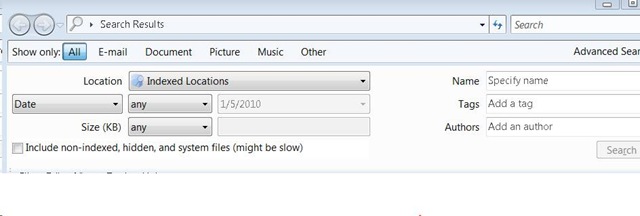
Sobald man zu faul wird, immer das Gui zu benutzen, kann man nach dem öffnen von windows-Taste + f in der Einzel-Suchzeile die “advanced syntax” (in der Hilfe dokumentiert) benutzen.
Die Abkürzungen, die ich am häufigsten benutze, sind ungefähr diese :
file:weihnachtsgeschenke ext:xls folder:myfiles date:>12/24/2009


Questions? Read the About. Or just ask me a quick Our Databases: Resources with calendars -- Language learning material Moodle Sites, multimedia files -- films


FAQs for LRC student staff or for students or for teachers. To search our FAQs, in the browser addressbar, add after "https://plagwitz.wordpress.com/feed/?tag=faqs+/" "+TAG1" (from tag cloud below) OR "https://plagwitz.wordpress.com/feed/tag=faqs
&category_name=" "CAT1" (from category hierarchy below). OR search both categories and tags, and multiple TAGs/CATs (connect with "," for OR-search, with "+" for AND-search), like so: https://plagwitz.wordpress.com/feed/?tag=TAG1+TAG2+...TAGn&category_name=CAT1
+CAT2+...CATn"
Other ways to find help
If you cannot find it here, look there: 5,500 Language-Learning Links and Programs for learning or teaching 150 languages
Shortcuts:Our Lists, Our Maps, LRC Staff Moodle Site,LRC Project Moodle Site, 49erexpress, UNCC Moodle, Student Recordings: s:claslcslrcsanakostudent
Learning usage samples: Sanako oral exam, Kaltura webcam presentation, Dictation with speech recognition, Sanako written exam, Chinese and Japanese interactive stroke-order practice
Test the Sanako Installer, Webbrowser Popup Konfigurator for XP, or Windows7, faster LRC TeacherPC Log-in Let MS facilitate diacritics writing by installing for you US-International keyboard layout
This is my personal blog (Google+). The views expressed on these pages are mine alone and not those of my employer. The information in this weblog is provided “AS IS” with no warranties, and confers no rights.
 Thomas' Work Space