Archive
Archive for the ‘training’ Category
Protected: How to boot to thawed or frozen, using Symantec-Ghost file action or Deepfreeze proper
2012/03/01
Enter your password to view comments.
Categories: e-infrastructure, training
faronics-deepfreeze, symantec-ghost
Screencasts for Spring 2012 Student Staff Workshop: LRC layout,, calendaring, tutoring, example Japanese
2012/02/05
Leave a comment
- Here are two screencasts of my presentation:
- one for the right screen/participant screen (using the Study1200 teacher to student screen casting). Requires Windows Media Player on PC, like in the LRC: download from MS-SkyDrive.
- one for the left screen/projector, where I displayed mostly a PowerPoint. You can watch this in parallel using another player, e.g. the VLC player, like in the LRC. However, it can also stream from MS-SkyDrive.
Screencasts for Fall 2011 Workshop: Computer classroom management in the LRC using Sanako Study 1200
2011/12/08
Leave a comment
- The workshop stayed “this side of the digital audio lab”, i.e. focused on those generic teaching tasks that the Sanako Study 1200 can facilitate which have the widest teaching application (including in, but also beyond language-skill-courses):
- remote controlling student computers,
- screen sharing, collaborating with students,
- launching applications on students computers,
- sending students to webpages,
- launching handout files to students and collecting their input back
- locking their computers, screens or keyboards,
- “clicker” classroom polls, for which I have written a PowerPoint Template you can base your own clicker-like face-to-face class exercises on.
- and more…
- Here are two screencasts of my presentation:
- one for the right screen/participant screen (using the Study1200 teacher to student screen casting). Requires Windows Media Player on PC, like in the LRC: download from MS-SkyDrive.
- one for the left screen/projector, where I displayed mostly a PowerPoint. You can watch this in parallel using another player, e.g. the VLC player, like in the LRC. However, it can also stream from MS-SkyDrive.
LRC assistant responsibilities: A checklist (on reception desk next to your screen)
2011/10/26
Leave a comment
For larger view, click “Full screen”windows in lower right corner. Mote that the sheet with LRC assistant responsibilities is handily posted right under your screen at your work station – refer to it as needed,

More SDL Trados Online Training
2011/10/25
Leave a comment
- Need to get up to speed with SDL technologies like Trados or MultiTerm in our translation programs, or recapitulate what you learnt for a job interview? We have recommended SDL’s online training archive before.
- Here are some highlights form their archive for our purposes:
- Translators’ Introduction to SDL Trados Studio 2009: Discover the key features and benefits of SDL Trados Studio 2009 for translators.
- A sneak peek at SDL Trados Studio 2011: Take a sneak peek at some of the new features in SDL Trados Studio 2011 before it is released this Autumn.
- Discover SDL Trados Studio 2009: Learn more about translation memory technology to help your translation projects get completed faster than ever before!
- SDL MultiTerm 2009 for Beginners: Join us for an overview of SDL MultiTerm 2009, the latest terminology management version.
- Introducing SDL Passolo 2011: Discover the exciting new features within this latest release of SDL Passolo.
- To view these webcasts, you will need their player.
Categories: training
cisco-webex, links, sdl-multiterm, sdl-passolo, sdl-trados
How to use the online Portuguese pronunciation help to generate phonetic alphabet transcriptions and text-to-speech
2011/10/20
1 comment
- Go to http://www.co.it.pt/~labfala/g2p/
- Write or paste your text into the textbox:“Grafemas”
- Choose your preferred phonetic alphabet (IPA, SAMPA) and other options.
- Press button: “Converter” to see results.
- Press button: “Sintetizar” to hear results.
- Like so:
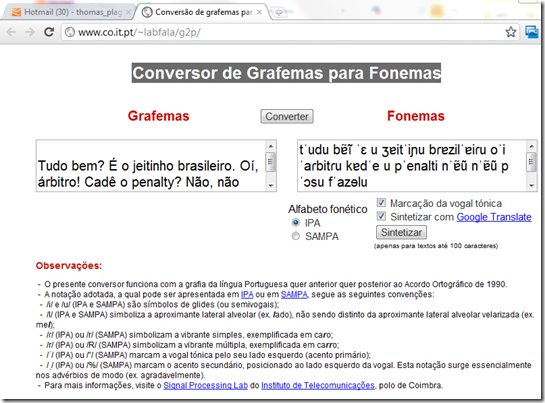
- Or click here to view a demo (requires Windows Media Player) with audio (download requires Windows Media Player). Our example was:
- Input: Tudo bem? É o jeitinho brasileiro. Oí, árbitro! Cadê o penalty? Não, não posso faze-lo.
- Output: tˈudu bɐ̃ĩ ˈɛ u ʒɐitˈiɲu bɾɐzilˈɐiɾu oˈi ˈaɾbitɾu kɐdˈe u pˈenalti nˈɐ̃ũ nˈɐ̃ũ pˈɔsu fˈazɘlu



Questions? Read the About. Or just ask me a quick Our Databases: Resources with calendars -- Language learning material Moodle Sites, multimedia files -- films


FAQs for LRC student staff or for students or for teachers. To search our FAQs, in the browser addressbar, add after "https://plagwitz.wordpress.com/feed/?tag=faqs+/" "+TAG1" (from tag cloud below) OR "https://plagwitz.wordpress.com/feed/tag=faqs
&category_name=" "CAT1" (from category hierarchy below). OR search both categories and tags, and multiple TAGs/CATs (connect with "," for OR-search, with "+" for AND-search), like so: https://plagwitz.wordpress.com/feed/?tag=TAG1+TAG2+...TAGn&category_name=CAT1
+CAT2+...CATn"
Other ways to find help
If you cannot find it here, look there: 5,500 Language-Learning Links and Programs for learning or teaching 150 languages
Shortcuts:Our Lists, Our Maps, LRC Staff Moodle Site,LRC Project Moodle Site, 49erexpress, UNCC Moodle, Student Recordings: s:claslcslrcsanakostudent
Learning usage samples: Sanako oral exam, Kaltura webcam presentation, Dictation with speech recognition, Sanako written exam, Chinese and Japanese interactive stroke-order practice
Test the Sanako Installer, Webbrowser Popup Konfigurator for XP, or Windows7, faster LRC TeacherPC Log-in Let MS facilitate diacritics writing by installing for you US-International keyboard layout
This is my personal blog (Google+). The views expressed on these pages are mine alone and not those of my employer. The information in this weblog is provided “AS IS” with no warranties, and confers no rights.
 Thomas' Work Space