Archive
Bab.la.com: Arabic–English Online Dictionary
Bab.la features: easy lookup (1,2,3), and for each lemma: grammar information (4), synonyms (5, with lookup (6)), usage samples (7), pronunciation help (8: audio, but not IPA), reverse lookup (9).

And an example for the reverse lookup:  .
.
In short, this is a real dictionary, unlike Google Translate, which is amazing in itself, but often misused by language learners. Unlike Google Translate, Bab.la helps with lookup by Arabic letter, but does not come with a phonetic transliteration to make it usable with a Roman letters keyboard. Fortunately, the LRC features to phonetic transliterators integrated into Windows: MS-Maren and Google Arabic Input.
Protected: How teachers can share multimedia files unsuitable for the LMS on MS-SkyDrive
How a teacher can show a model student screen to other student computers in Sanako Study 1200–the ultimate training summary…

How a teacher can divide a class into groups, each sharing audio and one screen, in Sanako Study 1200–the ultimate training summary…
- … using animated GIFS
- make groups (=sessions) like shown here;
- share audio/screen within each group so that (ideal for enforcing oral communication during a shared computer task)
Which browser and operating system we could get which Moodle Kaltura webcam assignments to work in
Below please find our current (work in progress) test matrix. Use one of the combinations that worked (“YES”) to avoid problems when taking or grading webcam assignments (or come to the LRC where we set up a working combination). You can view your version of the Kaltura video player and of Adobe Flash by right-clicking on the Kaltura video window.
Protected: How you can speed up log-in on the LRC teacher computer at the beginning of your class
Multilingual WordNet search interface
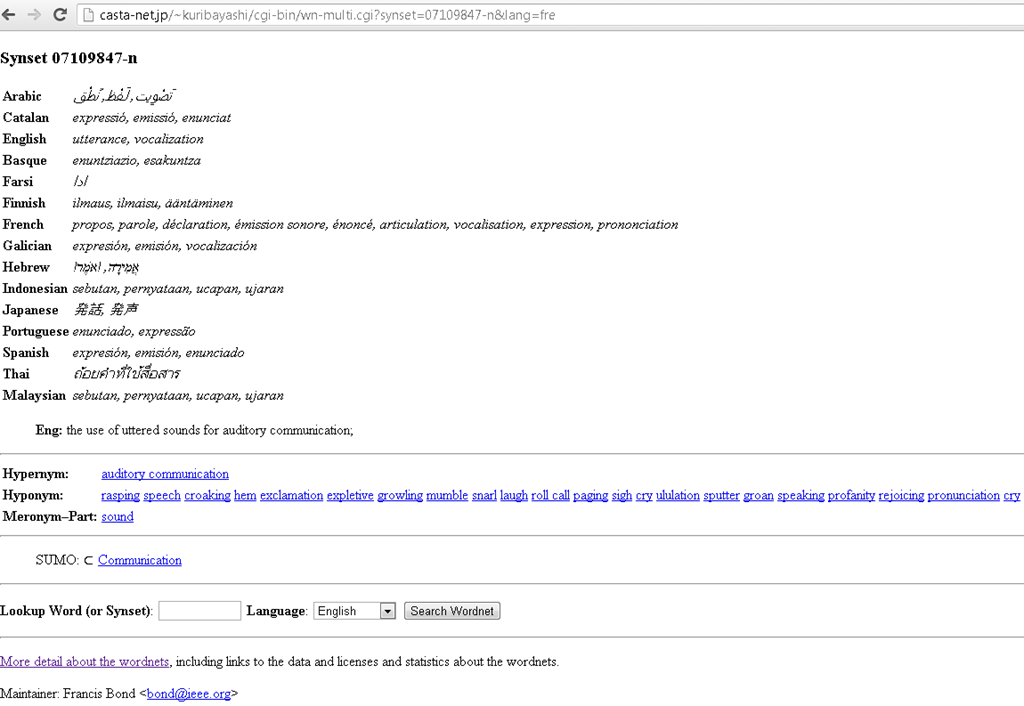
Covers a subset of the languages supported by the LRC. Based on Wordnet which is rather than a dictionary for human consumption, a machine-readable semantic network, but here is one of its machine-generated applications.
Protected: Block common translator, webmail and/or social web sites during LRC class by loading a RUL file in Sanako Study 1200


Questions? Read the About. Or just ask me a quick Our Databases: Resources with calendars -- Language learning material Moodle Sites, multimedia files -- films


FAQs for LRC student staff or for students or for teachers. To search our FAQs, in the browser addressbar, add after "https://plagwitz.wordpress.com/feed/?tag=faqs+/" "+TAG1" (from tag cloud below) OR "https://plagwitz.wordpress.com/feed/tag=faqs
&category_name=" "CAT1" (from category hierarchy below). OR search both categories and tags, and multiple TAGs/CATs (connect with "," for OR-search, with "+" for AND-search), like so: https://plagwitz.wordpress.com/feed/?tag=TAG1+TAG2+...TAGn&category_name=CAT1
+CAT2+...CATn"
Other ways to find help
If you cannot find it here, look there: 5,500 Language-Learning Links and Programs for learning or teaching 150 languages
Shortcuts:Our Lists, Our Maps, LRC Staff Moodle Site,LRC Project Moodle Site, 49erexpress, UNCC Moodle, Student Recordings: s:claslcslrcsanakostudent
Learning usage samples: Sanako oral exam, Kaltura webcam presentation, Dictation with speech recognition, Sanako written exam, Chinese and Japanese interactive stroke-order practice
Test the Sanako Installer, Webbrowser Popup Konfigurator for XP, or Windows7, faster LRC TeacherPC Log-in Let MS facilitate diacritics writing by installing for you US-International keyboard layout
This is my personal blog (Google+). The views expressed on these pages are mine alone and not those of my employer. The information in this weblog is provided “AS IS” with no warranties, and confers no rights.
 Thomas' Work Space