Archive
Archive for February, 2016
Extending an automated testing infrastructure through an Outlook Add-In to save, rename email attachments into a searchable archive
2016/02/29
Leave a comment
-
- Begin confronted with on average 250 daily emailed notification files per day, from varying sources – both custom test result messages and built-in default automation error messages –
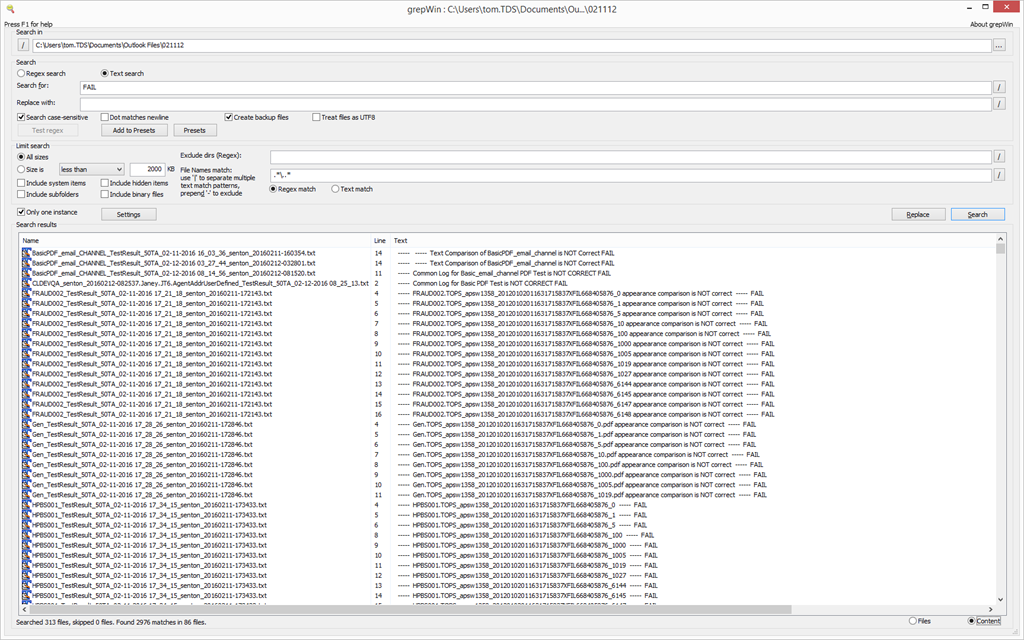
 I resorted to writing an outlook add-in that stores these attachments in a central repository that can be searched – both names following a more meaning full naming convention, and full text – with more powerful (regular expression capable) tools, like grepWin:

- The rules details evolved further, but here is an early version:
Public Sub SaveAttachmentsForSelectedMessagesToMyDocuments()
    Dim objOL As Outlook.Application
    Dim objMsg As Outlook.MailItem    'Object
    Dim objAttachments As Outlook.Attachments
    Dim objSelection As Outlook.Selection
    Dim I As Long
    Dim lngCount As Long
    Dim strFilePath As String
    Dim strFileName As String
    Dim strFolderPath As String
    Dim strDeletedFiles As String
    'add msgdate to atttachment
    Dim dtDate As Date
    Dim strFileExtendedName As String
    Dim strFileBasename As String
    Dim strExt As String
    Dim strSentTag As String
    Dim strSubject As String
    Dim strBody As String
    Dim strBasenamedate As String
    Dim strTESTCategory    'fail, warn, pass, finished=autom-error
    Dim allMatches As Object
    Dim objRE As Object
    Dim strTestnamefrombody As String

    ' Get the path to your My Documents folder
    strFolderPath = CreateObject("WScript.Shell").SpecialFolders(16)
    On Error Resume Next

    ' Instantiate an Outlook Application object.
    Set objOL = CreateObject("Outlook.Application")

    ' Get the collection of selected objects.
    Set objSelection = objOL.ActiveExplorer.Selection

    ' The attachment folder needs to exist
    ' You can change this to another folder name of your choice

    ' Set the Attachment folder.
    strFolderPath = strFolderPath & "\Outlook Files\"

    ' Check each selected item for attachments.
    For Each objMsg In objSelection 'msgs

        Set objAttachments = objMsg.Attachments
        lngCount = objAttachments.Count

        If (objMsg.SenderEmailAddress = "tdscautomation@gmail.com") And lngCount > 0 Then 'some other senders'mesages also end up in this folder
            strTESTCategory = ""
            strSourceCategory = ""
            Set objRE = CreateObject("vbscript.regexp")
            objRE.Global = True
            objRE.IgnoreCase = False
            objRE.Pattern = "(WARN|FAIL|PASS|finished)"    'ex: Testing Anywhere finished executing the test. / Version 5.2.1068 :- SQL03_TA_50 - STATUS= WARN / Version 5.2.1068 - System Tests - STATUS = PASS
            Set allMatches = objRE.Execute(objMsg.Subject)
            strTESTCategory = allMatches.Item(0).SubMatches.Item(0) + "~"

            objRE.Pattern = "(System|SQL03)"    'ex: Testing Anywhere finished executing the test. / Version 5.2.1068 :- SQL03_TA_50 - STATUS= WARN / Version 5.2.1068 - System Tests - STATUS = PASS / Version 5.2.1068 :- SQL03_TA_50 - STATUS= FAIL
            Set allMatches = objRE.Execute(objMsg.Subject)
            strSourceCategory = allMatches.Item(0).SubMatches.Item(0)
            If (LCase(strSourceCategory) = "system") Then
                strSourceCategory = "Server~"
            End If
            If (LCase(strSourceCategory) = "sql03") Then
                strSourceCategory = "Thinclient~"
            End If
            If (LCase(strSourceCategory) = "") Then
                strSourceCategory = "Testany~" ' correct: Testany~finished~Variable~sent-on~2016-02-12_18-39-21.txt
            End If

            objRE.IgnoreCase = True

            strSubjectOri = objMsg.Subject
            Debug.Print strSubjectOri

            For I = lngCount To 1 Step -1    'attachments
                ' Get the file name and other naming components for this attachment
                strFileName = objAttachments.Item(I).FileName
                strFileBasename = Mid(strFileName, 1, InStr(1, strFileName, ".") - 1)
                'Debug.Print strFileBasename
                strExt = Mid(strFileName, InStrRev(strFileName, "."), Len(strFileName))
                strBody = objMsg.Body
                dtDate = objMsg.SentOn    'add the msg date, to prevent overwriting undated files like testsuite.txt
                strSentTag = "~sent-on~" & Format(dtDate, "yyyy-mm-dd", vbUseSystemDayOfWeek, vbUseSystem) & "_" & Format(dtDate, "hh-mm-ss", vbUseSystemDayOfWeek, vbUseSystem)
                'excel can parse this date fromat to dtm , but not the time (all supported have chars illegal in filenames) - so go for sort and use excvel formula
                strSubject = ""    ' only 1 subject per message, but we don't check it for each attachment, and want it empty for some
                strBasenamedate = ""
                strTestnamefrombody = ""

                If (LCase(strExt) = ".zip") Then    'QA zip attachments don't indicate test script and date: we add from the subject (which does indicate) and msg
                    strSubject = Trim(strSubjectOri)
                    'strFileExtendedName = strSubject + strFileBasename + strSentTag + strExt
                Else
                    If (LCase(strExt) = ".txt") Then
                        If (LCase(strFileBasename) = "testsuite") Then    ' ex: attachment testsuite.txt"
                            'add no test name, since testsuite = summary for all tests
                            'add an extra ~ delimiter for excel column
                            'strSentTag = "~" + strSentTag
                            'todo: have to temp revert to regular send tag until i have more info about testsuite
                            'totest: sort by date asc: does not seem to work eith,er however, the testsuite is a mess anyway
                            'noworkie, saves from newest: so that most recent suite.txt overwrites previous summaries for this day (requires order by receiveddate desc display in outlook which is the norm)
                            'strFileExtendedName = strFileBasename + strSentTag + strExt
                            strSentTag = "~~sent-on~" & Format(dtDate, "yyyy-mm-dd", vbUseSystemDayOfWeek, vbUseSystem)    'using different strSentTag
                        Else    'not testsuite, but txt -> might (variable.txt) have a testname in the subject - split the tesname  out from what follows it
                        'todo: still
                            objRE.Pattern = "\_(January|February|March|April|May|June|July|August|September|October|November|December|\d{2,}\-)"    'need only start of datestring, for prepending delimiter
                            'done: not matching , is htis the inputSMAP_TestResult_50TA_02-07-2016_23_53_04

                            'no consistent formatmask: ex: SCE_OA_TestResult_50TA_02-11-2016_03_10_26
                            'BasicPDF_TestResult_50TA_01-04-2016 11_57_03.txt
                            'ST_HistoryTabs1_TestResult_SQL03_TA_50_January042016.txt
                             'ex: Testing Anywhere finished executing the test. / Version 5.2.1068 :- SQL03_TA_50 - STATUS= WARN / Version 5.2.1068 - System Tests - STATUS = PASS
                            Set allMatches = objRE.Execute(strFileBasename)
                            strBasenamedate = allMatches.Item(0).SubMatches.Item(0)
                            If (Len(strBasenamedate) > 0) Then strFileBasename = Replace(strFileBasename, "_" + strBasenamedate, "~" + strBasenamedate)  'todo:hack, use regex

                        End If
                    Else
                        If (LCase(strExt) = ".jpg") Then
                            If (LCase(strFileBasename) = "gogreen") Then    ' we know already, TU
                                GoTo NextIteration:    ' not having continueloop considered harmful
                            End If
                            'we do not seem to receive other jpg's?
                        Else
                            If (LCase(strExt) = ".png") Then
                                'TA's automation failure attachments have no originating script in filename, but the message body contains it
                                objRE.Pattern = "Test Name\s+:\s+(\S+)"    'ex: Test Name : Top10_INFO001.tamx
                                Set allMatches = objRE.Execute(strBody)
                                If allMatches.Count  0 Then
                                    strTestnamefrombody = allMatches.Item(0).SubMatches.Item(0)
                                End If
                            End If
                        End If
                    End If
                End If

                'components only initialized as "" will output nothing
                'prefer to add senton to all txt since even the ones that have a date have a hard to read/sort format mask
                ' add ~ as delimiters for  later parsing
                If (Len(strTestnamefrombody) > 0) Then
                    strTestnamefrombody = strTestnamefrombody + "~"
                End If
                If (Len(strSubject) > 0) Then
                    strSubject = strSubject + "~"
                End If
                strFileExtendedName = strSourceCategory + strTESTCategory + strTestnamefrombody + strSubject + strFileBasename + strSentTag + strExt
                strFileExtendedName = Replace(Replace(Replace(Replace(Replace(Replace(Replace(Replace(Replace(Replace(Replace(Replace(Replace(Replace(strFileExtendedName, "/", "_"), "\", "_"), "|", "_"), "", "_"), ":", "_"), "*", "_"), "?", "_"), """", "_"), "''", "_"), ",", "_"), " ", "_"), "__", "_"), "__", "_")
                ' Combine with the path to the folder.
                strFilePath = strFolderPath & strFileExtendedName
                If Dir(strFilePath) Then
                    If (FileLen(strFilePath) > objAttachments.Item(I).Size) Then
                    'todo: save attachment to temporary file  to compare sizes properly: keep only the largest = most recent one of undated files - should apply only testsuite.txt
                    Else
                    objAttachments.Item(I).SaveAsFile strFilePath
                    End If
                Else
                ' Save the attachment as a file.
                objAttachments.Item(I).SaveAsFile strFilePath
                End If
                'Debug.Print strFilePath + vbCrLf

NextIteration:
            Next I    'attachment
        End If 'if attachments
    Next    'message

ExitSub:

    Set objAttachments = Nothing
    Set objMsg = Nothing
    Set objSelection = Nothing
    Set objOL = Nothing
    Set objRE -= Nothing
End Sub
Categories: service-is-programming
automation-anywhere, ms-outlook, testing-anywhere, VBA


Questions? Read the About. Or just ask me a quick Our Databases: Resources with calendars -- Language learning material Moodle Sites, multimedia files -- films


FAQs for LRC student staff or for students or for teachers. To search our FAQs, in the browser addressbar, add after "https://plagwitz.wordpress.com/feed/?tag=faqs+/" "+TAG1" (from tag cloud below) OR "https://plagwitz.wordpress.com/feed/tag=faqs
&category_name=" "CAT1" (from category hierarchy below). OR search both categories and tags, and multiple TAGs/CATs (connect with "," for OR-search, with "+" for AND-search), like so: https://plagwitz.wordpress.com/feed/?tag=TAG1+TAG2+...TAGn&category_name=CAT1
+CAT2+...CATn"
Other ways to find help
If you cannot find it here, look there: 5,500 Language-Learning Links and Programs for learning or teaching 150 languages
Shortcuts:Our Lists, Our Maps, LRC Staff Moodle Site,LRC Project Moodle Site, 49erexpress, UNCC Moodle, Student Recordings: s:claslcslrcsanakostudent
Learning usage samples: Sanako oral exam, Kaltura webcam presentation, Dictation with speech recognition, Sanako written exam, Chinese and Japanese interactive stroke-order practice
Test the Sanako Installer, Webbrowser Popup Konfigurator for XP, or Windows7, faster LRC TeacherPC Log-in Let MS facilitate diacritics writing by installing for you US-International keyboard layout
This is my personal blog (Google+). The views expressed on these pages are mine alone and not those of my employer. The information in this weblog is provided “AS IS” with no warranties, and confers no rights.
 Thomas' Work Space