Archive
OneNote “absolutely loved by everyone who uses it” according to LifeHacker
 Microsoft’s note-taking application OneNote is one of those apps no one really talks about much, but is absolutely loved by everyone who uses it. Heck, you guys even voted it your favorite outlining tool, personal project management tool, and minutes meeting service, not to mention third place for best note taking app. It’s available for a ton of platforms, too (despite it being part of Microsoft Office), so if you’re finding that Evernote just isn’t quite powerful enough for your organizational needs, give OneNote a shot—you might be surprised at everything it can do given its lesser-known status.” (Onenote makes #1 of Top 10 Underhyped Windows Apps, via OneNote Testing). Now how to spread that love?
Redeemed my SkyDrive Enthusiast Bonus
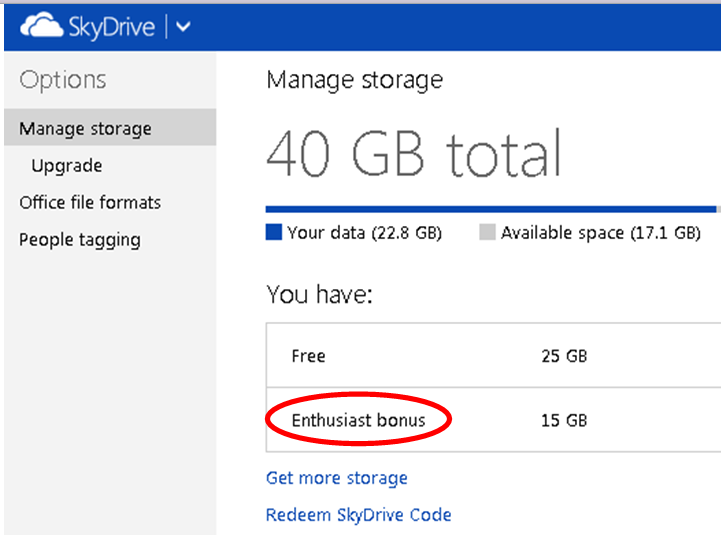
Nice, and just in time as I am running out of free space for photos. Guess I would not have qualified in the first place if I did not post such stuff here.
BTW, MS: I am also an Azure Enthusiast… 
Protected: Listening station booths need fixing
How a teacher can show a model student screen to other student computers in Sanako Study 1200–the ultimate training summary…

How a teacher can divide a class into groups, each sharing audio and one screen, in Sanako Study 1200–the ultimate training summary…
- … using animated GIFS
- make groups (=sessions) like shown here;
- share audio/screen within each group so that (ideal for enforcing oral communication during a shared computer task)
How to batch-produce animated-GIFs in different speeds
As a little time saver, here is a program (64bit) that automates animated-GIF production with the free UnFreez (a bit hairy to control from AutoIT, hence the mouse-moves) for a dozen or so different speeds. Decompile if you need to adjust it, otherwise no AutoIT software is needed. All other prerequisites are explained in the startup dialogue, rename the dummy output files to your liking.
Which browser and operating system we could get which Moodle Kaltura webcam assignments to work in
Below please find our current (work in progress) test matrix. Use one of the combinations that worked (“YES”) to avoid problems when taking or grading webcam assignments (or come to the LRC where we set up a working combination). You can view your version of the Kaltura video player and of Adobe Flash by right-clicking on the Kaltura video window.


Questions? Read the About. Or just ask me a quick Our Databases: Resources with calendars -- Language learning material Moodle Sites, multimedia files -- films


FAQs for LRC student staff or for students or for teachers. To search our FAQs, in the browser addressbar, add after "https://plagwitz.wordpress.com/feed/?tag=faqs+/" "+TAG1" (from tag cloud below) OR "https://plagwitz.wordpress.com/feed/tag=faqs
&category_name=" "CAT1" (from category hierarchy below). OR search both categories and tags, and multiple TAGs/CATs (connect with "," for OR-search, with "+" for AND-search), like so: https://plagwitz.wordpress.com/feed/?tag=TAG1+TAG2+...TAGn&category_name=CAT1
+CAT2+...CATn"
Other ways to find help
If you cannot find it here, look there: 5,500 Language-Learning Links and Programs for learning or teaching 150 languages
Shortcuts:Our Lists, Our Maps, LRC Staff Moodle Site,LRC Project Moodle Site, 49erexpress, UNCC Moodle, Student Recordings: s:claslcslrcsanakostudent
Learning usage samples: Sanako oral exam, Kaltura webcam presentation, Dictation with speech recognition, Sanako written exam, Chinese and Japanese interactive stroke-order practice
Test the Sanako Installer, Webbrowser Popup Konfigurator for XP, or Windows7, faster LRC TeacherPC Log-in Let MS facilitate diacritics writing by installing for you US-International keyboard layout
This is my personal blog (Google+). The views expressed on these pages are mine alone and not those of my employer. The information in this weblog is provided “AS IS” with no warranties, and confers no rights.
 Thomas' Work Space