Archive
Archive for May, 2011
Calendaring: How teachers can reserve the LRC for classes and schedule tutors in the LRC
2011/05/05
Leave a comment
- This is obsolete from Fall 2011, please view instead https://plagwitz.wordpress.com/2011/08/31/the-new-way-of-booking-lrc-rooms-and-equipment-from-fall-2011/.
- You may already collect calendars in one place to stay on top of your course calendars in Moodle and of your non-teaching-related university or departmental activities.
- Now you can do the same with the schedules of LRC rooms and “human resources” (tutors, LRC assistants, the director free/busy schedule is also available – equipment checkout remains to be solved!): We have added new calendars to the LRC public information and moved them into our newly upgraded MS-Exchange infrastructure.
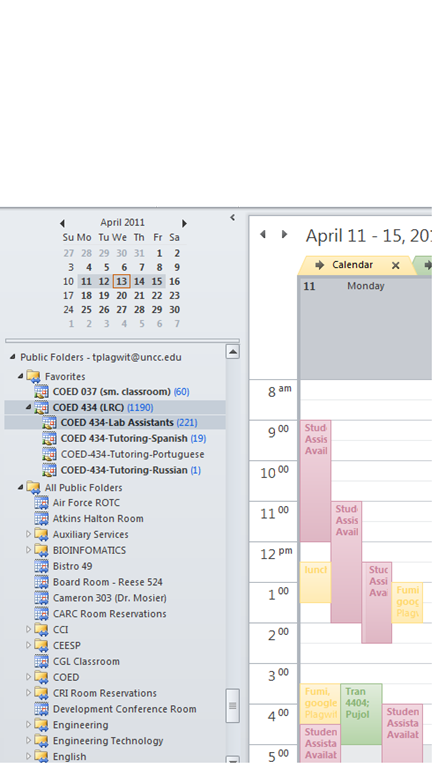
- Short answer: In Outlook (desktop, OWA may vary), go to Folder view / Public Folders / Languages / Coed 037 and Coed 434, with sub-calendars. Make any calendar you need a favorite (or in the dialogue (show below) “Add favorites” for Coed434, check “Add all subfolders”) . In Calendar view, show the calendar by adding a check to the checkbox in front of it. Add and edit your (recurring) appointments as on your personal calendar.
- For class reservation, put class number and activity in the Subject field. Put in the notes field sensitive information which you do not want to put on the WWW, as well as, if you need our support, details of technology activities planned and student numbers that need computers and headsets.
- For tutor scheduling, we have one schedule per language being tutored. Protect the tutor privacy by using the notes field for personal information. Use the Outlook recurrence options as a time-saver (just delete individual exceptions instead of the entire series).
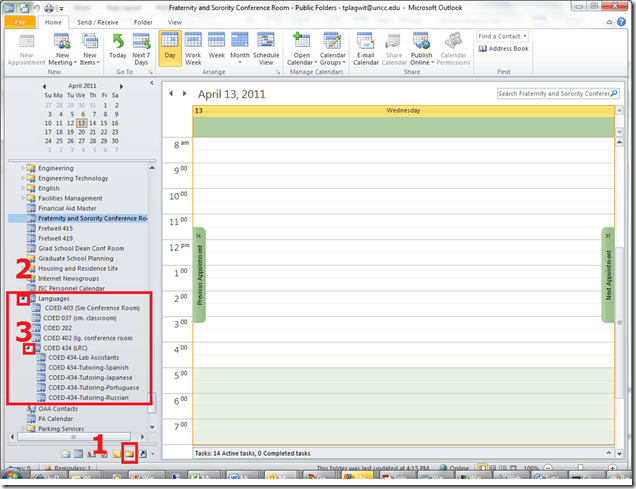
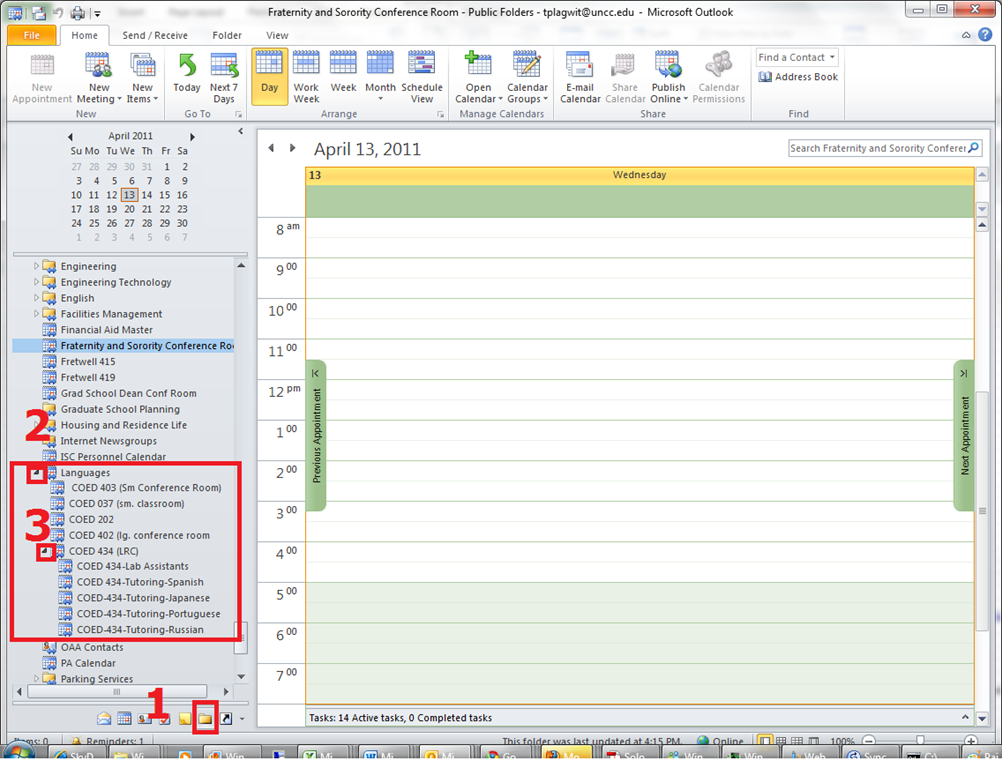
- More detail: You can access the calendar from 1. Folder view, 1a (not shown) Public Folders, 2. Languages and 3: Coed434, like you see here:
- I recommend adding them to your calendar favorites for easier management, like so:


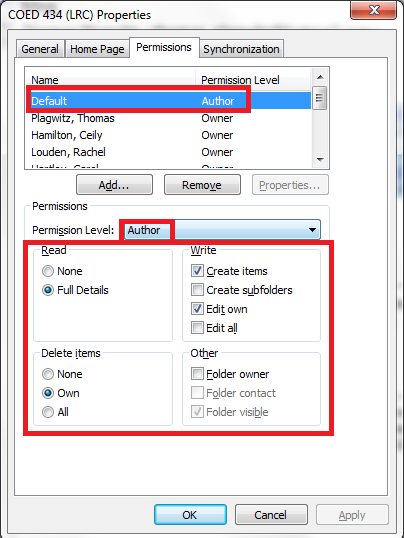
- Per default, you can see and edit (problems? request access) the LRC calendars in the Outlook "Public Folders" under "LRC", as the permissions dialogue below shows:


Categories: e-infrastructure
calendaring, LRC-website, tutoring
How to conduct an easy oral exam with Sanako Study-1200 (Model imitation/Question Response) – Part I: The exam administrator’s perspective
2011/05/04
Leave a comment
This 7-minute screencast explains how to operate the Study-1200 software interface to administer an oral exam, using as audio source the teacher, providing cues live:
- 0:00: from selecting the activity and program source,
- 1:50: over start and use of the autoscan screen control feature to monitor both audio and screen of the examined students
- 3:45: to ending the exam and automatic collection of the exam files.
For an implementation during an actual class-wide oral exam, see Part II of the Study-1200 oral exam.
Protected: How to conduct an easy oral exam with Sanako1200 (Model imitation/Question Response) – Part II: Implementation/instruction of examined students
2011/05/04
Enter your password to view comments.
Categories: all-languages, Arabic, assessments, audience-is-teachers, classroom-management-system, e-languages, English, Farsi, French, German, Greek (modern), Hindi, Institution-is-Aston-University, Italian, Japanese, Korean, Latin, learning-materials, learning-usage-samples, Mandarin, multimedia-recording, Polish, Portuguese, Presenter-Computer, Russian, Spanish, Speaking, Student-Computers, Swahili, Videos, Yoruba
interpreting, model-imitation, oral-exams, sanako-study-1200


Questions? Read the About. Or just ask me a quick Our Databases: Resources with calendars -- Language learning material Moodle Sites, multimedia files -- films


FAQs for LRC student staff or for students or for teachers. To search our FAQs, in the browser addressbar, add after "https://plagwitz.wordpress.com/feed/?tag=faqs+/" "+TAG1" (from tag cloud below) OR "https://plagwitz.wordpress.com/feed/tag=faqs
&category_name=" "CAT1" (from category hierarchy below). OR search both categories and tags, and multiple TAGs/CATs (connect with "," for OR-search, with "+" for AND-search), like so: https://plagwitz.wordpress.com/feed/?tag=TAG1+TAG2+...TAGn&category_name=CAT1
+CAT2+...CATn"
Other ways to find help
If you cannot find it here, look there: 5,500 Language-Learning Links and Programs for learning or teaching 150 languages
Shortcuts:Our Lists, Our Maps, LRC Staff Moodle Site,LRC Project Moodle Site, 49erexpress, UNCC Moodle, Student Recordings: s:claslcslrcsanakostudent
Learning usage samples: Sanako oral exam, Kaltura webcam presentation, Dictation with speech recognition, Sanako written exam, Chinese and Japanese interactive stroke-order practice
Test the Sanako Installer, Webbrowser Popup Konfigurator for XP, or Windows7, faster LRC TeacherPC Log-in Let MS facilitate diacritics writing by installing for you US-International keyboard layout
This is my personal blog (Google+). The views expressed on these pages are mine alone and not those of my employer. The information in this weblog is provided “AS IS” with no warranties, and confers no rights.
 Thomas' Work Space