Archive
Posts Tagged ‘backup’
How to use MS-Skydrive with your university account here
2012/11/29
Leave a comment
- One of the benefits of live@edu is institutional access to file storage space in the cloud. You need not set anything up for that. Just go to http://skydrive.com and log in with (1) your university account, here is what you get:
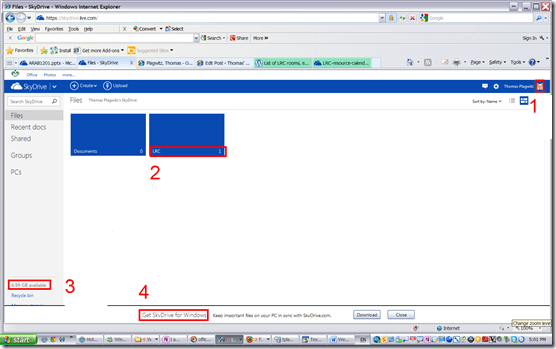
- You can create (or upload) folders and files (this one is from a long time ago, since I briefly could log in when live@edu was first introduced. Students always could log in).
- 7 GB of free space in the cloud should be plenty, including
- for teachers looking for a convenient way to bring files to the classroom beyond the limitations of the H: –drive “ My documents”
- for film students misplacing they backup hardware. No more hogging of checked out cameras just since you did not bring your portable hard drive. Just upload your clips to skydrive.com, access them from home.
- If you install the optional free Skydrive app (available ofr Windows Vista and up and MacOS X.7)
- the file size limit is expanded from 100MB to 2GB.
- files can be automatically synchronized between your classroom and home computer.
- To access files on classroom computers without the skydrive app, just use skydrive.com

How to recycle your Moodle Course using backup/restore
2012/08/20
Leave a comment
Better do this before the first day of classes, but if you need a quick refresher:

Sharing and reusing Moodle learning content using backup and restore, part I: Backup
2011/12/15
4 comments
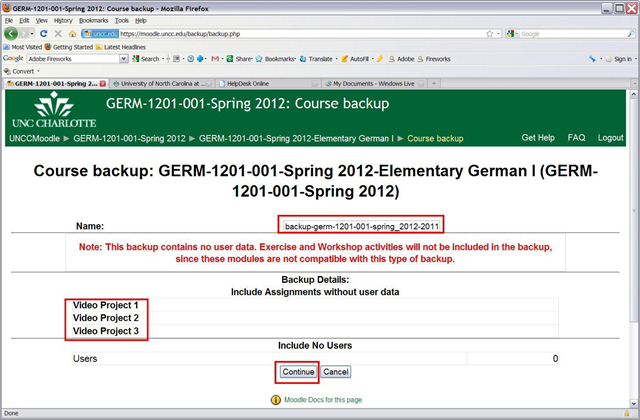
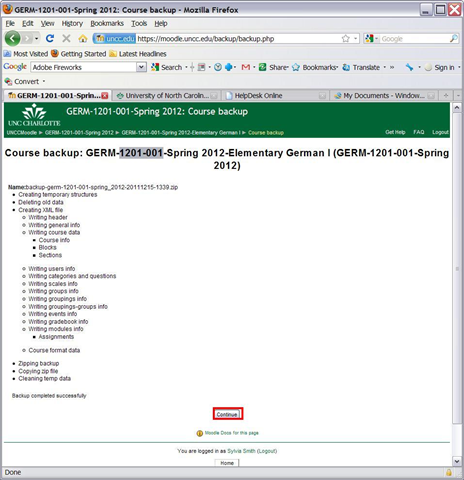
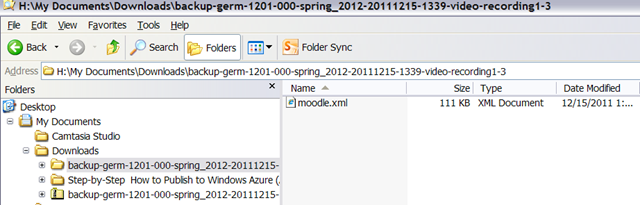
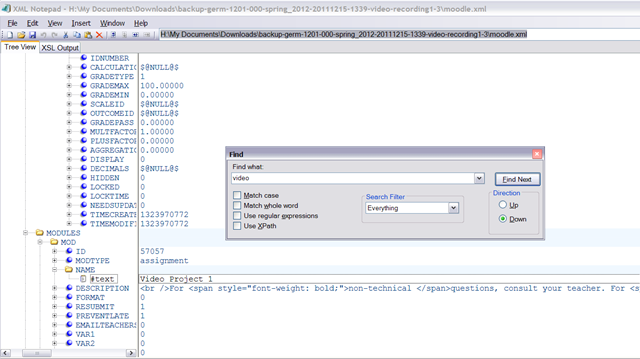
To reuse your own content, you can import. To use somebody else’s content, the other user can backup his content (even though not shown below, a subset of the content of a course can be chosen) and share (by downloading the file created within the course file area) the backup file with you (a zip-archive that contains an xml file), for the other user to restore. Like so: 




Questions? Read the About. Or just ask me a quick Our Databases: Resources with calendars -- Language learning material Moodle Sites, multimedia files -- films


FAQs for LRC student staff or for students or for teachers. To search our FAQs, in the browser addressbar, add after "https://plagwitz.wordpress.com/feed/?tag=faqs+/" "+TAG1" (from tag cloud below) OR "https://plagwitz.wordpress.com/feed/tag=faqs
&category_name=" "CAT1" (from category hierarchy below). OR search both categories and tags, and multiple TAGs/CATs (connect with "," for OR-search, with "+" for AND-search), like so: https://plagwitz.wordpress.com/feed/?tag=TAG1+TAG2+...TAGn&category_name=CAT1
+CAT2+...CATn"
Other ways to find help
If you cannot find it here, look there: 5,500 Language-Learning Links and Programs for learning or teaching 150 languages
Shortcuts:Our Lists, Our Maps, LRC Staff Moodle Site,LRC Project Moodle Site, 49erexpress, UNCC Moodle, Student Recordings: s:claslcslrcsanakostudent
Learning usage samples: Sanako oral exam, Kaltura webcam presentation, Dictation with speech recognition, Sanako written exam, Chinese and Japanese interactive stroke-order practice
Test the Sanako Installer, Webbrowser Popup Konfigurator for XP, or Windows7, faster LRC TeacherPC Log-in Let MS facilitate diacritics writing by installing for you US-International keyboard layout
This is my personal blog (Google+). The views expressed on these pages are mine alone and not those of my employer. The information in this weblog is provided “AS IS” with no warranties, and confers no rights.
 Thomas' Work Space