Archive
How to record a screencast and submit it to the Sanako teacher – the ultimate training…
…using animated GIFs. Slower? Click 0.50sec, 0.50sec, 0.75sec, 1sec, 2sec, 3sec, 4sec, 5sec, 6sec, 7sec, 8sec, 9sec, 10sec.

File renaming utilities
When working with foreign language (learning) digital media files electronic repositories, typical problems include having to:
- adding metadata information to the filename
- handling of foreign language characters in filenames across operating and file systems, including code pages
A good file renaming utility can work wonders in such situations.
I have been using the excellent BRU (Bulk rename utility) for a while, and always liked its flexibility – which is apparent from in its (initially somewhat intimidating) UI:

Now I found to my surprise, and confirmed with the help of the support forum, that the foreign language character support is lacking from BRU’s Regular Expression implementation.
Enter Renamer, another file renaming utility, which features a stable and beta version, pdf documentation and a wiki.
As you can see in the following screenshot, Renamer makes it possible, using Unicode character codes in Regular Expressions, to replace e.g. all Mandarin characters in a filename.

Renamer also has in-built support for common tasks like cleaning up filenames by stripping common tags, transliterating foreign alphabets or adding file numbering (serializing).
Both utilities are free and highly recommended, but also see TBA:part II for limitations.
UPDATE:

How to resolve error “Speech Recognition could not start because the language configuration is not supported”
- Problem: I have seen this error
 ,
, - Root cause: when the display language and speech language do not match (the latter is set to default to the former in the LRC, but it seems they can get out of sync), as you can witness here (English display does not match Chinese speech recognition):

- Solution: Follow the instructions in the error message, i.e.
- Access the Speech recognition control panel here:
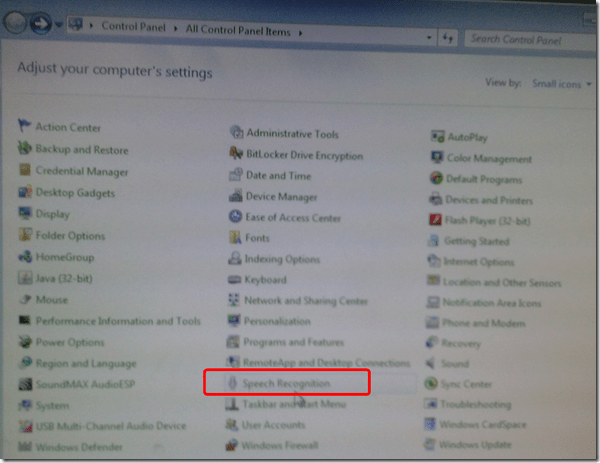
- Then change the speech recognition language to match the display language, like I am doing here:

- Quick workaround: Not sure about how quick, but in the LRC, you can also just try and restart the computers, they are “frozen” to a default configuration in display and speech recognition language (English/English – matches).


How students can manage sidetone manually
Sidetone echoes your voice from the microphone back into your headphone speakers. It makes wearing the headphones feel more natural, and lets you evaluate your pronunication better.
Until it is configured properly out of the box, to enable it, you have to:
Open sound settings: 
Check and Increase the sidetone volume until you can hear yourself talking well: 

Example 5: Watch how you can dictate to Windows speech-recognition (e.g. in English) and correct results in MS-Word

- Important: Listen carefully: I am not a native speaker, but have a reasonably low amount of errors, because it enunciate, speak clearly and slowly, and separate the words.
- Consider it part of the exercise that you will have to re-read and re-type some your output – use track changes in MS-Word:
- Make it a game: How good can you get?
- If you get really good at it, make a screencast like this one and include it in your Mahara ePortfolio as authentic evidence of your foreign language proficiency.
- Overall, it’s like how I refer to cycling: Beats walking. Anytime.

Sanako Student crashes on startup
- UPDATE: looking at the Saanko log files now.
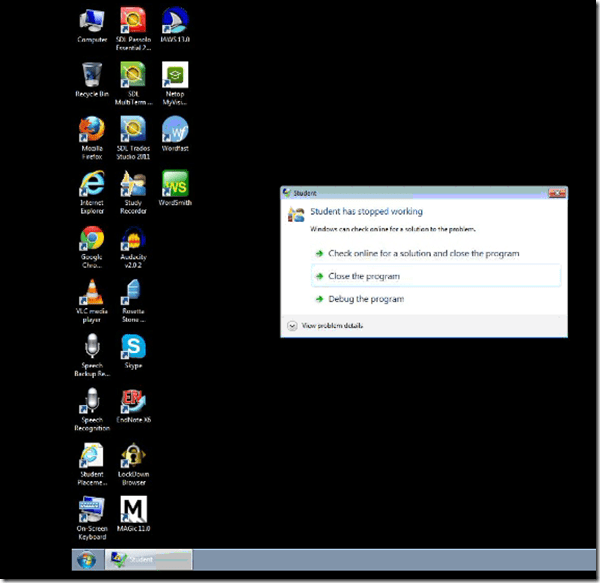
- PC24 and others during Chinese, and again (+ PC36) during Russian class –
- no details available
- is this specific to
- PCs (all imaged and frozen?), but different hardware (headsets?)
- logged in users?
- Workaround: “close the program” – helper.exe seems to autorestart the student.exe.


Questions? Read the About. Or just ask me a quick Our Databases: Resources with calendars -- Language learning material Moodle Sites, multimedia files -- films


FAQs for LRC student staff or for students or for teachers. To search our FAQs, in the browser addressbar, add after "https://plagwitz.wordpress.com/feed/?tag=faqs+/" "+TAG1" (from tag cloud below) OR "https://plagwitz.wordpress.com/feed/tag=faqs
&category_name=" "CAT1" (from category hierarchy below). OR search both categories and tags, and multiple TAGs/CATs (connect with "," for OR-search, with "+" for AND-search), like so: https://plagwitz.wordpress.com/feed/?tag=TAG1+TAG2+...TAGn&category_name=CAT1
+CAT2+...CATn"
Other ways to find help
If you cannot find it here, look there: 5,500 Language-Learning Links and Programs for learning or teaching 150 languages
Shortcuts:Our Lists, Our Maps, LRC Staff Moodle Site,LRC Project Moodle Site, 49erexpress, UNCC Moodle, Student Recordings: s:claslcslrcsanakostudent
Learning usage samples: Sanako oral exam, Kaltura webcam presentation, Dictation with speech recognition, Sanako written exam, Chinese and Japanese interactive stroke-order practice
Test the Sanako Installer, Webbrowser Popup Konfigurator for XP, or Windows7, faster LRC TeacherPC Log-in Let MS facilitate diacritics writing by installing for you US-International keyboard layout
This is my personal blog (Google+). The views expressed on these pages are mine alone and not those of my employer. The information in this weblog is provided “AS IS” with no warranties, and confers no rights.
 Thomas' Work Space