Archive
Archive for the ‘e-infrastructure’ Category
Can we get rid of Adobe Acrobat Reader’s Accessibility Setup Assistant dialogue?
2013/10/03
Leave a comment

For users not registered in AD as needing Accessibility this is distracting.
example os from the teacher station, assumed that is the same in the base image.
How you can report and get help with non-LRC-related computer issues
2013/10/02
Leave a comment
- First try to talk to temporary and permanent staff in the LRC. However, Computer issues that cannot be resolved within the LRC need to be reported to ITS – unless they are already known issues.
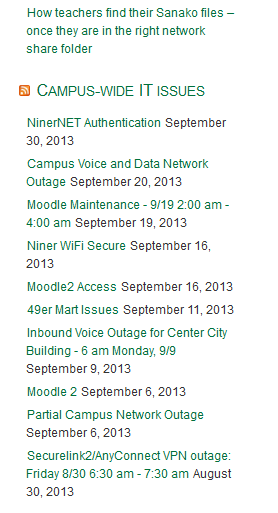
- To make it easy for you to check for known campus-wide issues, I added the ITS alerts to the bottom right of the LRC homepage (
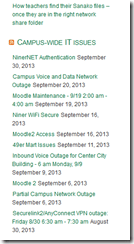 ). Depending on when this feed was last updated (simply refreshing the LRC homepage may NOT update it), you may also have to click on the title of this section, “Campus-wide IT issues”, to view the most recent updates.
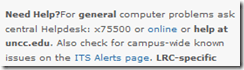
 - If you find out this way that need to report an issue to ITS, you can find ways to contact them in the upper right corner of my blog:

Student users in the wrong time zone still cause problems with our equipment circulation system
2013/09/30
Leave a comment
- Imagine you are trying to pick up an item on local time, but the previous users will return it on Japan time – or (like in the example below)`vice versa. It happens all the time here …
- We can see the misconfiguration when opening the meeting in Outlook (Desktop), but we rarely do this.

- What gets routinely done here is opening the meeting in the OWA of the organizer:
- is there an obvious way to see the time zone for the organizer?
- The best I have found is this, and it is anything but obvious, deeply hidden in the OWA settings dialogues. Any change with Office365?

How to get the model and serial number of your iMac
2013/09/24
Leave a comment
According to Apple, you can find it on the foot for the type of iMacs I have seen around here. 
Categories: audience-is-teachers, e-infrastructure, faculty-offices

Protected: Collaborating on and reusing teaching materials in the LRC
2013/09/17
Enter your password to view comments.
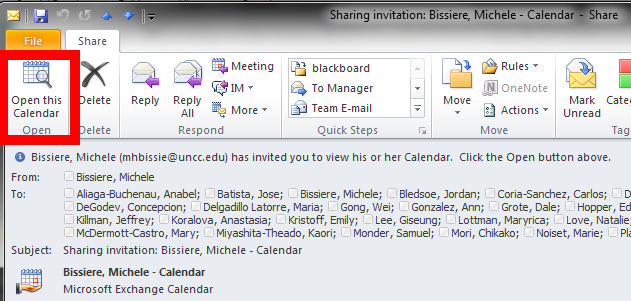
If you receive a calendar sharing invitation, click “Open the calendar”
2013/09/16
Leave a comment
- In Outlook (Desktop), like it says in the first item on the upper left:

- This will add the calendar to the list of calendars on the left of your Outlook, like so

- That is, if you do a calendar overlay, like so.



Questions? Read the About. Or just ask me a quick Our Databases: Resources with calendars -- Language learning material Moodle Sites, multimedia files -- films


FAQs for LRC student staff or for students or for teachers. To search our FAQs, in the browser addressbar, add after "https://plagwitz.wordpress.com/feed/?tag=faqs+/" "+TAG1" (from tag cloud below) OR "https://plagwitz.wordpress.com/feed/tag=faqs
&category_name=" "CAT1" (from category hierarchy below). OR search both categories and tags, and multiple TAGs/CATs (connect with "," for OR-search, with "+" for AND-search), like so: https://plagwitz.wordpress.com/feed/?tag=TAG1+TAG2+...TAGn&category_name=CAT1
+CAT2+...CATn"
Other ways to find help
If you cannot find it here, look there: 5,500 Language-Learning Links and Programs for learning or teaching 150 languages
Shortcuts:Our Lists, Our Maps, LRC Staff Moodle Site,LRC Project Moodle Site, 49erexpress, UNCC Moodle, Student Recordings: s:claslcslrcsanakostudent
Learning usage samples: Sanako oral exam, Kaltura webcam presentation, Dictation with speech recognition, Sanako written exam, Chinese and Japanese interactive stroke-order practice
Test the Sanako Installer, Webbrowser Popup Konfigurator for XP, or Windows7, faster LRC TeacherPC Log-in Let MS facilitate diacritics writing by installing for you US-International keyboard layout
This is my personal blog (Google+). The views expressed on these pages are mine alone and not those of my employer. The information in this weblog is provided “AS IS” with no warranties, and confers no rights.
 Thomas' Work Space