Archive
Treffpunkt Deutsch Companion Website with Online Exercises
- This first-year German textbook comes with a Companion Website with free online exercises, organized by chapter, on the publisher’s website (different from the Quia.com –based workbook and lab manual exercises).
- From the instructor guide: “The Companion Website is a robust online resource designed to give students a chance to practice and further explore the vocabulary, structures, and cultural themes introduced in the text. For each chapter, students will find self-grading practice exercises on vocabulary and grammar topics as well as Web-based reading and writing activities. Web links to carefully selected sites in Germany, Austria, Switzerland, Luxemburg, Liechtenstein, and South Tyrol (Italy), accompanied by interesting activities, provide additional interaction with the cultures of these German-speaking areas of Europe. Also available on the Website are the audio components of the Student Text and the SAM, as well as an interactive vocabulary flashcards tool. ”
- These exercises include vocabulary practice, even flash cards.
- The auto-correction feature provides:
- some useful feedback for further study,

- summary grades

- and an email to teacher function that should facilitate Syllabus integration of this useful resource:

- some useful feedback for further study,


Quia Options for Grading in course or book or exercise
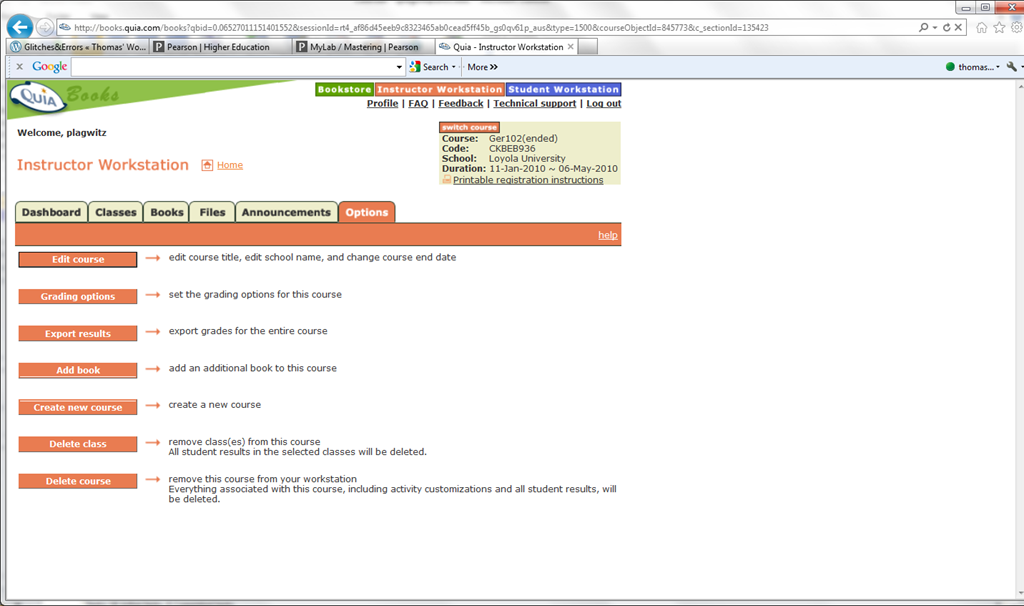
- The instructor workstation features prominently the tab : options.

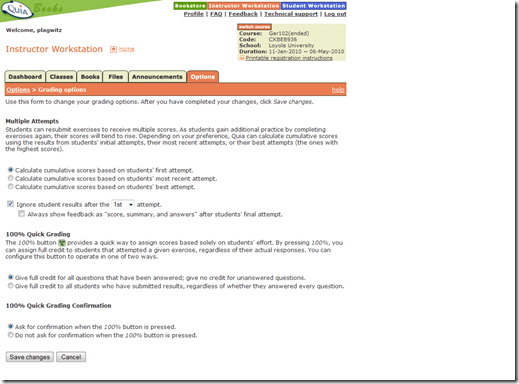
- if you go into grading, you see that not all options can be changed from here.
- However, when customizing your book, you may have already found the options next to each individual exercise that allow you to change Spelling/Case sensitivity

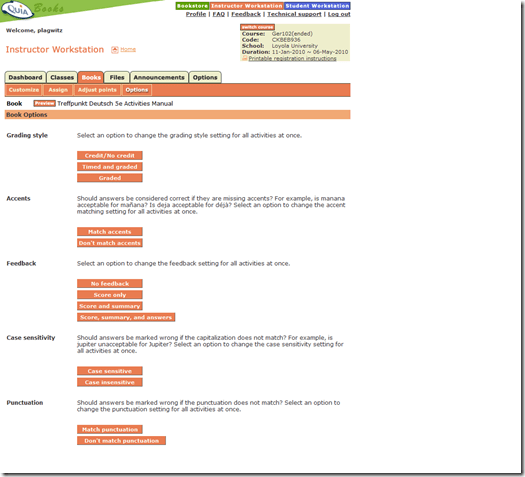
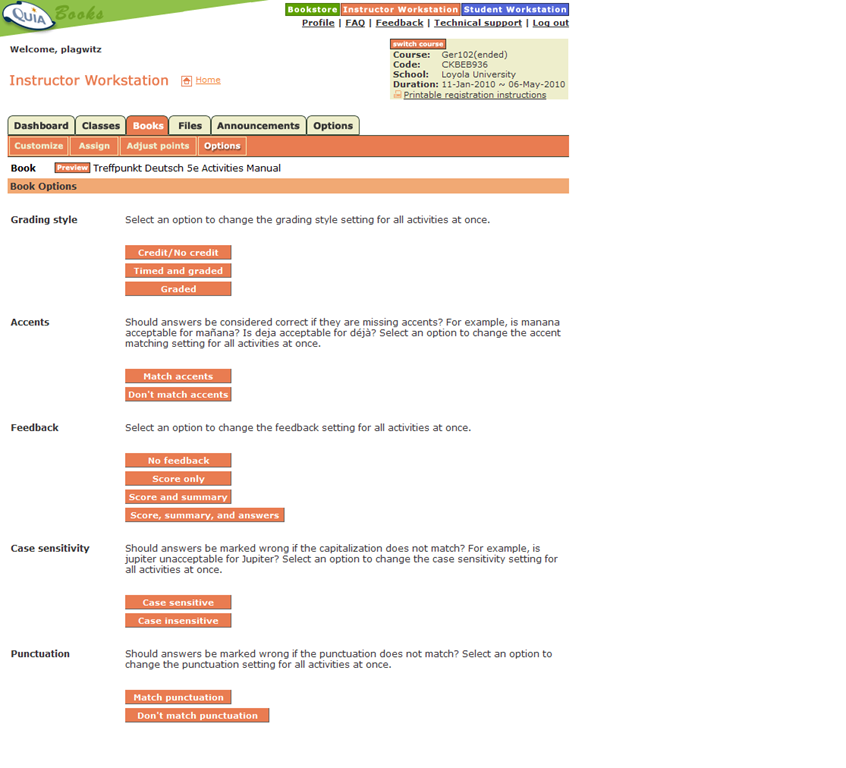
- However, if you go to the tab: book, you will find more options there, including how you can change Feedback and Spelling/Case sensitivity for the entire book instead of individual exercises:

Potential Moodle-compatible replacements for Wimba Voice
With the demise of Wimba Voice on campus, Languages and Culture Studies lost some of their online learning acitivities and are still looking for a replacement, perferably within Moodle.
I have looked through some options and would recommend the following applications for a test install:
1. NanoGong, free (as in kittens). More info here:
2. WebSwami, a language learning platform, not free, and can also record video, and do much more. More info here:
Introduction of NanoGong, free open source voice recorder for Moodle
- This is a brief summary outline of NanoGong (which has just been upgraded to version 4.1, which includes an installation file for our current Moodle version 1.9.8), would be a good audio recording add-on for language learning to install in our Moodle learning system. What follows is compiled from various online sources:
- “NanoGong is an applet that can be used by someone to record, playback and save their voice, in a web page. When the recording is played back the user can speed up or slow down the sound without changing it. The speeded up or slowed down version of the recorded sound can be saved to the user’s hard disk, if he/she wishes
- There are special features for programmers, such as the ability to show or hide parts of the NanoGong interface or to completely control what the applet does.
- The NanoGong applet has been released as an open source project since version 3. The picture below shows the NanoGong applet with all components shown. “
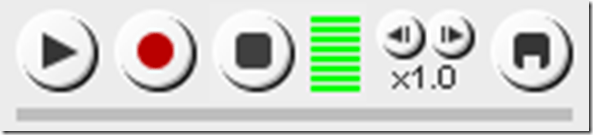
- “NanoGong provides a very simple and transparent voice support for Moodle. Using a NanoGong activity and a NanoGong filter NanoGong provides two different types of voice support for Moodle”:
- “An extended HTML editor which supports voice-enriched content”, “ enabling a voice recording option for virtually any Moodle activity entry that uses the wysiwyg toolbar”, as you can see here:

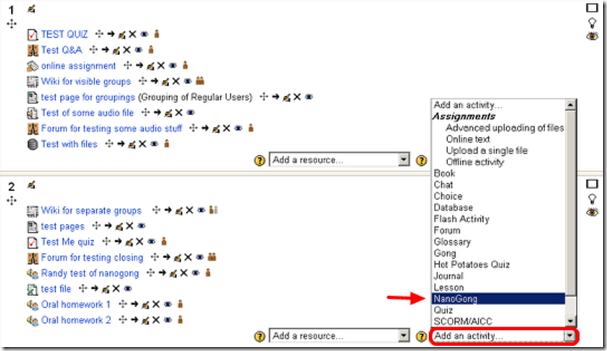
- ”A NanoGong activity which allows students to submit voice messages to their teachers”:
- Questions remain:
- You can customize the recorder applet: Need to check whether this includes the timestretching capability, given that language teachers can be averse to student-controlled,
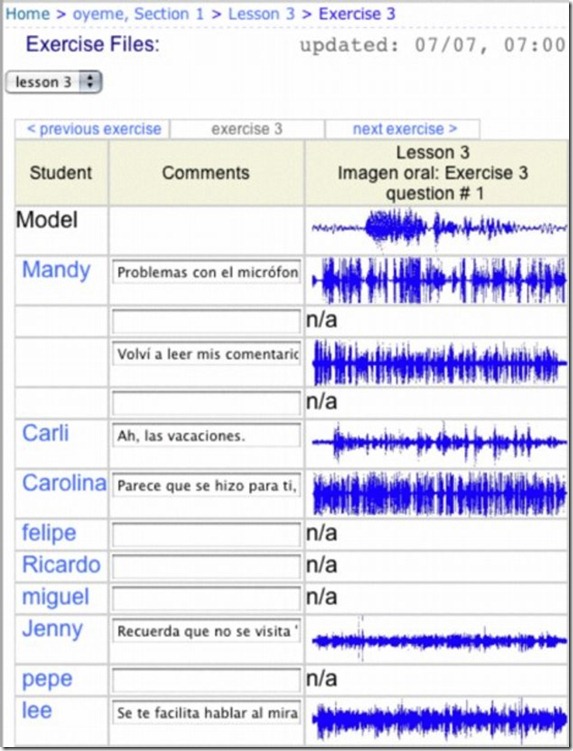
- Need to check for capability of downloading batches of submissions from the student class and grade it with time-saving techniques, like described here using Audacity. A more sophisticated example that testifies to the same features required to get graders adopt increasing audio student submissions was Web Audio Lab, an authoring system for developing interactive audio-based language courses (Language Resource Center, Cornell University. 2003-2007):

- How could one implement a dual-track recorder using NanoGong, with the program track providing aural cues for a more natural oral interaction?
- Requires JAVA (test compatibility).
- There is no Moodle 2.0 version yet.
- NanoGong seems “a derivative of the Gong standalone voice board” – without similar requirements and issues? Gong can also be integrated into Moodle, seems more advanced, but also much more difficult to implement (requires a tomkat server; problems have been reported with losing course deletion functionality in Moodle, the authentication pass-through not working from Moodle and the audio graph not working in Moodle).
- As with any open source project, there are some move Ifs.
- However, Nanogong seems the free audio recording plug-in for Moodle which is currently most favored.


Webswami, a Moodle-compatible language learning platform for self access (homework, asynchronous distance learning)
What about improving language learning through technology during homework activities?
“The greatest strength of WebSwami lies in the seamless support it provides for doing audio/visual-based tutorial activities within an existing course management system, thus allowing anywhere/anytime access for lesson designers, instructors, and students alike. Its student record keeping system, in particular the integration [duplication] of a grade book with direct access to student responses and the support it provides for multimedia response feedback, far surpasses what is available in any other virtual learning environment. Most important, it manages all of this through well established, reliable, web browser and Flash software coupled with ubiquitous, inexpensive web camera hardware.” (review by Jack Burston for CALICO (pay-link, ask me for access); see also also the freely accessible review by İlhan İnçay).
Authoring and managing authored materials is not an easy task, but gives more flexibility than using textbook provided materials. WebSwami promises the possibility of exchanging learning materials through a materials bank.
View a recording of a recent WebSwami Online Demo.
Example 8: Auralog Tell-Me-More Speech Recognition Test
How usable is the Auralog Speech Recognition for language learning? This test, by a non-native speaker of English, gives some authentic data points.

The test shows: Auralog Speech Recognition
- can be easily tripped up; however, by errors that a non-native language learner would not normally make
- more concerning is that the built-in AI, instead of e.g. escalating to additional feedback or help, like the pronunciation waveforms (which in itself seem to encourage only repeated attempts to mimic a given intonation, while not being fine-grained enough to spot mispronunciations on a word, let alone letter level) – lowers the requirements when a speaker repeatedly fails (which in extreme seems to amount to “waving through” any utterance).
- the preset dialogue – only few exercises including wrong answer options, most exercises testing only a comprehensible pronunciation of a given reading text which makes the exercise much easier for the built-in speech recognition, but also much less realistic and useful for a language learner (or more of a reading exercise).


Questions? Read the About. Or just ask me a quick Our Databases: Resources with calendars -- Language learning material Moodle Sites, multimedia files -- films


FAQs for LRC student staff or for students or for teachers. To search our FAQs, in the browser addressbar, add after "https://plagwitz.wordpress.com/feed/?tag=faqs+/" "+TAG1" (from tag cloud below) OR "https://plagwitz.wordpress.com/feed/tag=faqs
&category_name=" "CAT1" (from category hierarchy below). OR search both categories and tags, and multiple TAGs/CATs (connect with "," for OR-search, with "+" for AND-search), like so: https://plagwitz.wordpress.com/feed/?tag=TAG1+TAG2+...TAGn&category_name=CAT1
+CAT2+...CATn"
Other ways to find help
If you cannot find it here, look there: 5,500 Language-Learning Links and Programs for learning or teaching 150 languages
Shortcuts:Our Lists, Our Maps, LRC Staff Moodle Site,LRC Project Moodle Site, 49erexpress, UNCC Moodle, Student Recordings: s:claslcslrcsanakostudent
Learning usage samples: Sanako oral exam, Kaltura webcam presentation, Dictation with speech recognition, Sanako written exam, Chinese and Japanese interactive stroke-order practice
Test the Sanako Installer, Webbrowser Popup Konfigurator for XP, or Windows7, faster LRC TeacherPC Log-in Let MS facilitate diacritics writing by installing for you US-International keyboard layout
This is my personal blog (Google+). The views expressed on these pages are mine alone and not those of my employer. The information in this weblog is provided “AS IS” with no warranties, and confers no rights.
 Thomas' Work Space