Archive
Archive for February, 2012
Things you can try when having trouble playing video from the internet
2012/02/13
1 comment
There are several things you can try when having trouble playing video from the internet. I made a list here (less would be more, but hey, it’s computers, right?):
- Refresh the web page (f5 or ctrl-f5).
- Can you see an error message on the page itself? some video services prevent you from watching video abroad BBC iPlayer used to do this, since it is financed by fees of a local audience – so are ARD and ZDF, but they do not bother restricting by viewer location. However, they assume you are in Germany, and in their time zone, so they restrict you from watching the equivalent of R-rated content during daytime in Germany.
- Restart the web browser.
- Can your web browser play a video from a different website. Good candidates are Youtube.com (may be HTML5 delivered by now), hulu.com, ARD Mediathek if trying ZDF Mediathek or vice versa). Maybe your plug-in has crashed – try restarting your computer.
- Try a different web bowser (chrome, internet explorer, Firefox, safari, opera are all free downloads).
- Can you discern a notification bar on top of your web browser window telling you of an error or asking you to upgrade something?
- At this point it might be easier to come to the LRC and use what we maintain for you there, or, if you are trying to use your office computer, alter the helpdesk.
- Do you have to upgrade your video-plugin? Currently (before HTML5 delivered plug-in free video), most videos are plug-in based. search for adobe flash and MS-Silverlight upgrades.
- Do you have to upgrade your browser?
- Do you have to upgrade your operating system? your computer hardware? Let’s hope you do not get to here in this list…
Categories: audience-is-students, audience-is-teachers, e-infrastructure, Glitches&Errors, Media
FAQs, video
Nice Syntax highlighter tool from wisc.edu @ Madison
2012/02/10
Leave a comment
-
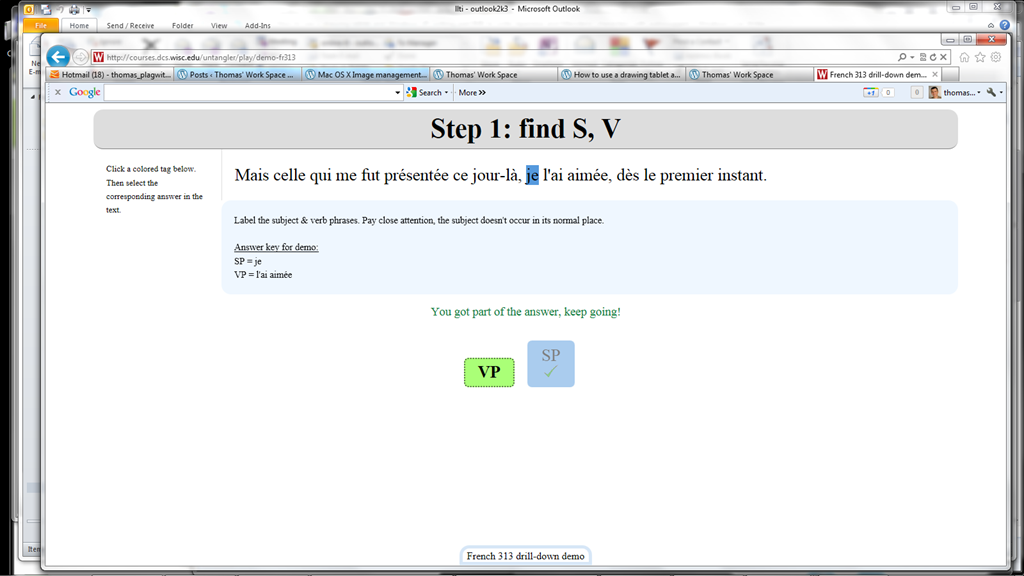
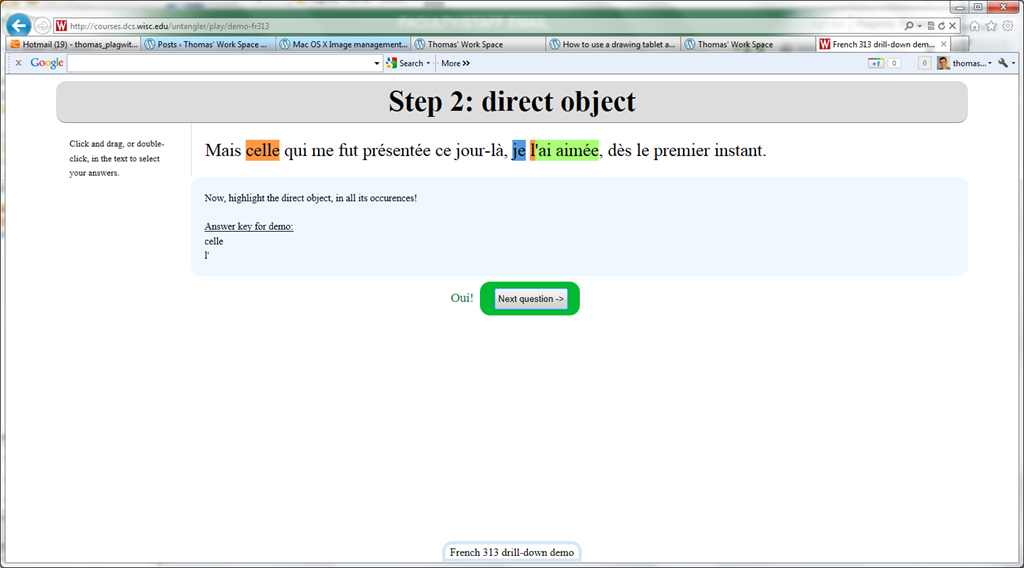
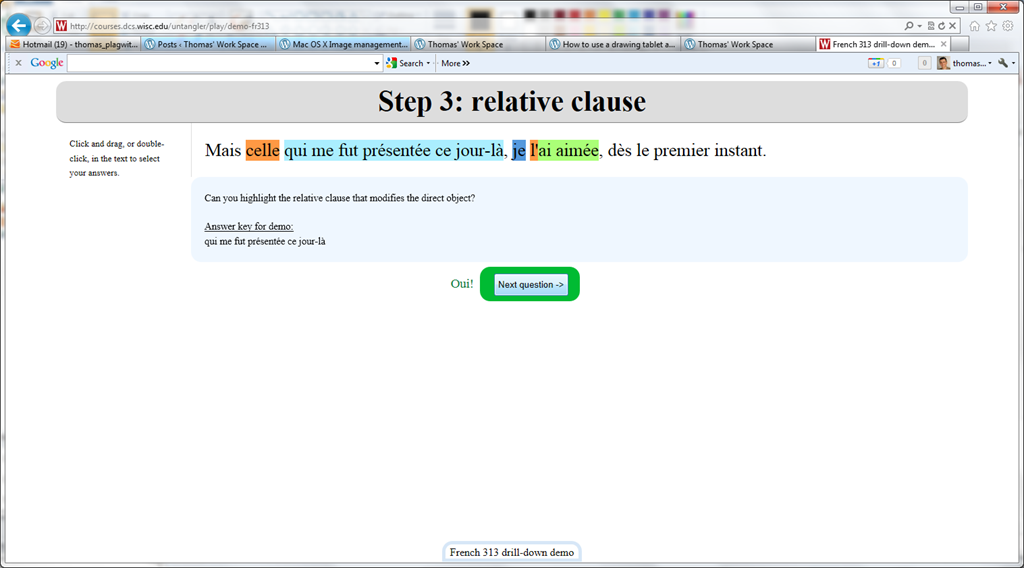
Wish my Latin teacher at home would have had such a nice tool when he analyzed the “Ante mare et terras et quod tegit omnia caelum / unus erat toto naturae vultus in orbe / quem dixere chaos”, he had only me:

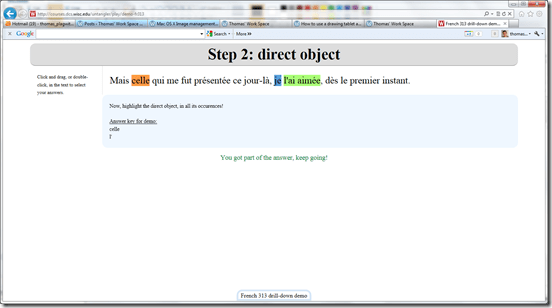

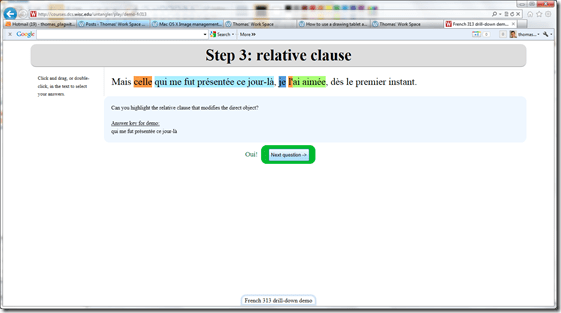

- Now how could such exercise creation made more automated by having it accept the output of NLP tools like Treetagger?


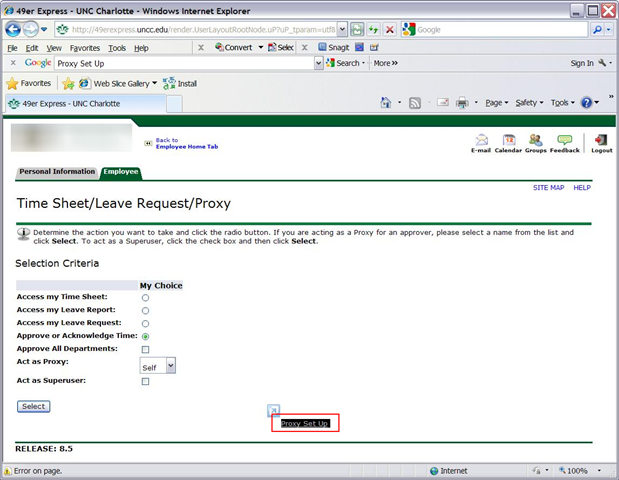
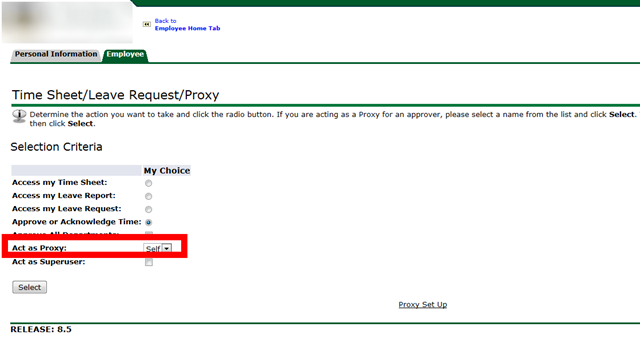
Acting as a Proxy when approving student workers’ time of behalf of others in Webtimeentry
2012/02/10
Leave a comment
- You need to be set up as a proxy by the primary approver:

- Once you have been set up as a proxy:

- you can follow the instructions for the dropdown on the approve times screen:


Protected: New resources mailboxes not visible in the GAL for student accounts in live@edu?
2012/02/09
Enter your password to view comments.
Categories: audience-is-IT-staff, e-infrastructure, Glitches&Errors
2007, 2010, 2011, calendaring, gal, ms-exchange, ms-outlook, publishing, resources, scheduling
How to navigate your Moodle gradebook more easily by hiding columns
2012/02/09
Leave a comment
- Clicking on the minus-icon next to aggregate columns will hide the assignments in this category; clicking the plus-icon will unhide:

- before (wide)

- after (narrow, better overview)


Categories: audience-is-teachers, documentation, e-learning, lms
gradebook, moodle
Unable to edit MS-Excel online spreadsheet because of other user locking
2012/02/08
Leave a comment
- Problem: Why is a user opening a spreadsheet in the browser (even if with edit.aspx URL) causing a warning "The spreadsheet is locked by another user" if i try to open it in MS-Excel? I thought Excel Web App allows multiple uses to edit the spreadsheet at the same time?
- Solution: Opening the spreadsheet for editing in the browser still locks it for being opened in MS-Excel (and vice versa), but not for opening it for editing in another browser.
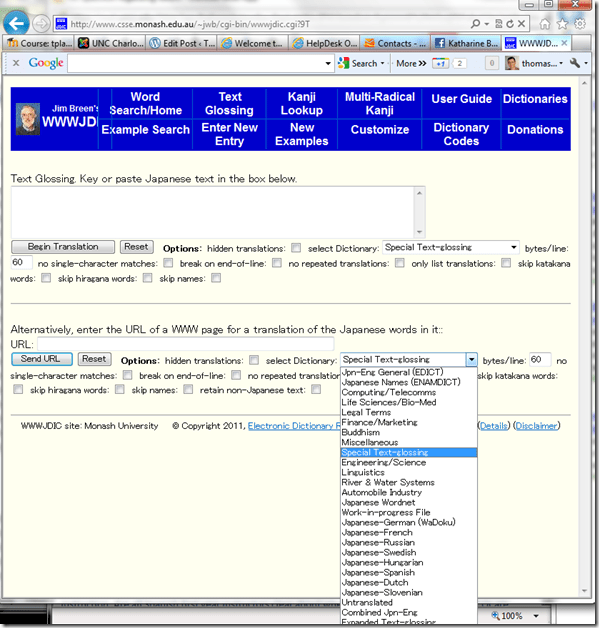
Jim Breen (Monash) Japanese-English Dictionary
2012/02/08
Leave a comment
Categories: audience-is-students, Dictionaries, Japanese, websites
links


Questions? Read the About. Or just ask me a quick Our Databases: Resources with calendars -- Language learning material Moodle Sites, multimedia files -- films


FAQs for LRC student staff or for students or for teachers. To search our FAQs, in the browser addressbar, add after "https://plagwitz.wordpress.com/feed/?tag=faqs+/" "+TAG1" (from tag cloud below) OR "https://plagwitz.wordpress.com/feed/tag=faqs
&category_name=" "CAT1" (from category hierarchy below). OR search both categories and tags, and multiple TAGs/CATs (connect with "," for OR-search, with "+" for AND-search), like so: https://plagwitz.wordpress.com/feed/?tag=TAG1+TAG2+...TAGn&category_name=CAT1
+CAT2+...CATn"
Other ways to find help
If you cannot find it here, look there: 5,500 Language-Learning Links and Programs for learning or teaching 150 languages
Shortcuts:Our Lists, Our Maps, LRC Staff Moodle Site,LRC Project Moodle Site, 49erexpress, UNCC Moodle, Student Recordings: s:claslcslrcsanakostudent
Learning usage samples: Sanako oral exam, Kaltura webcam presentation, Dictation with speech recognition, Sanako written exam, Chinese and Japanese interactive stroke-order practice
Test the Sanako Installer, Webbrowser Popup Konfigurator for XP, or Windows7, faster LRC TeacherPC Log-in Let MS facilitate diacritics writing by installing for you US-International keyboard layout
This is my personal blog (Google+). The views expressed on these pages are mine alone and not those of my employer. The information in this weblog is provided “AS IS” with no warranties, and confers no rights.
 Thomas' Work Space