Home
> e-infrastructure > MS-Office Templates and Macros
MS-Office Templates and Macros
- Templates
- A number of MS-Office-templates (and Add-ins) have been set up and/or programmed to facilitate teaching and learning as well as administration in the language services environment.
- The templates can be accessed in the language services network environment to base documents on (browse to the template in explorer, then double click the template).
- Documents that are based on language services templates can be taken outside the language services network environment. While some template-features (i.e. the macros) will be (temporarily, until the document is brought back into the language services network environment) lost, as long as the document cannot access the template file, the instructor or student written text will not.
- Prerequisites for the template macro code to work
- Do this once: in MS-Office, menu:tools / macros / macro security needs be set to “medium”, then “ok” – otherwise you will see this warning:
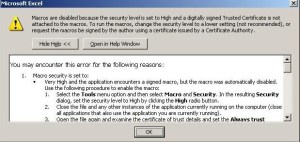
- Do this every time: click “enable” when opening a document form a trusted source, like based on one of your templates:

- Do this once: in MS-Office, menu:tools / macros / macro security needs be set to “medium”, then “ok” – otherwise you will see this warning:
- Add-ins
- Some customizations required the installation of add-ins. These add-ins have been only installed on the computers where they are needed (i.e. the instructor computer).
- PowerPoint HALE Lookup Menu Add-in
- The custom-made consoleadd-in.ppa has been added to the MGB-36 TEACHER COMPUTER and the code in consoleadd-in.reg added to the MGB-36 TEACHER COMPUTER’s registry to load the menu add-in upon startup of PowerPoint on the TEACHER COMPUTER.


Categories: e-infrastructure
Comments (0)
Trackbacks (0)
Leave a comment
Trackback


Questions? Read the About. Or just ask me a quick Our Databases: Resources with calendars -- Language learning material Moodle Sites, multimedia files -- films


FAQs for LRC student staff or for students or for teachers. To search our FAQs, in the browser addressbar, add after "https://plagwitz.wordpress.com/feed/?tag=faqs+/" "+TAG1" (from tag cloud below) OR "https://plagwitz.wordpress.com/feed/tag=faqs
&category_name=" "CAT1" (from category hierarchy below). OR search both categories and tags, and multiple TAGs/CATs (connect with "," for OR-search, with "+" for AND-search), like so: https://plagwitz.wordpress.com/feed/?tag=TAG1+TAG2+...TAGn&category_name=CAT1
+CAT2+...CATn"
Other ways to find help
If you cannot find it here, look there: 5,500 Language-Learning Links and Programs for learning or teaching 150 languages
Shortcuts:Our Lists, Our Maps, LRC Staff Moodle Site,LRC Project Moodle Site, 49erexpress, UNCC Moodle, Student Recordings: s:claslcslrcsanakostudent
Learning usage samples: Sanako oral exam, Kaltura webcam presentation, Dictation with speech recognition, Sanako written exam, Chinese and Japanese interactive stroke-order practice
Test the Sanako Installer, Webbrowser Popup Konfigurator for XP, or Windows7, faster LRC TeacherPC Log-in Let MS facilitate diacritics writing by installing for you US-International keyboard layout
This is my personal blog (Google+). The views expressed on these pages are mine alone and not those of my employer. The information in this weblog is provided “AS IS” with no warranties, and confers no rights.
 Thomas' Work Space